Sports / Fitness
User Manual for UREVO Strol Lite 2-in-1 Under Desk Treadmill UR9TM0011
Comprehensive user guide for the UREVO Strol Lite 2-in-1 Under Desk Treadmill (UR9TM0011). Includes assembly instructions, remote control operation, belt adjustment, lubrication procedures, and troubleshooting steps.
Quick answers from the manual
Quick answer
- The UREVO Strol Lite 2-in-1 Under Desk Treadmill (UR9TM0011) is operated via remote or console. It requires 100-120VAC power, has a speed range of 0.6-7.6 MPH, and a max weight capacity of 265 lbs. Regular maintenance includes lubricating the belt every 100 miles or 3 months and adjusting belt tension using the rear roller bolts. p. 4, 5, 9, 14
Key actions
- Lubricate the belt p. 16
- Adjust belt tension p. 14
- Assemble the treadmill p. 7
First start
- Add 10ml of lubricant to the lubrication port before first use. p. 4, 16
- Ensure the safety lock switch is magnetically attached to the instrument panel. p. 10, 12
Problems and fixes
E01
Communication error. Check display-to-controller connection or reinsert main IC.
p. 17
E05/E06
Overload protection. Reduce load or add lubricant.
p. 17Error codes
| Code | Meaning | Action | Pages |
|---|---|---|---|
| E01 | Communication error | Check display connection, reinsert main IC, or replace controller. | p. 17 |
| E02 | Explosion protection | Replace motor or check connection terminal; replace power tube or controller. | p. 17 |
| E05 | Overcurrent protection | Check for overload, add lubricant, or replace motor. | p. 17 |
| E06 | Overload protection | Check for overload, add lubricant, or replace motor. | p. 17 |
| E10 | Communication failure between keyboard and control panel | Check display connection, reinsert controller plug, or replace controller. | p. 17 |
Maintenance and reset
- Clear lubricating icon: Press '+' key on remote for 10 seconds (or '+' and '6' on keyboard for 10 seconds) in standby mode. p. 10, 16
Technical specifications
| Parameter | Value | Meaning | Pages |
|---|---|---|---|
| Input voltage | 100 ~ 120VAC | Operating voltage | p. 5 |
| Rated power | 550 W | Power consumption | p. 5 |
| Range of speed | 0.6 - 7.6 MPH | Speed capability | p. 5 |
| Maximum load bearing | 265 LBS | Weight limit | p. 5 |
Where to find it in the PDF
- Assembly p. 6, 7, 8
- Operation p. 9, 10, 11, 12
- Maintenance p. 13, 14, 15, 16
Table of contents
Manual images
Click an image to enlargeQuick guide from the manual
The UREVO Strol Lite 2-in-1 Under Desk Treadmill is designed for home fitness. Before first use, ensure the machine is placed on a flat, clean surface with a 3-6 ft safe area behind it. Important: You must add 10ml of lubricant to the lubrication port before the first use. The treadmill requires a 100V-120VAC grounded power outlet. Always ensure the safety lock switch is magnetically attached to the console to start the machine.
Product structure
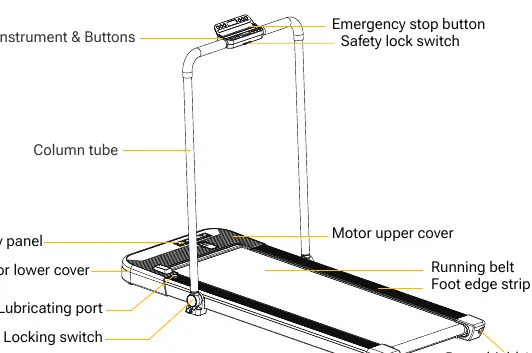
The treadmill consists of the main walking platform, a foldable column tube with an instrument panel, and a remote control. Key components include the emergency stop button, safety lock switch, lubricating port, and the power switch located at the base.
Assembly
Follow these steps to assemble the treadmill:
- Remove the machine and accessories from the box and place it on flat ground.
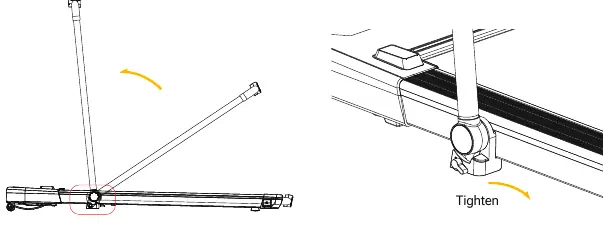
- Lift and push the column tube upwards until it stops.
- Hold the column tube with one hand and turn the locking switch to the OFF position on both sides to secure it.
- Connect the power cord to the machine and plug it into a grounded outlet.
Operation
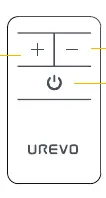
The treadmill can be controlled via the remote or the instrument panel. The speed range is 0.6-7.6 MPH. The remote control allows for start/stop and speed adjustments. Note that the remote can only increase speed up to 3.8 MPH; to reach higher speeds (up to 7.6 MPH), use the keyboard on the instrument panel. The machine enters sleep mode after 5 minutes of inactivity.
Maintenance
Regular maintenance is essential for product longevity:
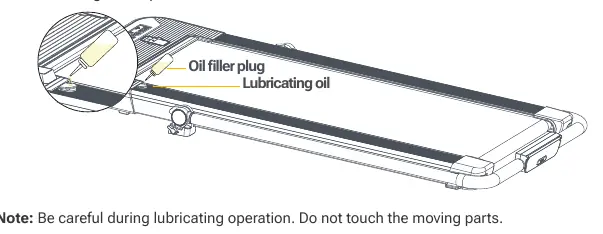
- Lubrication: Add 10ml of lubricant to the port every 3 months or after every 100 miles of use. A red indicator on the display will prompt for lubrication.
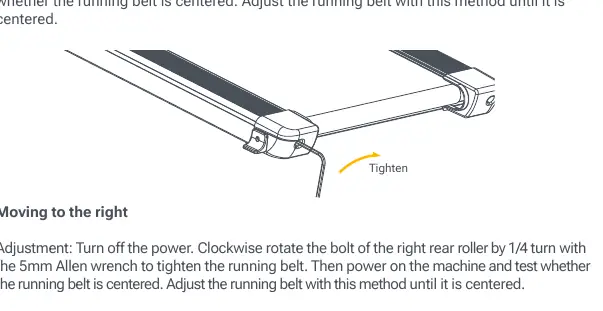
- Belt Adjustment: If the belt slips or is off-center, turn off the power. Use the 5mm Allen wrench to rotate the rear roller bolts clockwise by 1/4 turn to tighten. Test the belt and repeat if necessary.
Troubleshooting
If the machine displays an error code, check the following:
- E01: Communication error. Check display-to-controller connection or reinsert the main IC.
- E02: Explosion protection. Check motor connection or replace the controller/power tube.
- E05/E06: Overload protection. Reduce load or add lubricant to reduce belt resistance.
- E10: Communication failure between keyboard and control panel. Check connections.
Practical help
Common problems
Machine does not start
Ensure the safety lock switch is magnetically attached to the instrument panel.
Running belt is off-center
Turn off power. Use the 5mm Allen wrench to rotate the rear roller bolt on the side the belt is drifting toward by 1/4 turn.
Lubricating LED is on
Add 10ml of lubricant to the port. Press the '+' key on the remote for 10 seconds (or '+' and '6' on the keyboard) to clear the icon.
Remote control not working
Check if the insulating paper has been removed from the battery compartment. Replace the CR2450 3V battery if necessary.
Before use
- Place on a flat, clean surface with 3-6 ft of clearance behind.
- Ensure all screws and nuts are tightened.
- Verify power supply is 100V-120VAC with a grounded socket.
- Add 10ml of lubricant to the lubrication port.
- Attach the safety lock switch magnetically.
Specs in practice
- Maximum Load
- 265 lbs (120 kg). Do not exceed.
Images and diagrams
- The locking switch on the column tube must be turned to the OFF position to fix the tube in place for use.
- The lubrication port is located on the side of the motor cover.
- The rear roller bolts are used for belt tension and alignment.
Model compatibility
- For home use only; not for professional, medical, or outdoor use.
- Only one person can use the treadmill at a time.

Manual page author
Michael Turner
Technical manual editor
Reviews PDF manuals for structure, safety notes, and practical product details so readers can find the right information quickly.