Power / Batteries & Chargers
Verbatim GaN Charger 100W GNC-100
A quick guide for the Verbatim GaN Charger 100W (GNC-100), covering plug installation (US, EU, UK), port layout, safety instructions, and technical specifications for multi-port charging.
Table of contents
Manual images
Click an image to enlargeQuick guide from the manual
The Verbatim GaN Charger 100W (GNC-100) is a versatile power adapter featuring multiple USB ports and interchangeable plugs for US, EU, and UK standards. Before use, ensure the power outlet voltage matches the adapter requirements (100-240V). The device is designed for indoor use only in dry environments.
Device Overview
The charger features four output ports:
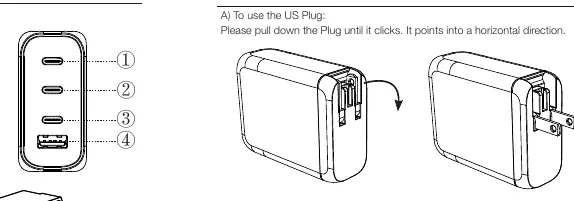
- USB-C1 PD 3.0
- USB-C2 PD 3.0
- USB-C3 PD 3.0
- USB-A QC 3.0
Plug Installation
The charger comes with an integrated US plug and detachable EU and UK adapters.
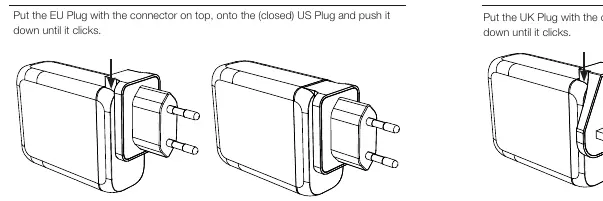
Using the US Plug
The US plug is integrated into the device. Pull the plug down until it clicks into a horizontal position. To close, pull it upwards until it returns to the vertical position.
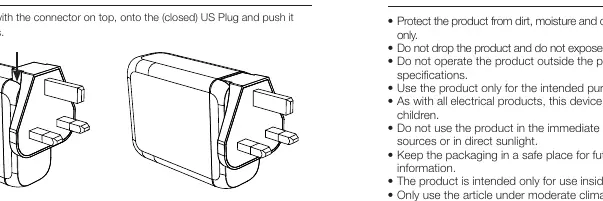
Using EU and UK Plugs
Ensure the US plug is in the closed (vertical) position before attaching other plugs. Align the EU or UK plug with the connector on top of the closed US plug and push down until it clicks. To remove, push the plug upwards.
Safety Instructions
- Use only in dry rooms and indoor environments.
- Do not operate outside the power limits specified.
- Keep out of reach of children.
- Do not use in the immediate vicinity of heaters or direct sunlight.
- Operate only under moderate climatic conditions (0°C-35°C, humidity below 80%).
- Do not open the device or operate if visibly damaged.
- Do not use with other adapters.
Care and Maintenance
Disconnect the device from the mains before cleaning and during prolonged periods of non-use. Plug devices directly into the adapter and the adapter directly into the wall socket. Remove all connected devices before unplugging the adapter from the wall.
Technical Specifications
Input Voltage: AC 100-240V, 50/60Hz, 1.8A max.
Output Capabilities:
- USB-C1/C2 PD 3.0: Up to 100W max.
- USB-C3 PD 3.0: Up to 65W max.
- USB-A QC 3.0: Up to 30W max.
- Total Output: 100W max.
The device includes protection against short circuits, over-voltage, over-current, and over-temperature.
Practical help
Common problems
Plug does not fit or attach correctly
Ensure the integrated US plug is fully closed (vertical position) before attempting to attach the EU or UK plug adapters.
Device not charging
Verify the adapter is fully inserted into the wall socket and the device is connected properly. Ensure the total power draw does not exceed the 100W limit.
Before use
- Check that the power outlet voltage is between 100-240V.
- Ensure the environment is dry and temperature is between 0°C and 35°C.
- Verify the US plug is closed before attaching EU/UK adapters.
- Ensure the device is compatible with the charger's output specifications.
- Disconnect all devices before removing the adapter from the wall socket.
Specs in practice
- USB-C1/C2 PD 3.0
- High-speed ports capable of delivering up to 100W individually.
- USB-A QC 3.0
- Port supporting Quick Charge 3.0, up to 30W.
- Total Output
- The maximum combined power the charger can provide is 100W.
Images and diagrams
- 1: USB-C1 PD 3.0 port
- 2: USB-C2 PD 3.0 port
- 3: USB-C3 PD 3.0 port
- 4: USB-A QC 3.0 port
- 5: Integrated US plug
Model compatibility
- Indoor use only.
- Not designed for continuous operation.
- Do not use with other adapters.

Manual page author
David Miller
Documentation analyst
Organizes user manual content into clear summaries, with attention to model details, product context, and everyday usability.