Computers / KVM Switches
User Manual for Vertiv Liebert GXE UPS 1-3kVA
Quick guide for the Vertiv Liebert GXE UPS 1-3kVA. Includes installation, operation, battery replacement, troubleshooting, and technical specifications.
Table of contents
Manual images
Click an image to enlargeImportant Safety Instructions
Read all safety information before installing or operating the UPS. The UPS operates at hazardous voltages; maintenance should only be performed by qualified personnel. Ensure the UPS is installed in a controlled environment, away from water, moisture, and direct sunlight. Do not block ventilation holes. Always use earthed shockproof outlets and VDE-tested, CE-marked cables.
Product Description
The Vertiv Liebert GXE is an online uninterruptible power system (UPS) that conditions and regulates output voltage. It features an LCD display for configuration, ECO mode for energy saving, and supports optional network management cards via the IntelliSlot port.
Installation
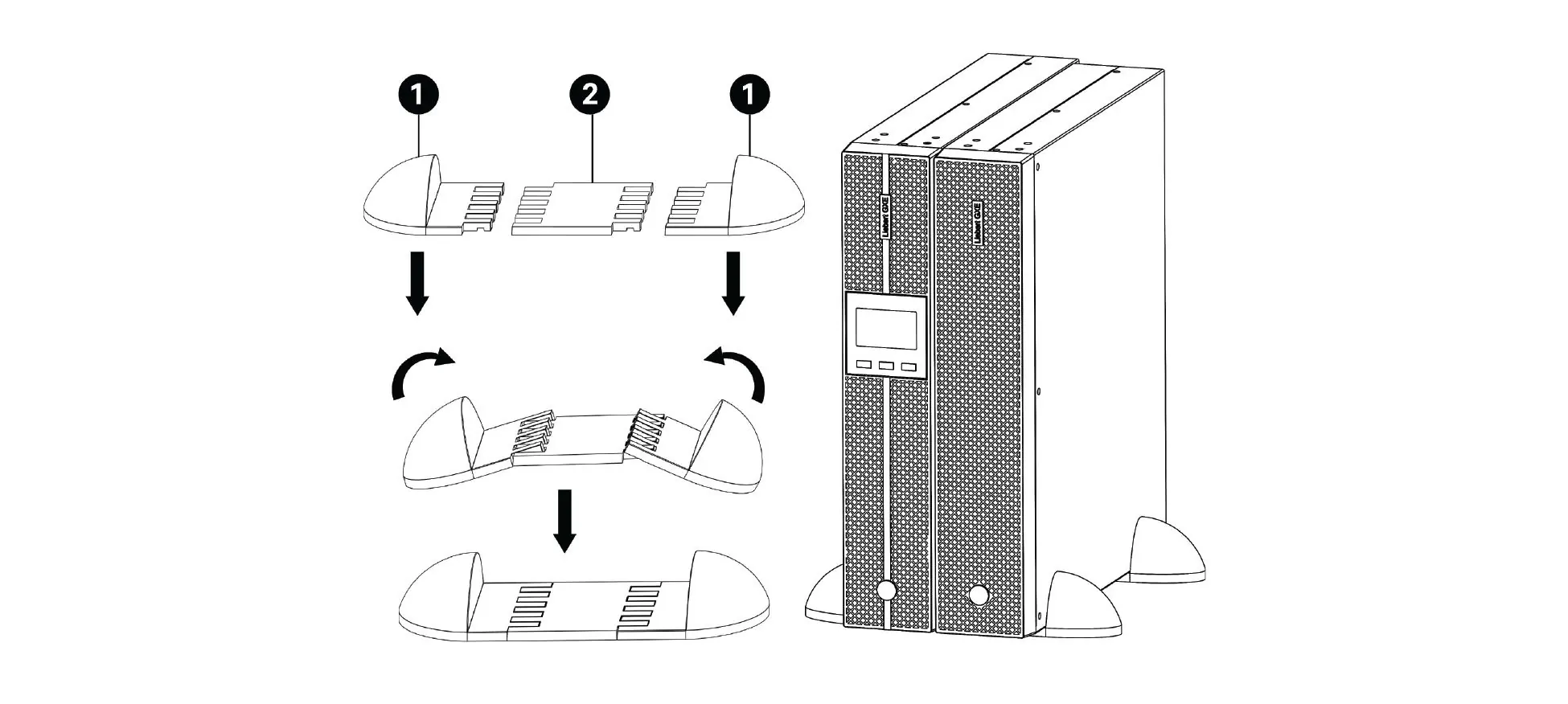
Tower Installation: Use the provided support bases and spacers. Ensure the UPS is on a flat, clean surface away from vibration and dust.
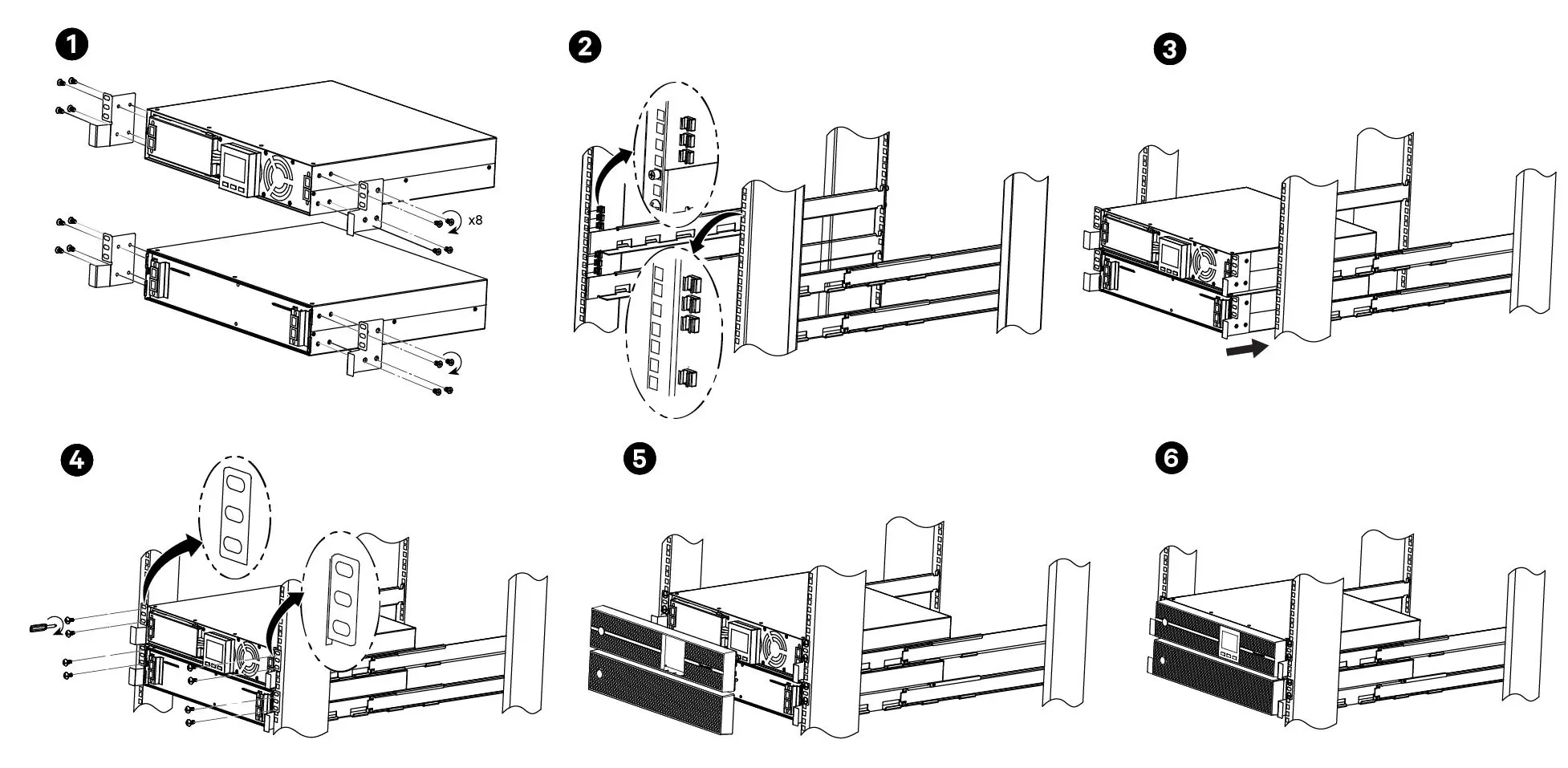
Rack Installation: Use the provided rack mount kit. Install the UPS as near the bottom of the rack as possible to prevent tipping.
EBC Connection: Up to 4 External Battery Cabinets (EBCs) can be connected. Ensure the EBC breaker is in the Off position before connecting cables to the UPS. After connection, manually set the EBC quantity in the UPS settings menu.
Wiring: Provide an upstream branch circuit breaker according to local codes. Do not install input and output wiring in the same conduit.
Operating the UPS
Starting Up: Ensure the EPO connector has a jumper or is wired to an emergency power off circuit. Close all external breakers and press and hold the ON/Mute button for at least 5 seconds.
Operating Modes: The UPS operates in Normal mode by default. Other modes include Bypass, Battery, ECO, and Frequency Converter. Use the front panel buttons to navigate settings and monitor status.
Emergency Power Off (EPO): To activate, cut the wire between pin 1 and pin 2 on the EPO port. This immediately stops the rectifier and inverter.
Maintenance
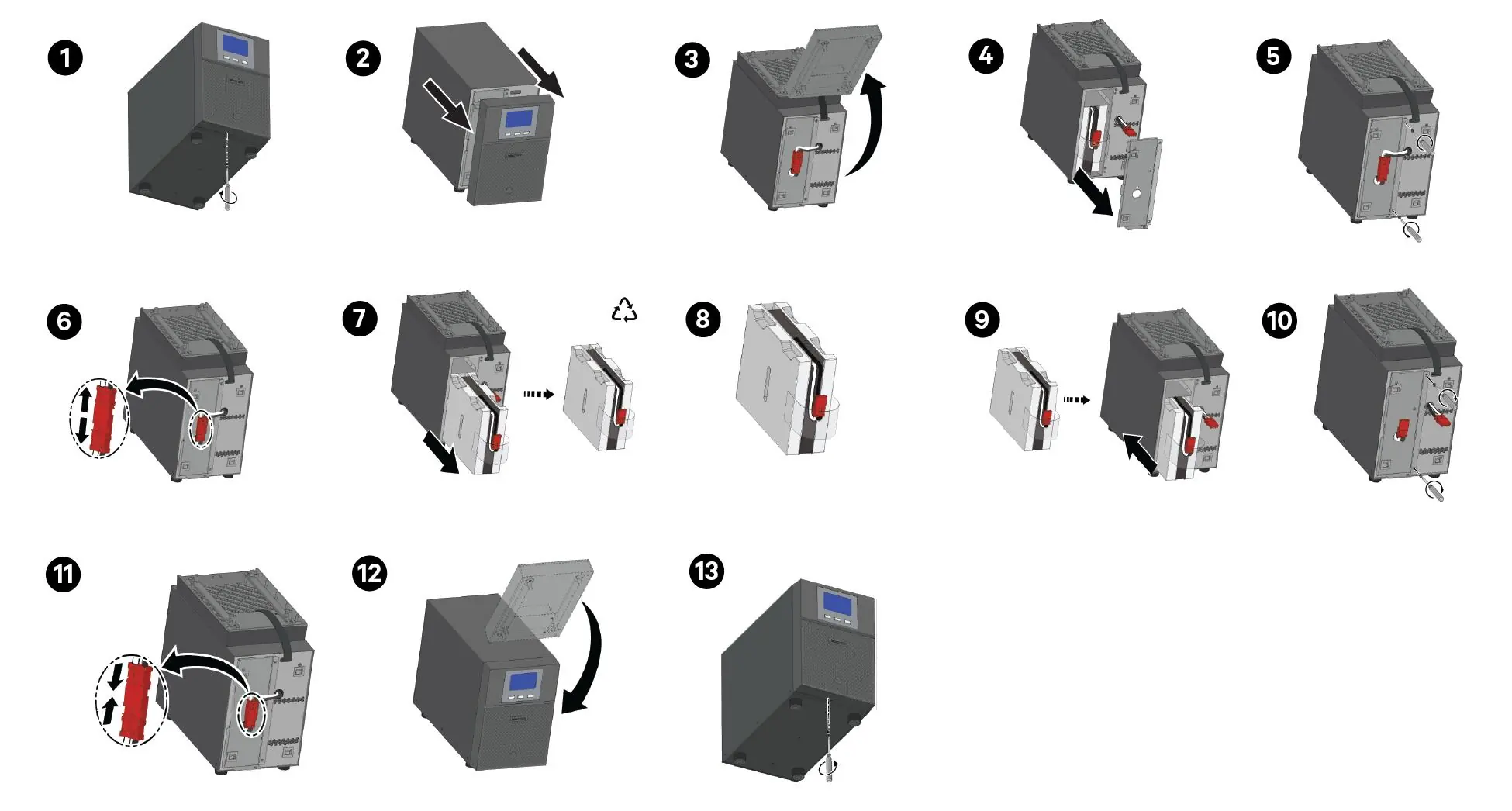
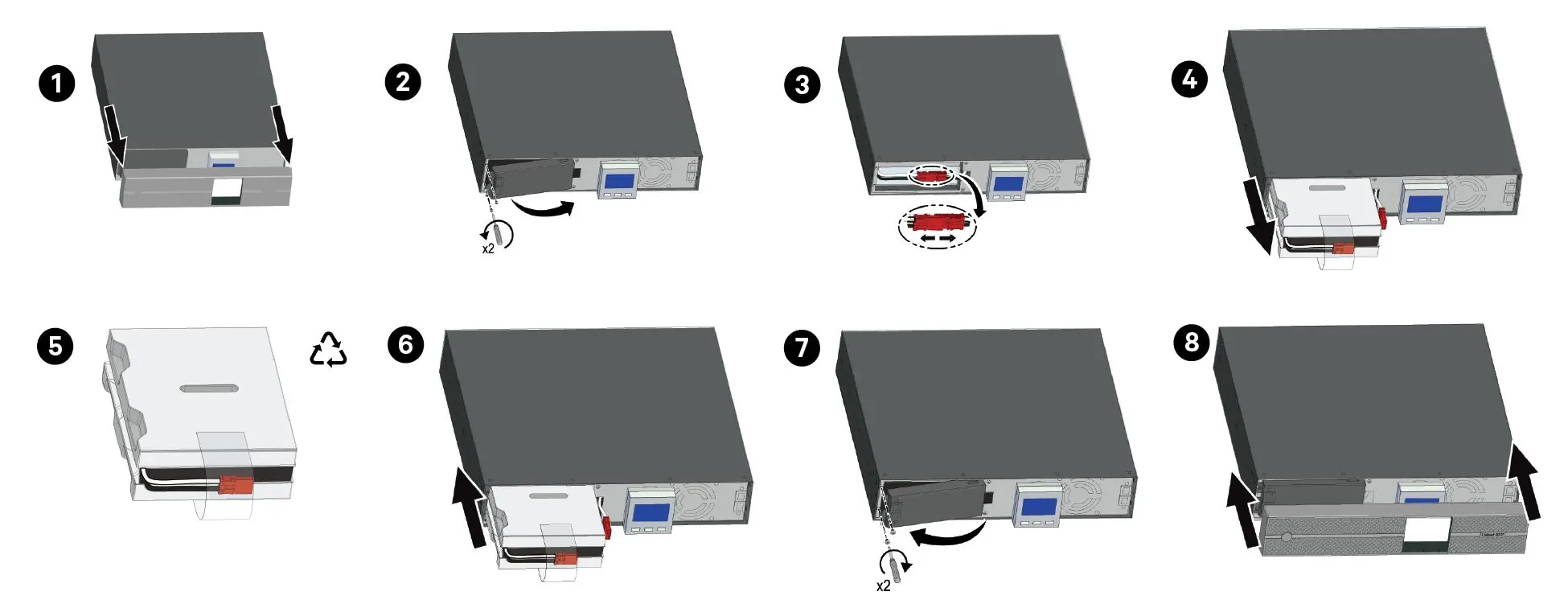
Battery Replacement: The internal battery pack is hot-swappable. However, exercise caution as the load is unprotected during this procedure. Do not replace the battery while the UPS is in Battery mode. Use the correct replacement battery kit (e.g., GXTRT-24BATKIT) as specified in the manual.
Cleaning: Wipe the outside of the UPS with a dry cloth. Do not use liquid or aerosol cleaners.
Troubleshooting
If the UPS does not operate correctly, check the following:
- No indication/alarm: Check AC input connection.
- Battery backup time short: Charge batteries for at least 5 hours.
- Fault code 14: Short circuit on output; check wiring.
- Fault code 27/28: Battery voltage issue; contact technical support.
Specifications
The Liebert GXE series is available in 1000 VA, 1500 VA, 2000 VA, and 3000 VA capacities. Input voltage is 220-240 VAC. Operating temperature is 0 °C to 40 °C. Refer to the full manual for detailed battery run time tables and environmental specifications.
Practical help
Common problems
No indication or alarm even though mains is normal
Check if the input power cord is firmly connected to the mains or if the AC input is incorrectly connected to the UPS output.
Battery backup time is shorter than nominal value
Batteries may not be fully charged. Charge for at least 5 hours and re-check. If the problem persists, the batteries may be defective.
Fault code 14 on LCD
Short circuit on the UPS output. Check output wiring and connected devices.
Fault code 27 or 28
Battery voltage is too high or too low. Contact Vertiv Technical Support.
Before use
- Inspect the UPS for shipping damage.
- Ensure the installation environment is controlled and dry.
- Verify external overcurrent protection devices are open (off).
- Charge batteries for at least 3 hours before connecting equipment.
- Ensure the EPO connector has a jumper installed or is properly wired.
Specs in practice
- Input Nominal Voltage
- 220-240 VAC (default is 230 VAC).
- Operating Temperature
- 0 °C to 40 °C.
Images and diagrams
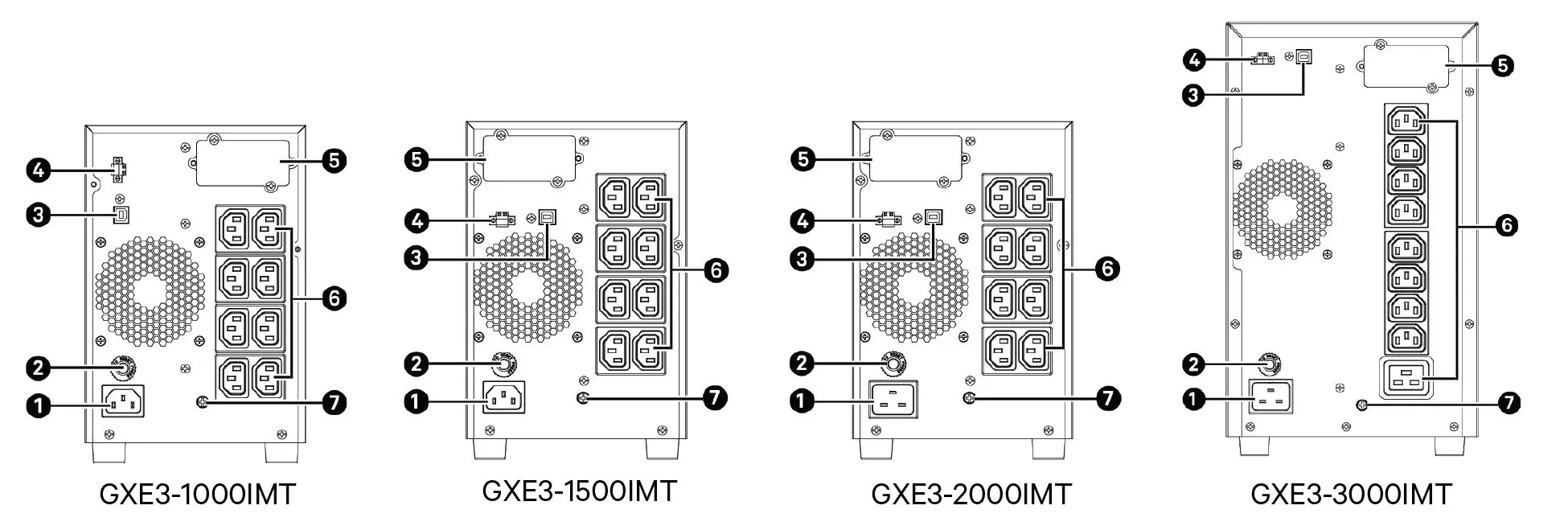
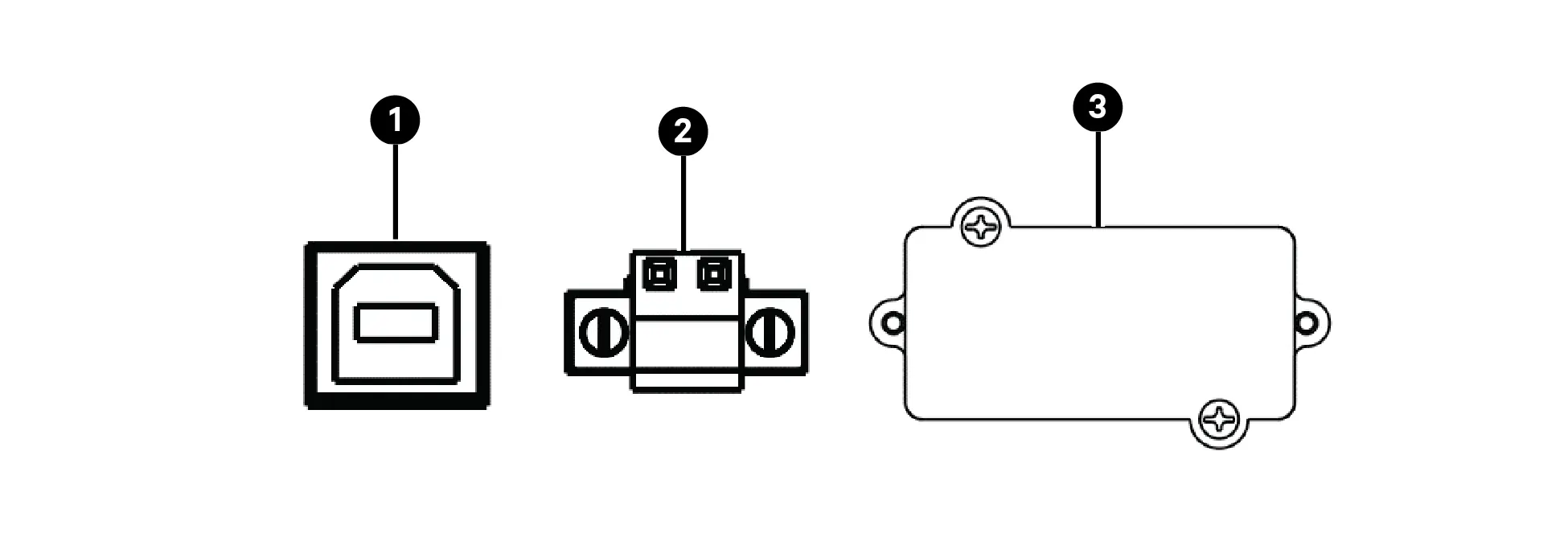
- Rear Panel: Identifies AC input, USB port, EPO port, and output receptacles.
- Tower Installation: Illustrates assembly of support bases.
- Rack Installation: Shows mounting in a rack enclosure.
- Battery Replacement: Step-by-step visual guide for accessing and replacing battery packs.
Model compatibility
- Supports up to 4 External Battery Cabinets (EBCs).
- Compatible with Vertiv Power Insight and Power Assist software.
- Supports optional network management cards via IntelliSlot.

Manual page author
Michael Turner
Technical manual editor
Reviews PDF manuals for structure, safety notes, and practical product details so readers can find the right information quickly.