Computers / Computer Cases
User Manual for VEVOR 215ATX Computer Case
Comprehensive user guide for the VEVOR 215ATX computer case, including assembly instructions, component installation, and interface details.
Quick answers from the manual
Quick answer
- The VEVOR 215ATX is a computer case. This manual provides instructions for assembling the case and installing components like fans, power supplies, storage drives, motherboards, and graphics cards. p. 4, 11
Key actions
- Installing the motherboard p. 11
- Installing a graphics card p. 11
Where to find it in the PDF
- Installation Guide p. 4, 5, 6, 7
Table of contents
Manual images
Click an image to enlargeQuick guide from the manual
This manual provides instructions for the assembly and component installation of the VEVOR 215ATX computer case. Before beginning, ensure you have all necessary tools and components. The case features a modular design allowing for various fan and cooling configurations.
Safety information
To reduce the risk of injury, read the manual carefully before operating. This product is subject to European Directive 2012/19/EC. The crossed-out wheelie bin symbol indicates that the product requires separate collection in the European Union and must be taken to a recycling point for electrical and electronic devices.
Parts and accessories
The accessories package includes:
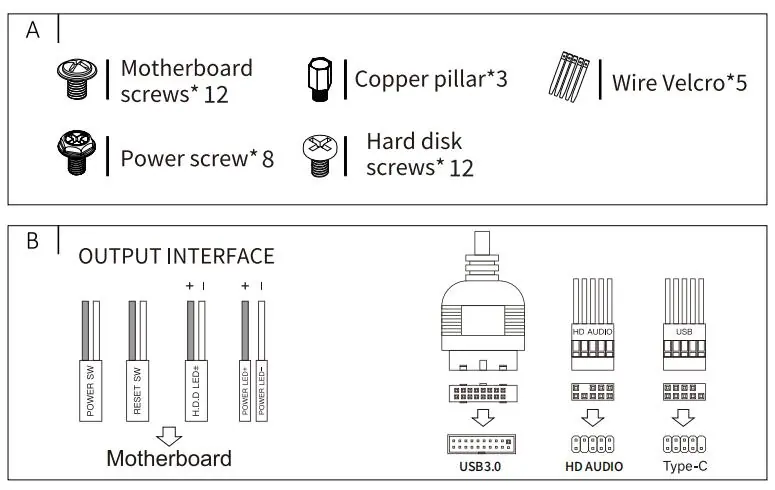
- Motherboard screws (12)
- Power screws (8)
- Hard disk screws (12)
- Copper pillars (3)
- Wire Velcro (5)
I/O interface overview
The top I/O panel includes the following interfaces:
- Power button
- HD Audio jack
- USB 3.0 port
- Type-C port
- Cue Light
- Reset button
Installation guide
Follow these steps to assemble your system:

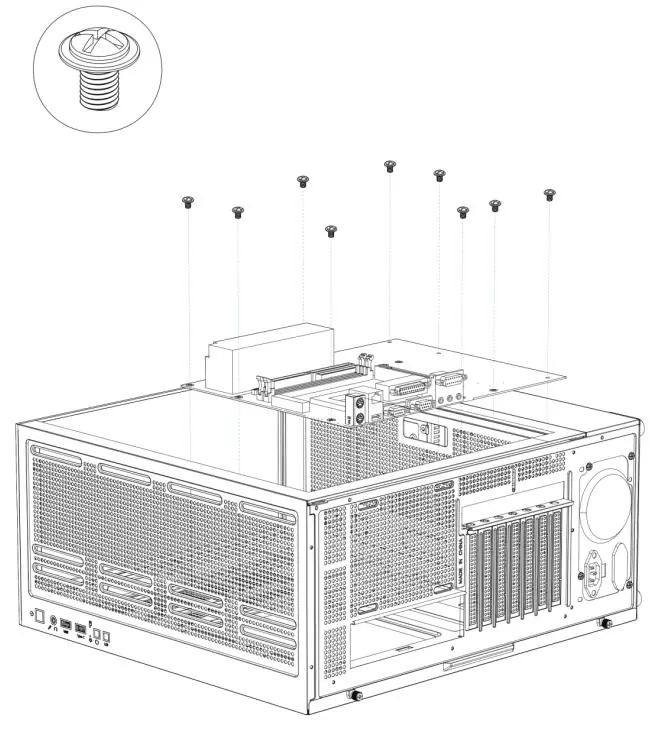
Panel removal
Remove the right side panel, left glass panel, and front panel to access the interior of the chassis.
Fan and cooling installation
The case supports multiple fan configurations:
- Top fan installation
- Back fan installation
- Motherboard front side fan installation
- Fan mount on top of the power supply compartment
- Top water-cooled row installation
Component installation
- Power supply: Install the power supply unit into the designated compartment.
- Storage: Install SSD and HDD hard drives into the hard disk drive cage.
- Motherboard: Secure the motherboard using the provided screws and copper pillars.
- Graphics card: Install the graphics card into the PCIe slots.
Manufacturer information
VEVOR
Practical help
Before use
- Verify all accessories are present in the package
- Ensure your components are compatible with the case dimensions
- Prepare a screwdriver for installation
Images and diagrams
- The manual includes detailed diagrams for panel removal, fan placement, and component installation steps.
Show more Show less
Model compatibility
- The product is subject to European Directive 2012/19/EC regarding the disposal of electrical and electronic equipment.

Manual page author
David Miller
Documentation analyst