Power / Solar Panels
User Manual for VEVOR S100 / S400 Solar Panel
Quick guide for VEVOR S100 and S400 solar panels. Includes installation, connection diagrams, safety warnings, and technical specifications.
Table of contents
Manual images
Click an image to enlargeQuick guide from the manual
This document provides essential instructions for the VEVOR S100 and S400 solar panels. These panels are designed for outdoor power generation. Users must ensure the installation location is unobstructed and well-lit. Always verify that the positive and negative poles are connected correctly to prevent short circuits. Note that parallel connection cables are not included and must be purchased separately.
Safety Warnings
- Do not disassemble or refit the product, as it may cause electric shock or damage.
- Do not place metal objects between the solar panel and a smartphone, as this may cause a fire.
- Disconnect the adapter cable and the device being charged before cleaning the panel.
- Installation operations are strictly prohibited during thunderstorms.
- Keep the product away from children.
- Ensure the solar panel and the device being charged can be immediately disconnected in case of an accident.
Operation Scenario
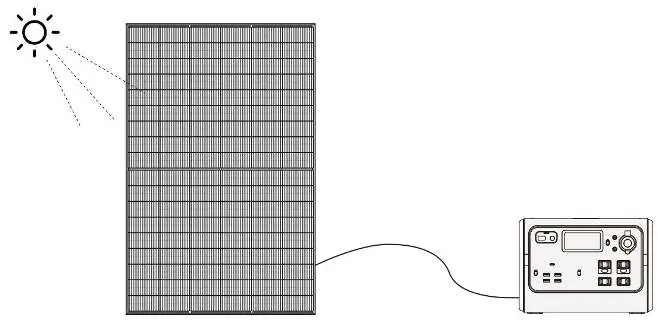
To use the solar panel, place it in direct sunlight. Use the appropriate wire to connect the panel to the device you need to charge. Ensure the connection is secure and the insulation is intact.
Parallel Connection
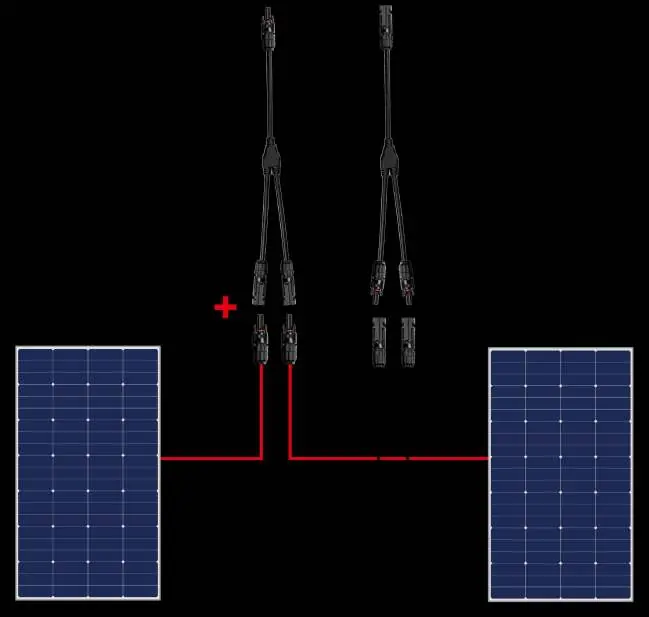
The panels can be used in series or parallel. For parallel connections, users must purchase the necessary parallel lines separately. Ensure the positive and negative terminals are matched correctly according to the connection diagrams provided in the manual.
Product Parameters
S100 Model: Rated Power: 100W, Open-circuit Voltage: 22V, Short circuit Current: 6A, Operating Voltage: 19V, Operating Current: 5.26A, Protection Grade: IP67, Operating Temperature: -10°C~65°C.
S400 Model: Rated Power: 400W, Open-circuit Voltage: 37.8V, Short circuit Current: 13.5A, Operating Voltage: 33V, Operating Current: 12.1A, Protection Grade: IP65, Operating Temperature: -10°C~65°C.
Construction and Dimensions
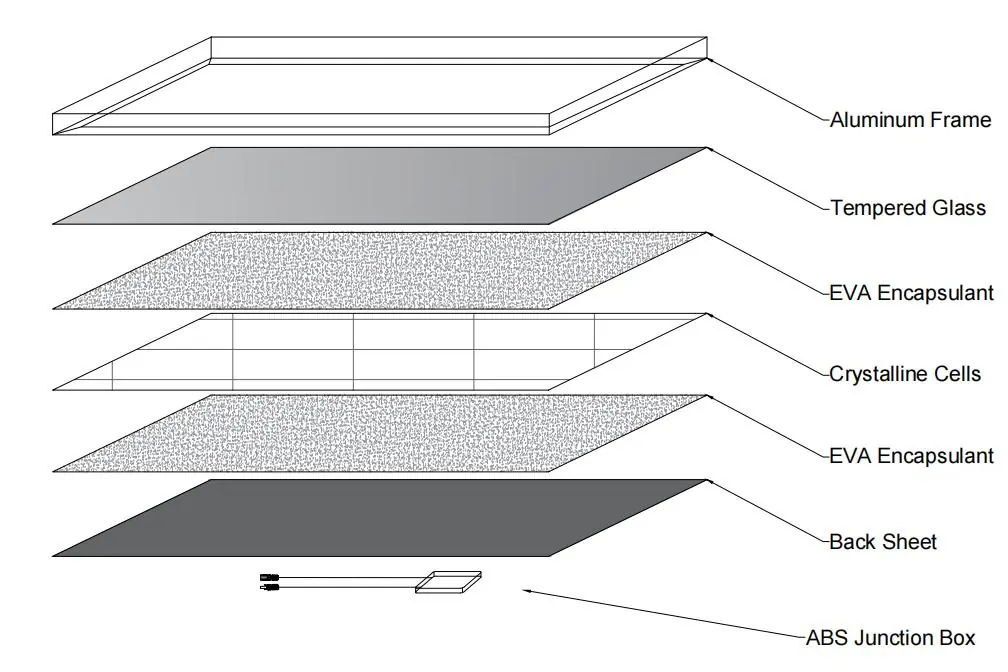
The solar panel consists of an aluminum frame, tempered glass, EVA encapsulant, crystalline cells, a back sheet, and an ABS junction box. Refer to the dimension figures for specific mounting and size requirements for the 100W and 400W models.
Manufacturer information
VEVOR
Practical help
Common problems
Short circuit
Ensure positive and negative poles are connected correctly.
Interference with radio/TV
Reorient or relocate the receiving antenna, increase distance between product and receiver, or connect to a different circuit.
Connection issues
Check the insulation of the circuit and the reliability of the connection.
Before use
- Confirm the installation location is unobstructed and well-lit.
- Check that the support structure is stable.
- Ensure all connections are insulated and reliable.
- Verify that the solar panel and device can be immediately disconnected if needed.
- Ensure no metal objects are between the panel and the device being charged.
Specs in practice
- Open-circuit Voltage
- The maximum voltage the panel can output when not connected to a load.
- Short circuit Current
- The maximum current the panel can output when the terminals are shorted.
- Protection Grade
- Indicates the level of protection against dust and water (e.g., IP67 is dust-tight and protected against immersion).
Images and diagrams
- The manual provides specific wiring diagrams for connecting two 100W panels in parallel and two 400W panels in parallel.
- A breakdown diagram illustrates the layered construction of the solar panel from the aluminum frame to the back sheet.
Model compatibility
- Output interface is an MC4 connector.
- Parallel connection cables are not included and must be purchased by the consumer.

Manual page author
David Miller
Documentation analyst
Organizes user manual content into clear summaries, with attention to model details, product context, and everyday usability.