Power / Power Banks
User Manual for Videx 202C Power Bank 20000 mAh
Quick guide for the Videx 202C 20000 mAh power bank. Learn how to charge your devices, recharge the power bank, use the LED display, and activate low-power mode.
Quick answers from the manual
Quick answer
- The Videx 202C is a 20000 mAh power bank. To charge devices, connect them to the USB-C or USB-A ports. To recharge the power bank, use the USB-C1 port with a wall charger. p. 4, 5
Key actions
- Check battery level p. 5
- Activate low power mode p. 5
First start
- Charge the power bank fully before first use using a USB-C charger. p. 5
Show 3 more answers Show less
Problems and fixes
Device not charging
Check cable connection and compatibility. If the device port differs, use a different cable.
p. 4Technical specifications
| Parameter | Value | Meaning | Pages |
|---|---|---|---|
| Capacity | 20000 mAh | Total battery capacity | p. 2 |
| Max Input | 70W | Maximum charging input via USB-C1 | p. 2 |
Where to find it in the PDF
- Specifications p. 2
- Product Scheme p. 3
- Usage Instructions p. 4, 5
Table of contents
Manual images
Click an image to enlargeImportant Information
This guide provides instructions for the Videx 202C 20000 mAh power bank. Always use a compatible USB-C cable for charging. For maximum recharging speed, use a 100W USB-C charger. The device features a low-power mode for small electronics like Bluetooth headphones and smart bracelets.
Specifications
- Battery: Li-ion 3.65V 20000mAh 73Wh
- Input (USB-C1): 70W
- Output (USB-C1): 70W
- Output (USB-C2): 30W
- Output (USB-A): 22.5W
- Dimensions: 151.5 x 65.5 x 25 mm
- Weight: 365 g
Product Scheme
The power bank includes the following components:
- USB-C1 and USB-C2 ports
- USB-A port
- Power button
- LED display
Charging Outer Devices
Connect one end of the USB-C charging cable to one of the USB-C ports on the power bank and the other end to the input port of your device. The charging process will start automatically. If your device's input port type differs from the cable port, you will need to purchase an additional cable.
Recharging the Power Bank
Connect one end of the USB-C charging cable to a wall charger and the other end to the USB-C1 input port on the power bank. To achieve maximum charging speed (approx. 1 hour 40 minutes to full charge), use a 100W USB-C charger.
LED Display
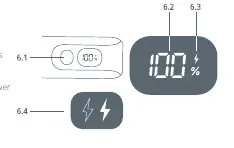
- Check Battery Level: Press the button once to display the remaining battery percentage (0-100%).
- Fast Charging Indicator: An indicator appears on the display during fast charging. Use a USB-C cable and a charger with at least 20W power for fast charging.
- Low Power Mode: Press and hold the button for 3 seconds to switch to low power charging mode. The lightning icon will flash. This mode is designed for safely charging small devices with low current requirements.
Precautions
- Do not throw, disassemble, or attempt to repair the product yourself.
- Keep away from damp places, direct sunlight, open flames, and heating devices.
- Keep out of reach of children.
- Improper use may void the warranty.
Practical help
Common problems
Device not charging
Ensure the cable is connected properly to both the power bank and the device. If the device's input port type is different, you may need a different cable.
Slow charging speed
For fast charging, ensure you are using a USB-C cable and a charger with at least 20W power.
Before use
- Check the battery level by pressing the button once.
- Ensure you have a compatible USB-C cable.
- For fast charging, use a charger with at least 20W output.
- Identify the correct port (USB-C1 is the primary input).
Show more Show less
Specs in practice
- Battery Capacity
- 20000mAh capacity, providing multiple charges for most smartphones.
- USB-C1 Input
- Supports up to 70W input for fast recharging of the power bank.
- Low Power Mode
- A special mode for charging small devices like headphones without damaging them.
Images and diagrams
- USB-C1/C2: Ports for charging devices or recharging the power bank.
- USB-A: Port for charging devices.
- Power Button: Used to check battery level and toggle low power mode.
- LED Display: Shows battery percentage and charging status.
Model compatibility
- Compatible with small devices like Bluetooth headphones and smart bracelets using low power mode.
- Requires a 100W USB-C charger for maximum recharging speed (approx. 1h 40min).

Manual page author
David Miller
Documentation analyst