HVAC / Heat Pumps
Operating Instructions for Viessmann Vitodens 050-W Gas Boiler
Quick guide for the Viessmann Vitodens 050-W wall-mounted gas boiler. Learn how to operate the control unit, adjust heating and hot water settings, connect to WiFi, and troubleshoot common issues.
Table of contents
Manual images
Click an image to enlargeQuick guide from the manual
This document provides operating instructions for the Viessmann Vitodens 050-W wall-mounted gas boiler. It covers basic operation, system settings, and troubleshooting. Always ensure the gas shut-off valve is open and the system pressure is sufficient before operation. If you smell gas, immediately close the gas shut-off valve, open windows, and contact your heating contractor from outside the building.
Control panel overview
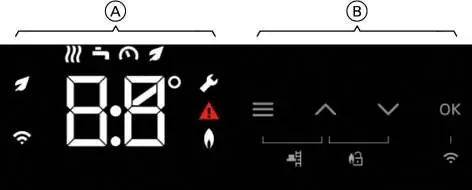
The boiler is operated via a touch-sensitive control unit. The display is divided into a function area (A) and a navigation area (B). Use the navigation buttons to scroll through menus, adjust values, and confirm selections with the OK button. The Lightguide (white spot) indicates status: pulsating slowly means standby, flashing quickly indicates a system fault.
Central heating
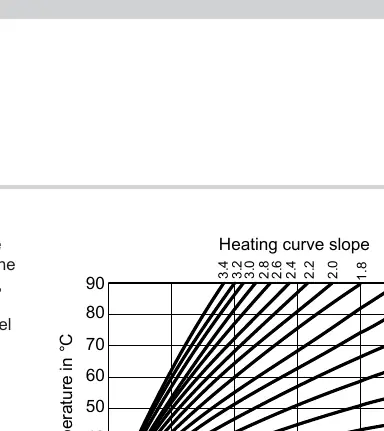
You can switch the central heating on or off and adjust temperatures. In weather-compensated operation, the flow temperature is adjusted based on outside temperature. In constant operation, the flow temperature remains fixed. To adjust the heating curve, access the main menu (hold the menu button for 4 seconds), select the heating curve menu, and adjust the slope and level according to your building's requirements.
DHW heating
Domestic Hot Water (DHW) heating can be switched on or off independently. The factory setting is 50 °C. For hygiene reasons, it is recommended not to set the temperature lower than 50 °C. If you have a combi boiler, you can enable the Eco function to save energy.
WiFi and connectivity
The system can be controlled remotely via the ViCare app. To establish a connection, hold the OK button for 4 seconds until the WiFi symbol appears. Follow the instructions in the ViCare app on your mobile device to complete the setup. The WiFi symbol indicates connection status: flashing (connecting), dimly illuminated (connected to local network), brightly illuminated (connected to server).
Troubleshooting and maintenance
If a fault occurs, a warning symbol and a fault code will appear on the display. Do not acknowledge fault messages repeatedly. If the burner is locked out, you can attempt to reset it by pressing the up and down buttons simultaneously for 4 seconds. If the fault persists, contact your heating contractor. Regular maintenance, including annual cleaning of the appliance and checking the safety valve, is essential for safe and efficient operation.
Manufacturer information
Viessmann Climate Solutions
Practical help
Common problems
Rooms are too cold
Check if the heating system is switched off, ensure the ON/OFF switch is on, check the mains isolator, and verify that the heating settings are correct.
No hot water
Check if the heating system is switched off, ensure the ON/OFF switch is on, and verify that the DHW temperature settings are correct.
Burner fault (flashing warning symbol)
Attempt to reset the burner by pressing the up and down buttons simultaneously for 4 seconds. If the fault recurs, contact your heating contractor.
WiFi connection failed (E10 or E12)
For E10, check the router connection and network password. For E12, try re-establishing the connection at a later time.
Before use
- Ensure the gas shut-off valve is open.
- Verify the power supply is switched on at the fuse box or mains isolator.
- Check that the system pressure is at the required level (typically above 1.0 bar).
- Ensure the installation room has adequate ventilation.
- Check for any visible damage to the appliance.
Specs in practice
- Heating curve slope
- Determines how the flow temperature changes based on outside temperature. Higher slope means higher flow temperature for the same outside temperature.
- Flow temperature
- The temperature at which heating water enters the system components.
- DHW temperature
- The target temperature for domestic hot water.
Images and diagrams
- Control Panel: Shows the function area (A) and navigation area (B) with touch buttons for menu access, scrolling, and confirmation.
- Heating Curve: Illustrates the relationship between outside temperature, set room temperature, and flow temperature.
Model compatibility
- Compatible with ViCare app for remote control.
- Supports OpenTherm controllers for room temperature-dependent operation.

Manual page author
Emily Carter
User documentation editor
Prepares concise manual descriptions and highlights the most useful setup, operation, and maintenance information for readers.