Electronics / Cameras
Viltrox Sprite 15C RGB Photography Fill Light
A quick guide to using the Viltrox Sprite 15C RGB Photography Fill Light, covering setup, power supply modes, operation instructions, app control, and technical specifications.
Table of contents
Manual images
Click an image to enlargeQuick Start Guide
The Viltrox Sprite 15C is a portable RGB fill light designed for photography and video. To get started, ensure you have the necessary power source (adapter or battery) and the light mounted on a stand. Use the onboard controls or the WeeylitePro app to adjust brightness, color temperature, and RGB modes.
Product Overview
The device features a compact design with a built-in display for monitoring settings. It supports multiple power supply methods and offers versatile lighting adjustments including HSL, RGBWW, and CCT modes.
Parts Identification
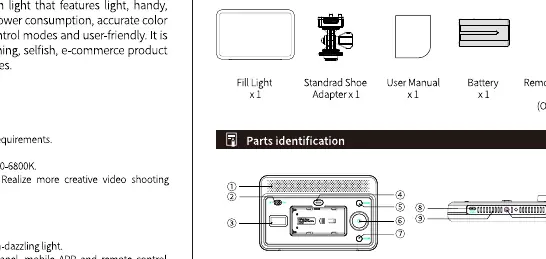
- Controls: Includes a dimming knob, mode button, and power switch.
- Ports: Features a Type-C interface for power and a heat emission hole.
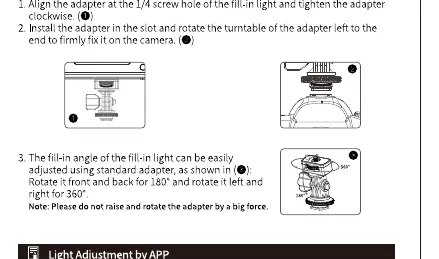
- Mounting: Includes a 1/4 screw hole for standard light stands.
Power Supply
The light supports two power supply modes:
- Adapter: Connect the provided power adapter to the Type-C port.
- Battery: The device can be powered by compatible batteries (check specifications for compatibility).
Operation Instructions
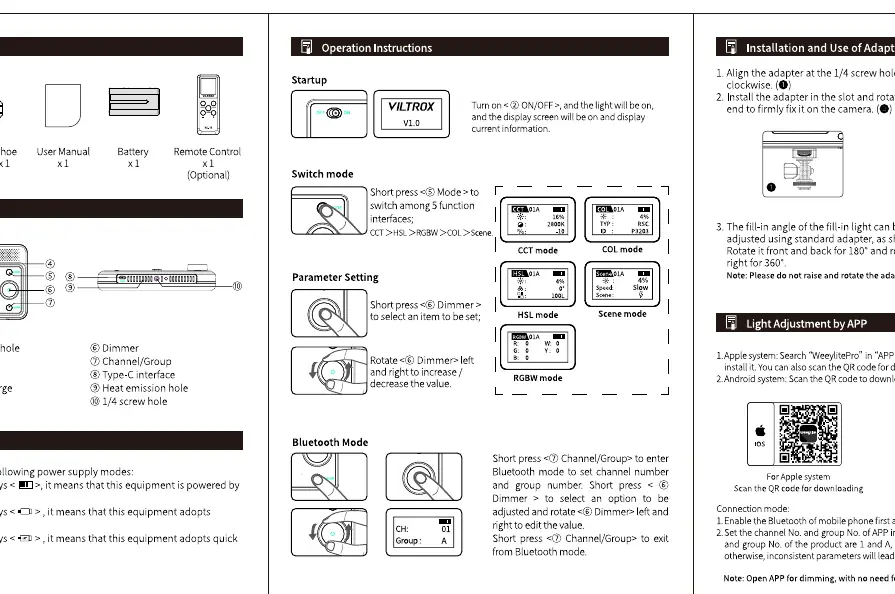
Startup and Mode Switching
- Turn the power switch to ON.
- Press the Mode button to cycle through different lighting interfaces (CCT, HSL, Scene mode).
- Use the Dimming knob to adjust parameters within each mode.
Bluetooth and App Control
- Download the WeeylitePro app from the App Store or Google Play.
- Enable Bluetooth on your mobile device.
- Use the app to control light settings, group management, and channel selection.
Remote Control (Optional)
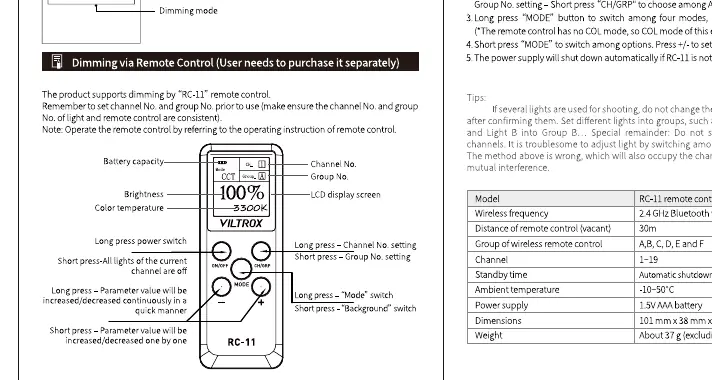
If using the optional remote control, ensure it is paired with the light. You can adjust brightness, color temperature, and channel settings directly from the remote.
Specifications
- Color Temperature: 2600-6800K
- Power: 15W
- CRI: 95
- Dimensions: 175 x 112 x 43mm
- Weight: 263g
Manufacturer information
Viltrox
Practical help
Common problems
Light does not turn on
Check if the power adapter is securely connected or if the battery is charged.
Cannot connect to App
Ensure Bluetooth is enabled on your smartphone and the light is in the correct Bluetooth pairing mode.
Remote control not responding
Verify the remote is paired with the correct channel and group, and ensure it is within the 30m range.
Before use
- Verify all accessories (Fill light, stand adapter, power adapter) are present.
- Ensure the light is mounted securely on a stable stand.
- Charge the battery or connect the power adapter.
- Download the WeeylitePro app for advanced control.
Specs in practice
- Color Temperature (2600-6800K)
- Allows adjustment from warm (yellowish) to cool (bluish) white light.
Images and diagrams
- Parts Identification: Shows the location of the dimming knob, mode button, and power interface.
- Adapter Installation: Illustrates how to attach the adapter to the light stand mount.
- Remote Control: Explains the function of each button on the optional remote.
Model compatibility
- Requires WeeylitePro app for mobile control.
- Remote control is an optional accessory and sold separately.

Manual page author
Michael Turner
Technical manual editor
Reviews PDF manuals for structure, safety notes, and practical product details so readers can find the right information quickly.