Electronics / Video Lighting
User Manual for amaran Pano 120c LED Panel Light
Comprehensive user guide for the amaran Pano 120c LED panel light. Includes setup instructions, power supply methods, lighting modes (CCT, HSI, RGB, FX), installation of accessories, and technical specifications.
Table of contents
Manual images
Click an image to enlargeQuick Guide
The amaran Pano 120c is a 120W full-color panel light designed for mobile and studio use. It features USB-C PD power delivery, amaran Ace E-Lock compatibility, and various lighting modes including CCT, HSI, RGB, and FX. Ensure you use a power supply with at least 65W output (140W recommended) for full performance.
Components List
The package includes the light fixture, amaran Ace Lock to Light Stand Adapter, diffuser, and charging cable. The Kit version adds a softbox, light control grid, 150W DC power adapter, and carrying case. Verify all items are present before use.
Product Overview
The light features a 1/4-20in screw mount, fan vent, function control knob, power button, return button, display screen, USB-C charging port, and DC power input. The amaran Ace E-Lock quick-release mount allows for fast installation and disassembly.
Power Supply
There are three methods to power the light:
- Method 1: Use the included amaran 150W DC Locking Power Adapter.
- Method 2: Use a PD-supported power supply (minimum 65W required).
- Method 3: Use the amaran Peak portable power supply (sold separately).
Installation
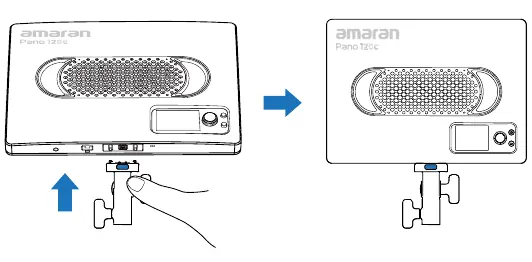
Light Installation: Align the contact pins on the mounting bracket to the light's Ace Lock mount. Press the blue release key and push until it clicks. To disassemble, press the blue release key and pull the light upwards.
Accessories:
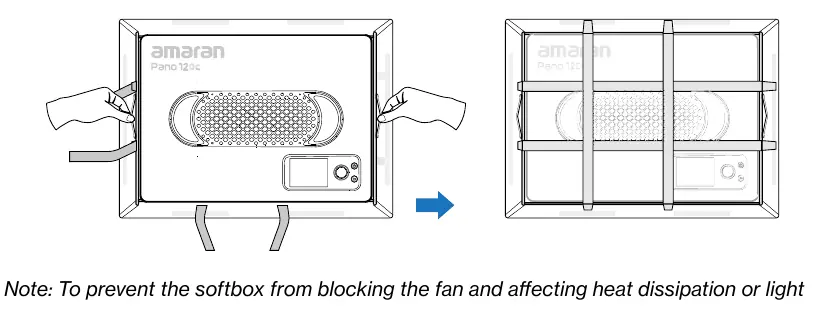
- Softbox: Unfold and place the light face down onto the frame. Pull handles to unfold, then secure with elastic straps.
- Light Control Grid: Attach to the softbox and secure with Velcro.
- Diffuser: Hook onto the light's heat dissipation holes.
- Barn Doors: Secure using the wire clasps on the light's heat dissipation holes.
Operations and Lighting Modes
Use the function control knob to navigate the menu.
- CCT: Adjust color temperature (2,300K-10,000K) and Green-Magenta shift.
- HSI: Adjust Intensity, Hue (1-360), and Saturation.
- RGB: Adjust Intensity, Red, Green, and Blue values.
- FX: Access lighting effects like Fireworks, Lightning, Strobe, etc.
- Custom Mode: Configure shortcuts for the Return button.
- Fan Mode: Toggle between Silent (limited to 25W) and Smart modes.
- Studio Mode: Automatically turns the light on when connected to power.
App and Firmware
Download the amaran app for mobile or desktop to control the light and perform firmware updates. Visit amarancreators.com for more information.
Safety Instructions
Do not block ventilation. Do not use in wet conditions. Avoid rapid shaking or rotating when mounted. Use only original power adapters. If the light is damaged or the cord is faulty, have it checked by authorized service personnel.
Official resources from the manual
Manufacturer information
Amaran
Practical help
Common problems
Light will not turn on or brightness is reduced
Ensure the power supply provides at least 65W. 140W is recommended for full power. If using a lower wattage supply, brightness will be limited.
Bluetooth connection issues
Navigate to the BT menu and perform a Bluetooth Reset.
Softbox blocking fan
Ensure the softbox is securely wrapped around the edges of the light to prevent blocking the fan vent.
Before use
- Verify all accessories are present based on your version (Base or Kit).
- Ensure your power supply supports PD3.0 and provides at least 65W.
- Check for firmware updates via the amaran app.
- Ensure the blue release key on the mounting bracket is facing the back of the light during installation.
Images and diagrams
- Product Overview: Identifies the location of the power button, control knob, and mounting points.
- Installation: Shows the correct orientation for the Ace Lock adapter and how to mount the light to a stand.
- Accessory Mounting: Illustrates how to attach the softbox, grid, and diffuser.
Model compatibility
- Compatible with amaran Peak power bank.
- Requires USB PD3.0 or higher power supply.
- Not compatible with some third-party private charging protocols.

Manual page author
Michael Turner
Technical manual editor
Reviews PDF manuals for structure, safety notes, and practical product details so readers can find the right information quickly.