Home Appliances / Small Kitchen Appliances
Blade Replacement and Adjustment Guide for Vollrath Tomato Pro, Econo Pro and Tomato King
A comprehensive guide for replacing and adjusting blades on Vollrath Tomato Pro, Econo Pro, and Tomato King food processors. Includes step-by-step instructions for pusher head alignment, blade installation, and proper tightening sequences.
Table of contents
Manual images
Click an image to enlargeQuick Guide from the Manual
This guide provides instructions for the safe replacement and adjustment of blade assemblies for Vollrath Tomato Pro, Econo Pro, and Tomato King food processors. Always handle blades with extreme caution as they are sharp and pose a hazard.
- Safety: Only trained personnel should perform maintenance. Never mix old and new blades in the same assembly to prevent breakage.
- Preparation: Work on a flat, dry surface. Wash new blades with warm, soapy water to remove the protective oil film before installation.
- Maintenance: Regularly check pusher head fingers for nicks or burrs and ensure they do not contact the blades during operation.
Replacing Blade Assembly
- Familiarize yourself with the parts diagram. Blade assemblies consist of blades, blade blocks, blade block pins, rubber seals, and screws.
- Positioning: For Tomato King, close the pusher head so fingers are through the blades against the pin stop. For Tomato Pro and Econo Pro, pull the pusher head assembly back against the back stop.
- Remove the four blade block screws (two at each end) using the proper tool. Retain the rubber seals mounted on the screws.
- Dispose of used blades and assemblies properly.
Adjustments
If pusher head fingers are nicked or burred, smooth the rough edges with a small flat file. Ensure the spaces between fingers are uniform and straighten any bent fingers.
Pusher Head Finger Alignment
Pusher head fingers must never contact the blades. If contact occurs, adjust the pusher head assembly:
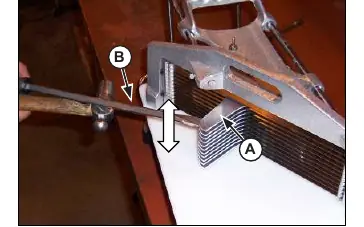
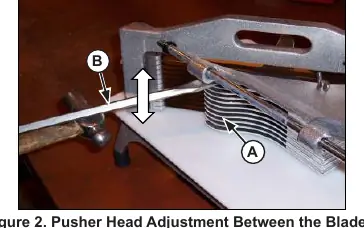
- Front Adjustment: Insert a screwdriver between the slots in the Pusher Head Assembly. Gently tap the screwdriver up or down to alter the location of the fingers so they slide effortlessly through the blades.
- Back Adjustment: If necessary, perform the same screwdriver adjustment from the back side of the equipment.
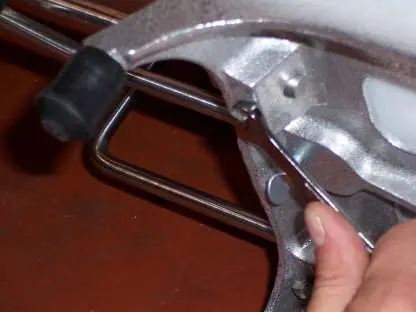
- Guide Rod Adjustment: Momentarily loosen set screws to the guide rods to adjust the location of the Pusher Head Assembly by pushing or pulling on the guide rod. Tighten set screws once located.
Tightening the Blades
Blades must be tightened in an alternating sequence to ensure proper tension:
- Keep the blade assembly centered between casting end-posts with a gap of air space between the blade block and post.
- Tighten screws one-half turn at a time in this order: Top Right, Bottom Left, Bottom Right, Top Left.
- Repeat this sequence until screws are tight. Check for proper tightness by strumming the dull side of the blade to identify a uniform vibration.
Practical help
Common problems
Pusher head fingers hitting blades
Adjust the pusher head assembly using a screwdriver between the slots to align fingers so they slide effortlessly through the blades.
Excessive blade breakage
Never mix old and new blades in the same assembly; always replace the complete assembly.
Blades feel loose
Tighten screws in an alternating sequence (Top Right, Bottom Left, Bottom Right, Top Left) 1/2 turn at a time until a uniform vibration is achieved.
Before use
- Ensure work surface is flat and dry
- Familiarize yourself with the parts diagram
- Wash new blades with warm, soapy water to remove protective oil film
- Check pusher head fingers for nicks or burrs
- Verify pusher head fingers do not touch blades during full travel
Images and diagrams
- Figure 1 & 2: Adjusting pusher head fingers using a screwdriver between slots
- Figure 3: Adjusting pusher head assembly position via guide rods
Model compatibility
- Instructions apply to Tomato Pro, Econo Pro, and Tomato King models.

Manual page author
Michael Turner
Technical manual editor
Reviews PDF manuals for structure, safety notes, and practical product details so readers can find the right information quickly.