Power / Solar Chargers
User Manual for Voltcraft VC-SP 120W 18V Solar Charger
Quick guide for the Voltcraft VC-SP 120W 18V Solar Charger. Learn how to set up, connect, maintain, and troubleshoot your portable solar panel for optimal power generation.
Table of contents
Manual images
Click an image to enlargeQuick guide from the manual
The Voltcraft VC-SP 120W is a portable solar charger designed for mobile power generation. It is suitable for outdoor use and features an IP65 ingress protection rating, meaning it is protected against dust and low-pressure water jets. Do not immerse the product in water. For optimal performance, ensure the panels are directly exposed to sunlight at a 90-degree angle. The product can be connected in series with one other identical solar charger to increase output power.
Product overview
The solar charger consists of the following main components:
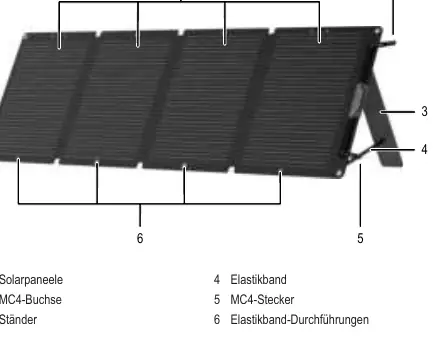
- Solar panels: The main surface for energy collection.
- MC4 socket and connector: Used for electrical connection.
- Stand: Integrated supports to angle the panels.
- Elastic band: Used to regulate the inclination of the panels.
Installation
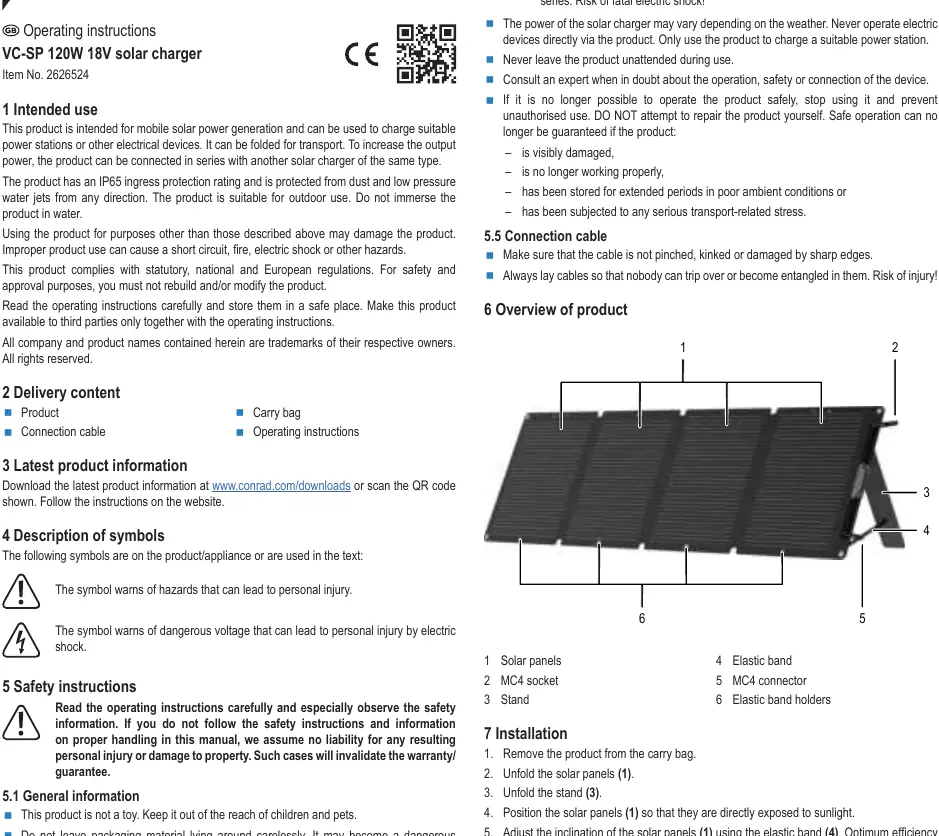
- Remove the product from the transport bag.
- Unfold the solar panels.
- Unfold the integrated stands.
- Position the panels so they are directly exposed to sunlight.
- Adjust the inclination of the panels using the elastic band to ensure sunlight hits the surface at a 90-degree angle.
Operation
Direct connection: Connect the MC4 connector on the connection cable to the MC4 socket on the solar charger, and the MC4 socket on the cable to the MC4 connector on the charger. Connect the output plug to your power station or electrical device.
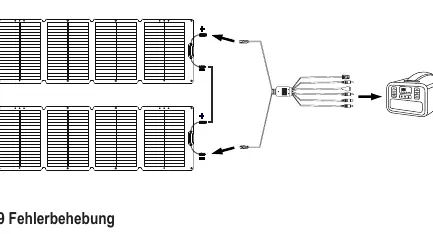
Series connection: You may connect a maximum of two solar chargers of the same type in series. Connect the MC4 connector of the first charger to the MC4 socket of the second charger. Use the connection cable to link the remaining free MC4 socket and connector to your power station.
Cleaning and maintenance
Clean the surface regularly with a soft, damp cloth to prevent a drop in output power. Do not use aggressive cleaning agents, rubbing alcohol, or other chemical solutions, as these can damage the housing. Never immerse the product in water.
Troubleshooting
If the product does not generate electricity, ensure all cables are connected properly. If output power is low, check the following:
- Ensure the solar panels are directly facing the sun.
- Adjust the inclination so sunlight hits at a 90-degree angle.
- Check for shadows on the panels.
- Clean the panels if they are dirty.
Technical data
Rated power: 120 WNominal operating voltage: 19.4 VNominal operating current: 6.18 AShort-circuit voltage: 21.6 VShort-circuit current: 6.68 AIngress protection: IP65Operating/storage conditions: -20 to 60 °CDimensions (folded): 505 x 423 x 25 mmDimensions (unfolded): 1548 x 505 x 4 mmWeight: 4.64 kg
Practical help
Common problems
Product does not generate electricity
Ensure all cables are connected properly.
Output power is low
Ensure panels are directly facing the sun, adjust the angle to 90 degrees, remove any shadows, or clean the panels.
Before use
- Check for visible damage to the panels or cables.
- Ensure the product is not stored in poor conditions.
- Verify that the power station or device is compatible.
- Ensure the area is free of flammable gases or solvents.
Specs in practice
- Rated power (120 W)
- The maximum power output under optimal conditions.
- Operating temperature (-20 to 60 °C)
- The safe ambient temperature range for operation and storage.
Images and diagrams
- The diagram shows the solar panel layout with numbered components: 1 (Solar panels), 2 (MC4 socket), 3 (Stand), 4 (Elastic band), 5 (MC4 connector), 6 (Elastic band holders).
Model compatibility
- Can be connected in series with a maximum of one other identical solar charger (total of 2).
- Compatible with power stations or electrical devices that accept the provided connection cable ports.

Manual page author
Michael Turner
Technical manual editor
Reviews PDF manuals for structure, safety notes, and practical product details so readers can find the right information quickly.