Toys / Pretend Play
User Manual for VTech My 1st Doll - Emma
Quick guide for VTech My 1st Doll - Emma. Learn how to install batteries, switch between Day and Night modes, use music features, and troubleshoot common issues.
Quick answers from the manual
Quick answer
- The My 1st Doll - Emma features Day and Night modes. Use the switch on the side to select the mode. It requires 1 AA battery. p. 3, 4, 7
Key actions
- Install battery p. 4
- Switch modes p. 7
First start
- Exit try-me mode p. 4
Problems and fixes
Program/activity stops working
Turn off, remove batteries, wait, replace batteries, turn on.
p. 9Maintenance and reset
- Reset the unit by removing and replacing batteries. p. 9
Technical specifications
| Parameter | Value | Meaning | Pages |
|---|---|---|---|
| Battery | 1 x AA (LR6/AM-3) | Power source | p. 4 |
Where to find it in the PDF
- Introduction and Controls p. 3
- Battery Installation p. 4
- Product Features p. 7
- Troubleshooting p. 9
Table of contents
Manual images
Click an image to enlargeQuick guide from the manual
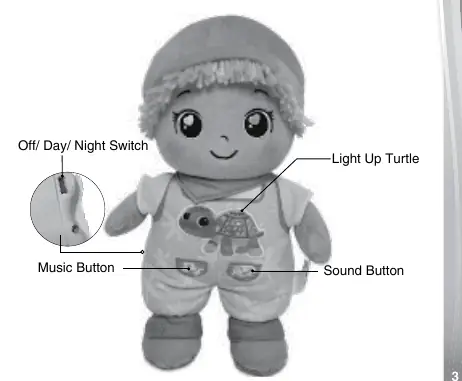
The VTech My 1st Doll - Emma is an interactive soft toy designed to provide comfort and entertainment. It features two distinct modes: Day mode for nurturing play, songs, and phrases, and Night mode for soothing lullabies and nature sounds. The doll includes a light-up turtle that interacts with the sounds.
Getting Started
The doll comes in a try-me mode. To exit this mode and begin normal play, slide the Off/Day/Night switch on the side of the unit from Day/Night to Off, and then back to Day or Night.
Battery Installation
Adult assembly is required for battery installation. Follow these steps:
- Open the fabric on the back of the doll.
- Ensure the unit is turned OFF.
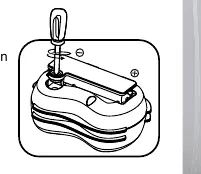
- Locate the battery cover on the back of the unit. Use a screwdriver to loosen the screw and remove the cover.
- If a used battery is present, remove it by pulling up on one end.
- Install 1 new AA (LR6/AM-3) battery, ensuring correct polarity (+ and -). Alkaline batteries are recommended.
- Replace the battery cover and tighten the screw to secure.
Product Features
- Off/Day/Night Switch: Located on the side of the unit. Use this to turn the unit on/off and select the desired mode.
- Music and Sound Buttons: Press these buttons to trigger songs, phrases, or soothing sounds depending on the selected mode.
- Light Up Turtle: Flashes in Day mode and fades in and out in Night mode.
- Automatic Shut-Off: To preserve battery life, the unit automatically powers down after a short period in Day mode, or after approximately 15 minutes in Night mode. Press any button to wake the unit.
Care & Maintenance
- Keep the unit clean by wiping it with a slightly damp cloth.
- Keep the unit out of direct sunlight and away from any direct heat source.
- Remove the batteries when the unit is not in use for an extended period.
- Do not drop the unit on hard surfaces and do not expose the unit to moisture or water.
Troubleshooting
If the program or activity stops working, follow these steps:
- Turn the unit OFF.
- Remove the batteries to interrupt the power supply.
- Let the unit stand for a few minutes, then replace the batteries.
- Turn the unit ON.
- If the product still does not work, install a brand new set of batteries.
If problems persist, contact the VTech Consumer Services Department.
Practical help
Common problems
Toy stops working or program freezes
Turn the unit off, remove batteries, wait a few minutes, reinsert batteries, and turn back on. If it still fails, replace with new batteries.
Toy powers down repeatedly during play
This indicates low battery power. Please insert a new set of batteries.
Before use
- Remove all packaging materials (tape, plastic sheets, packaging locks, etc.)
- Ensure the unit is switched out of 'Try-me' mode
- Install 1 new AA (LR6/AM-3) battery
- Ensure the battery cover is securely screwed shut
Specs in practice
- Auto-shutoff
- Powers down after 15 minutes in Night mode to save battery life.
Images and diagrams
- The battery compartment is located on the back of the doll, accessible by opening the fabric.
- The Off/Day/Night switch is located on the side of the doll.
Model compatibility
- Keep this soft toy out of the sleeping environment for babies under twelve months to avoid suffocation risk.

Manual page author
Emily Carter
User documentation editor
Prepares concise manual descriptions and highlights the most useful setup, operation, and maintenance information for readers.