Toys / Pretend Play
User Guide for VTech Toot-Toot Friends 2-in-1 Dinosaur Park
Comprehensive user guide for the VTech Toot-Toot Friends 2-in-1 Dinosaur Park. Includes assembly instructions, battery installation, play modes, transformation steps, and troubleshooting tips.
Quick answers from the manual
Quick answer
- The VTech 2-in-1 Dinosaur Park is an interactive playset that transforms between a dinosaur transportation truck and a dinosaur park. It features three play modes, MagicPoint interaction, and light-up buttons. p. 2, 11, 12
Key actions
- Transforming the playset p. 14
- Installing batteries p. 9
First start
- Exit Try Me mode p. 11
Problems and fixes
Toy stops working or malfunctions
Turn the toy OFF, remove batteries, wait a few minutes, replace batteries, and turn ON. If it still fails, install new batteries.
p. 16Maintenance and reset
- Resetting the toy p. 16
Technical specifications
| Parameter | Value | Meaning | Pages |
|---|---|---|---|
| Batteries | 2 x AA (LR6/AM-3) | Required power source | p. 9 |
Where to find it in the PDF
- Assembly Instructions p. 5, 6, 7
- Battery Installation p. 9
- Activities and Modes p. 11, 13
Table of contents
Manual images
Click an image to enlargeQuick Start Guide
The VTech 2-in-1 Dinosaur Park is an interactive playset that transforms between a dinosaur transportation truck and a dinosaur park. To begin, ensure the toy is fully assembled and fresh batteries are installed. Place one of the characters onto the MagicPoint location to exit 'Try Me' mode and begin normal play.
Included Items
- Park Ranger, Pterosaur, and Triceratops characters
- T-Rex
- Small truck, net launcher, and net
- Play set base, park sign, telescope, slider, claw, and platforms
- Bowl of food and label sheet
Assembly Instructions
Adult assembly is required. Ensure the toy is fully assembled before allowing children to play.
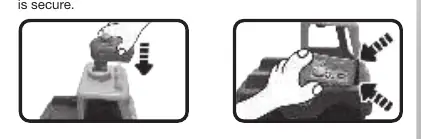
- Small Truck: Insert the net launcher into the top of the truck until it clicks. Attach the door by clicking the top part first, then the bottom.
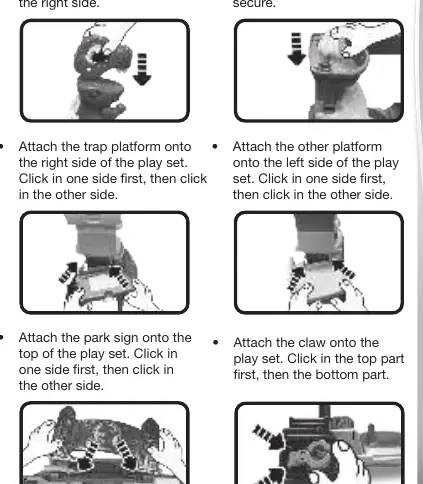
- Play Set: Attach the T-Rex head to its body. Insert the telescope onto the lookout. Attach the trap platform, normal platform, park sign, claw, and T-Rex slider to the main base by clicking them into place as indicated in the diagrams.
Battery Installation
The toy requires 2 AA (LR6/AM-3) batteries.
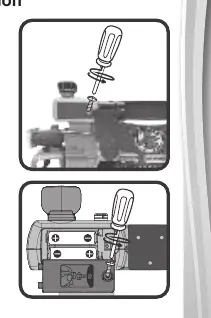
- Ensure the toy is turned OFF.
- Locate the battery cover on the back of the play set and loosen the screw.
- Remove old batteries if present.
- Install 2 new AA batteries following the polarity diagram inside the battery box.
- Replace the battery cover and tighten the screw.
Product Features and Modes
The play set features an Off/Volume switch and a Mode Switch to select between three activities:
- Music & Sounds Mode: Press Light Up Buttons to hear melodies. Place characters on the MagicPoint to hear them talk and sing.
- Learning Mode: Learn about colours, numbers, and objects. Characters introduce themselves on the MagicPoint.
- Mission Mode: Follow instructions to press Light Up Buttons and place characters on the MagicPoint to operate the truck and park.
Transformation
The set can be transformed between a truck and a park:
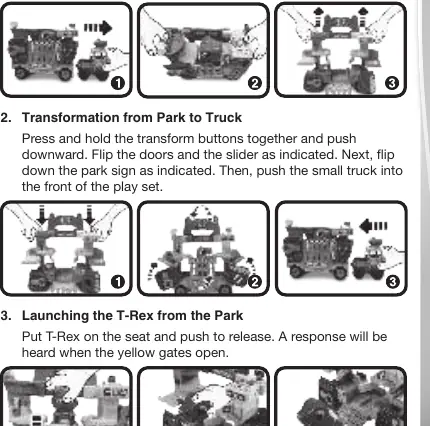
- Truck to Park: Pull the small truck out from the front. Press and hold the transform buttons together and pull upward.
- Park to Truck: Press and hold the transform buttons together and push downward. Flip the doors, slider, and park sign as indicated, then push the small truck into the front of the play set.
Care and Maintenance
- Keep the product and metal parts clean by wiping with a slightly damp cloth.
- Keep away from direct sunlight and heat sources.
- Remove batteries during long periods of non-use.
- Do not drop on hard surfaces or expose to moisture.
Troubleshooting
If the toy malfunctions:
- Turn the toy OFF.
- Remove the batteries.
- Let the toy stand for a few minutes, then replace the batteries.
- Turn the toy ON.
- If the problem persists, install a new set of batteries.
Practical help
Common problems
Toy stops working or malfunctions while a character is on the MagicPoint
Remove the character and place them back onto the MagicPoint.
Toy stops working or malfunctions on its own
Turn the toy OFF, remove batteries, wait a few minutes, replace batteries, and turn ON. If it still fails, install new batteries.
Toy powers down while playing
The toy has an automatic shut-off feature to save battery. If it powers down during play, install a brand new set of batteries.
Before use
- Ensure adult assembly is complete before use.
- Install 2 new AA batteries.
- Apply labels to the play set as indicated.
- Ensure the toy is turned OFF before battery installation.
- Place a character on the MagicPoint to exit 'Try Me' mode.
Images and diagrams
- Assembly diagrams show where to click parts into place.
- Transformation diagrams illustrate the steps to switch between truck and park modes.
- Battery compartment diagram shows correct polarity orientation.
Model compatibility
- The MagicPoint location interacts with other VTech Toot-Toot Friends characters (sold separately).

Manual page author
Emily Carter
User documentation editor
Prepares concise manual descriptions and highlights the most useful setup, operation, and maintenance information for readers.