Baby / Baby Toys
User Manual for VTech 2-in-1 Roll & Discover Roller Drum
Comprehensive user guide for the VTech 2-in-1 Roll & Discover Roller Drum. Includes instructions for packaging removal, battery installation, operation, activity features, care, and troubleshooting.
Quick answers from the manual
Quick answer
- To turn on the VTech 2-in-1 Roll & Discover Roller Drum, slide the On/Off/Volume selector to the Low or High volume position. The unit will automatically shut off after 30 seconds of inactivity. p. 6
Key actions
- Install 2 new AAA batteries p. 4
- Unlock packaging locks p. 3
First start
- Remove packaging locks and install 2 AAA batteries. p. 3, 4
Problems and fixes
Unit stops working or malfunctions
Turn off, remove batteries, wait, reinsert batteries, and turn on. If issue persists, replace batteries.
p. 10Maintenance and reset
- Reset by removing and replacing batteries. p. 10
Technical specifications
| Parameter | Value | Meaning | Pages |
|---|---|---|---|
| Battery Type | 2 x AAA (AM-4/LR03) | Required power source | p. 4 |
Where to find it in the PDF
- Introduction and Features p. 2
- Packaging Removal p. 3
- Battery Installation p. 4
- Troubleshooting p. 10
Table of contents
Manual images
Click an image to enlargeQuick Guide
The VTech 2-in-1 Roll & Discover Roller Drum is an interactive toy designed for infants. To begin, remove the packaging locks, install two AAA batteries, and use the On/Off/Volume selector to start playing. The toy features various tactile activities, lights, and sounds to encourage motor skill development.
Getting Started
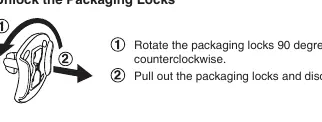
Packaging Removal: Before use, remove all packaging materials. Locate the packaging locks on the toy, rotate them 90 degrees counterclockwise, and pull them out to discard.
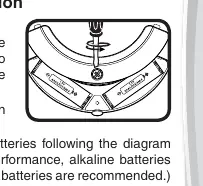
Battery Installation: Adult assembly is required. Ensure the unit is turned off. Locate the battery cover on the back of the unit, use a screwdriver to loosen the screw, and open the cover. Install 2 new AAA (AM-4/LR03) batteries, ensuring correct polarity (+ and -). Replace the cover and tighten the screw.
Product Features
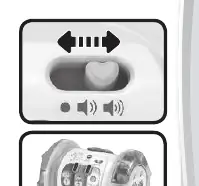
- On/Off/Volume Selector: Slide the switch to the Low volume or High volume position to turn the unit on. Slide to the Off position to turn it off.
- Interactive Roller: Roll the drum to play sounds and music.
- Automatic Shut-Off: To preserve battery life, the unit automatically shuts off after approximately 30 seconds of inactivity. Press the Piano Keys or Drum Button to wake it up.
Activities
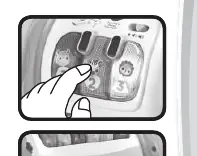
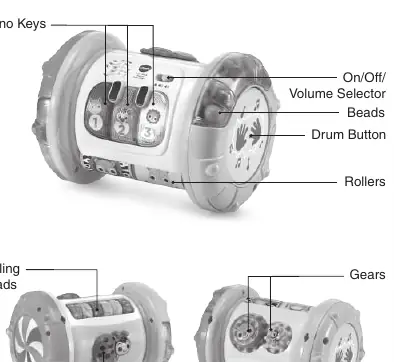
- Light-Up Piano Keys: Pressing these keys introduces animals and numbers with songs and phrases.
- Turn, Slide & Spin: Features gears, rollers, beads, and a ladybug slider to help strengthen motor skills.
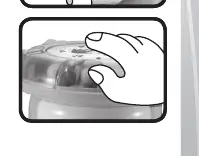
- Drum Button: Tap this button to hear drum sounds and watch the beads roll.
Care and Maintenance
- Keep the unit clean by wiping it with a slightly damp cloth.
- Keep the unit out of direct sunlight and away from direct heat sources.
- Remove batteries if the unit will not be in use for an extended period.
- Do not drop the unit on hard surfaces or expose it to moisture or water.
Troubleshooting
If the unit stops working or malfunctions, follow these steps:
- Turn the unit Off.
- Remove the batteries to interrupt the power supply.
- Let the unit stand for a few minutes, then replace the batteries.
- Turn the unit On.
- If it still does not work, install a new set of batteries.
Practical help
Common problems
Unit stops working or malfunctions
Turn the unit off, remove batteries, wait a few minutes, reinsert batteries, and turn back on. If it still fails, replace with a new set of batteries.
Light fades out or unit powers down during play
Install a new set of batteries.
Before use
- Remove all packaging materials (tape, plastic sheets, packaging locks).
- Rotate packaging locks 90 degrees counterclockwise to remove.
- Install 2 new AAA (AM-4/LR03) batteries.
- Ensure correct battery polarity (+ and -).
Specs in practice
- Auto Shut-Off
- Unit turns off after 30 seconds of inactivity to save battery.
Images and diagrams
- Packaging locks: Rotate 90 degrees counterclockwise to unlock.
- Battery compartment: Located on the back, requires a screwdriver to open.
- Controls: On/Off/Volume switch, Piano Keys, Drum Button, Gears, and Ladybug Slider.

Manual page author
David Miller
Documentation analyst
Organizes user manual content into clear summaries, with attention to model details, product context, and everyday usability.