Toys / Pretend Play
User Manual for VTech Toot-Toot Friends 2-in-1 Fire Station
Quick guide for the VTech Toot-Toot Friends 2-in-1 Fire Station. Learn how to set up, transform between modes, install batteries, and troubleshoot your toy.
Quick answers from the manual
Quick answer
- The VTech 2-in-1 Fire Station transforms between a fire station and a fire engine. It features three play modes, MagicPoint interaction, and requires 2 AA batteries. p. 3, 10, 11
Key actions
- Transforming the playset p. 10
- Activating Normal Play mode p. 9
First start
- Install 2 AA batteries and place a character on the MagicPoint to exit Try Me mode. p. 4, 9
Problems and fixes
Unit stops working or malfunctions
Turn the unit off, remove batteries, wait a few minutes, replace batteries, and turn on.
p. 16Maintenance and reset
- Reset by removing and replacing batteries. p. 16
Technical specifications
| Parameter | Value | Meaning | Pages |
|---|---|---|---|
| Batteries | 2 x AA (AM-3/LR6) | Required power source | p. 4 |
Where to find it in the PDF
- Getting Started p. 4
- Transformation p. 10
- Troubleshooting p. 16
Table of contents
Manual images
Click an image to enlargeQuick Start
This product is in Try Me mode in the packaging. To activate Normal Play mode, turn the unit on and place one Fire Fighter on the MagicPoint. When you hear two short sounds, normal game play is activated.
Getting Started
Battery Removal and Installation:
- Make sure the unit is turned Off.
- Find the battery cover located on the bottom water cannon and use a screwdriver to loosen the screw.
- Remove old batteries by pulling up on one end of each battery.
- Install 2 new AA (AM-3/LR6) batteries following the diagram inside the battery box.
- Replace the battery cover and tighten the screw to secure.
Removing Packaging Locks: Rotate the packaging locks anticlockwise 90 degrees and pull them out. Cut and discard the plastic tie between the door and the front of the Fire Engine before playing.
Product Features
- Off/Low/High Volume Switch: Slide to select volume or turn the unit off.
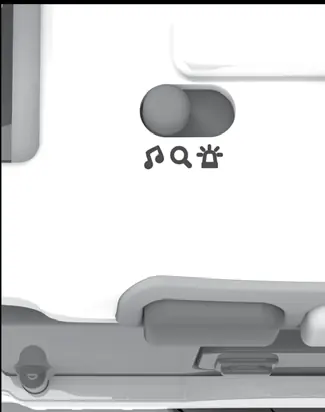
- Mode Switch: Slide to select Music & Sounds mode, Explore & Train mode, or Rescue Mission mode.
- Action Buttons: Press to learn about colours, sounds, and rescue gear.
- Water Cannon: Press to help put out the fire.
- MagicPoint: Place characters here to hear fun responses.
Transformation
The playset can be transformed from a Fire Engine to a Fire Station and back again:
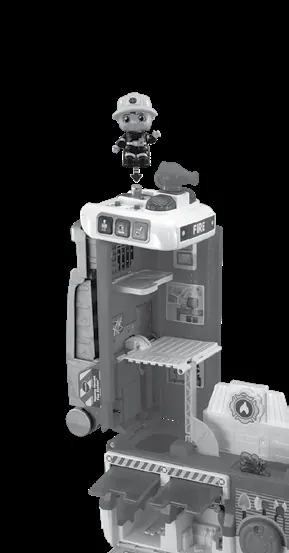
- Lift up the top section of the engine.
- Twist the cab of the engine anticlockwise.
- Lift the doors and pull down the side of the engine.
Activities
- Music & Sounds Mode: Press Action Buttons for sound effects and phrases; place characters on MagicPoint for melodies and songs.
- Explore & Train Mode: Press Action Buttons to learn about colours and firefighting; place characters on MagicPoint to hear them talk.
- Rescue Mission Mode: Press Action Buttons or Water Cannon, or use MagicPoint to play training and rescue games.
Motor Skill Development
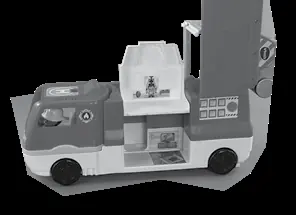
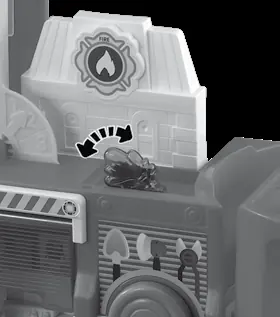
The playset includes several interactive features to encourage motor skills, such as moving the workout room, dropping characters into the engine, using the helicopter, spinning the water hose, and operating the extension ladder.
Care & Maintenance
- Keep the product and metal parts clean by wiping with a slightly damp cloth.
- Keep out of direct sunlight and away from direct heat sources.
- Remove batteries if the unit will not be in use for an extended period.
- Do not drop on hard surfaces or expose to moisture/water.
Troubleshooting
If the unit stops working or malfunctions while a character is on the MagicPoint, remove the character and place it back. If it still does not function, turn the unit off, remove the batteries, wait a few minutes, replace the batteries, and turn the unit back on. If it still does not work, install a new set of batteries.
Practical help
Common problems
Unit stops working or malfunctions
Remove character from MagicPoint and replace. If issue persists, turn off, remove batteries, wait a few minutes, and replace with new batteries.
Unit is in Try Me mode
Place a character on the MagicPoint to activate Normal Play mode.
Before use
- Remove all packaging locks (rotate 90 degrees anticlockwise).
- Cut and discard the plastic tie between the door and the front of the Fire Engine.
- Install 2 new AA (AM-3/LR6) batteries.
- Apply labels to the playset as indicated in the guide.
Images and diagrams
- Transformation steps: Lift top section, twist cab, and pull down side.
- Battery installation: Located on the bottom water cannon.
Model compatibility
- Not intended for teething.
- Not intended for playing in water.

Manual page author
Michael Turner
Technical manual editor
Reviews PDF manuals for structure, safety notes, and practical product details so readers can find the right information quickly.