Toys / Pretend Play
User Manual for VTech Switch & Go 2-in-1 Spino Speedster
Quick guide for the VTech Switch & Go 2-in-1 Spino Speedster. Learn how to install batteries, transform the toy, use features, and troubleshoot common issues.
Quick answers from the manual
Quick answer
- The VTech Switch & Go 2-in-1 Spino Speedster is an electronic toy that transforms between a Spinosaurus and a vehicle. It requires 1 AAA battery for operation. p. 2, 4
Key actions
- Install battery p. 4
- Transform modes p. 9, 10
First start
- Install 1 AAA battery and set the volume selector to Low or High. p. 4, 7
Problems and fixes
Unit stops working or malfunctions
Turn off, remove batteries, wait a few minutes, replace batteries, and turn on.
p. 12Maintenance and reset
- If the unit malfunctions, remove and replace the batteries. p. 12
Technical specifications
| Parameter | Value | Meaning | Pages |
|---|---|---|---|
| Battery | 1 x AAA (LR03/AM-4) | Power source | p. 4 |
Where to find it in the PDF
- Introduction and Features p. 2
- Battery Installation p. 4
- Transformation Instructions p. 9, 10, 11
- Troubleshooting p. 12
Table of contents
Manual images
Click an image to enlargeQuick guide from the manual
The VTech Switch & Go 2-in-1 Spino Speedster is an interactive toy that transforms between a Spinosaurus and a vehicle. It features sound effects, light effects, and projectile launching capabilities. Adult assembly is required for battery installation.
Getting Started
To prepare the toy for play, you must install the battery:
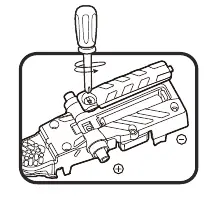
- Ensure the unit is turned Off.
- Locate the battery cover on the bottom of the unit.
- Use a screwdriver to loosen the screw and open the cover.
- Install 1 new AAA (LR03/AM-4) battery, ensuring correct polarity (+ and -).
- Replace the cover and tighten the screw.
For best performance, use alkaline batteries or fully charged Ni-MH rechargeable batteries.
Product Features
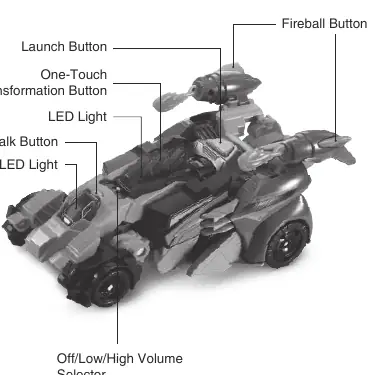
- Off/Low/High Volume Selector: Slide to select volume or turn the unit Off.
- Talk Button: Press to hear phrases and dinosaur/vehicle sounds.
- One-Touch Transformation Button: Automatically switches the unit between modes.
- Launch Button: Launches the race car or transforms it into a super Spinosaurus.
- Fireball Button: Launches the fireball projectile.
- LED Lights: Flash along with sounds.
Transformation
The toy can transform between different modes:
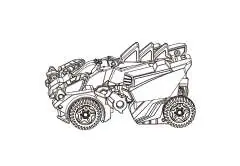
- Spinosaurus to Vehicle: Flip the tail, push back wheels up, flip the mouth up, and fold legs.
- Vehicle to Spinosaurus: Press the One-Touch Transformation Button.
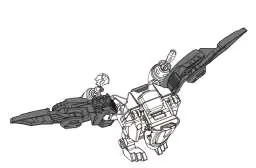
- Pterodactyl to Launcher: Flip the head down, fold wing tips and wings, and flip feet up.
Combination
You can combine the vehicle with the launcher to create a Super Race Car. Press the Launch Button to release the vehicle and trigger the auto-switch into a super Spinosaurus.
Care & Maintenance
- Keep the unit clean by wiping with a slightly damp cloth.
- Keep away from direct sunlight and heat sources.
- Remove batteries if the unit will not be used for an extended period.
- Do not drop on hard surfaces or expose to moisture.
Troubleshooting
If the unit stops working or malfunctions:
- Turn the unit Off.
- Remove the batteries to interrupt power.
- Wait a few minutes, then replace the batteries.
- Turn the unit On.
- If it still does not work, install a new set of batteries.
Practical help
Common problems
Unit stops working or malfunctions
Turn the unit off, remove batteries, wait a few minutes, and replace with fresh batteries.
Unit powers down or light fades during play
Install a new set of batteries.
Before use
- Adult assembly required for battery installation.
- Use 1 new AAA (LR03/AM-4) battery.
- Ensure correct polarity (+ and -).
- Remove all packing materials (tape, plastic sheets, etc.) before giving to a child.
Specs in practice
- Automatic Shut-Off
- The unit turns off after approximately 20 seconds of inactivity to preserve battery life.
Images and diagrams
- Battery compartment is located on the bottom of the unit.
- Transformation steps are provided for Spinosaurus, Vehicle, and Pterodactyl modes.
Model compatibility
- Not for children under 3 years due to small parts (choking hazard).

Manual page author
Emily Carter
User documentation editor
Prepares concise manual descriptions and highlights the most useful setup, operation, and maintenance information for readers.