Baby / Activity Centers
User Manual for VTech Little Friendlies 2-in-1 Baby Gym
Comprehensive user guide for the VTech Little Friendlies 2-in-1 Baby Gym. Includes assembly instructions, battery installation, product features, maintenance tips, and troubleshooting steps.
Quick answers from the manual
Quick answer
- The VTech Little Friendlies 2-in-1 Baby Gym is an interactive play gym that requires 2 AA batteries and adult assembly. It features three modes (Animal, Colours & Shapes, Music) and an automatic shut-off function. p. 1, 9, 10
Key actions
- Assemble the gym by clicking the arches into the cloud hub and attaching the mat. p. 8
- Install 2 AA batteries in the electronic sun panel. p. 6
First start
- Slide the ON/OFF/VOLUME CONTROL SWITCH to the desired volume level to turn the unit on. p. 10
Problems and fixes
Unit stops working or malfunctions.
Turn the unit OFF, remove batteries, wait a few minutes, replace batteries, and turn ON. Replace with new batteries if the issue persists.
p. 13Maintenance and reset
- Remove batteries to reset the unit. p. 13
Technical specifications
| Parameter | Value | Meaning | Pages |
|---|---|---|---|
| Battery Type | 2 x AA (AM-3/LR6) | Required power source | p. 6 |
Where to find it in the PDF
- Assembly Instructions p. 8, 9
- Product Features p. 10, 11
- Care & Maintenance p. 13
Table of contents
Manual images
Click an image to enlargeQuick Guide
The VTech Little Friendlies 2-in-1 Baby Gym is an interactive learning toy designed to develop motor and sensory skills. It requires adult assembly and 2 AA batteries. The unit features three play modes: Animal Mode, Colours & Shapes Mode, and Music Mode, with an automatic shut-off feature to preserve battery life.
Included in Package
- 1 Play mat
- 4 Arch pieces
- 1 Electronic sun panel
- 1 Cuddly cow toy
- 1 Bear
- 1 Sheep
- 1 Frog
- 1 Bird
- 1 Baby-safe mirror
- 6 Activity links
- 2 Straps with buckles
Assembly Instructions
Adult assembly is required for safety.
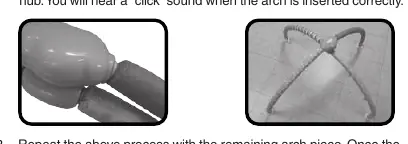
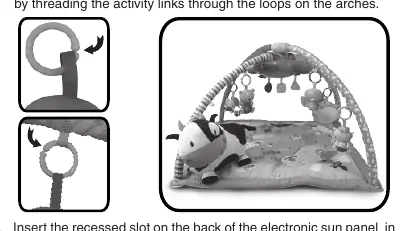
- Assemble Arches: Insert one arch piece into the round slot in the blue cloud hub until you hear a "click". Repeat with the remaining arch piece. Note: Once assembled, the arches cannot be disassembled.
- Attach Mat: Lay the play mat on a flat surface with the animal character side facing up. Insert the end of each arch into the slots on the four corners of the play mat.
- Attach Toys: Thread the activity links through the loops on the arches to attach the dangling animal characters and the mirror.
- Attach Sun Panel: Insert the recessed slot on the back of the electronic sun panel into the round attachment on the cloud hub. Secure it using the provided straps and buckles. The sun panel can also be attached to a cot rail.
Battery Installation
The unit requires 2 new AA (AM-3/LR6) batteries.
- Ensure the unit is turned OFF.
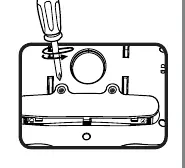
- Locate the battery cover on the back of the unit and use a screwdriver to loosen the screw.
- Install 2 new AA batteries following the diagram inside the battery box.
- Replace the battery cover and tighten the screw.
Product Features
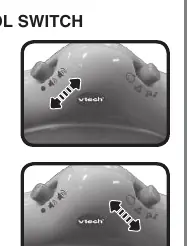
- On/Off/Volume Control: Slide the switch to Low Volume, High Volume, or Off.
- Mode Selector: Choose between Animal Mode, Colours & Shapes Mode, or Music Mode.
- Automatic Shut-Off: The unit powers down after approximately 30 seconds of inactivity. Press any button or move the dangling pieces to wake it up.
Care & Maintenance
- Keep the unit clean by wiping it with a slightly damp cloth.
- The play mat is machine washable; remove all play pieces first and follow the care instructions on the tag.
- Keep the unit out of direct sunlight and away from direct heat sources.
- Remove batteries if the unit will not be used for an extended period.
- Do not drop the unit on hard surfaces or expose it to moisture.
Practical help
Common problems
The unit stops working or malfunctions.
Turn the unit OFF, remove the batteries, wait a few minutes, replace the batteries, and turn the unit back ON. If it still does not work, replace with a fresh set of batteries.
Before use
- Remove all packing materials (tape, plastic sheets, packaging locks, and tags).
- Install 2 new AA (AM-3/LR6) batteries.
- Assemble the arches into the blue cloud hub until they click.
- Attach the play mat to the arches.
- Attach the dangling toys and mirror using the activity links.
Specs in practice
- Auto Shut-Off
- The unit automatically powers down after 30 seconds of no input to save battery life.
Images and diagrams
- The assembly diagram shows the arch pieces clicking into the central cloud hub.
- The battery installation diagram illustrates using a screwdriver to open the compartment on the back of the sun panel.
- The strap diagram shows how to thread the straps through the buckles to secure the sun panel to the arches or a cot rail.
Model compatibility
- The play mat is machine washable (remove all play pieces first).
- The electronic sun panel can be attached to the gym arches or a cot rail.

Manual page author
David Miller
Documentation analyst
Organizes user manual content into clear summaries, with attention to model details, product context, and everyday usability.