Accessories / Mounts & Stands
Installation Manual for WALI 1330LM TV Wall Mount
A comprehensive installation guide for the WALI 1330LM TV wall mount. Includes a parts list, required tools, and step-by-step instructions for mounting on brick or wood walls.
Table of contents
Manual images
Click an image to enlargeQuick guide from the manual
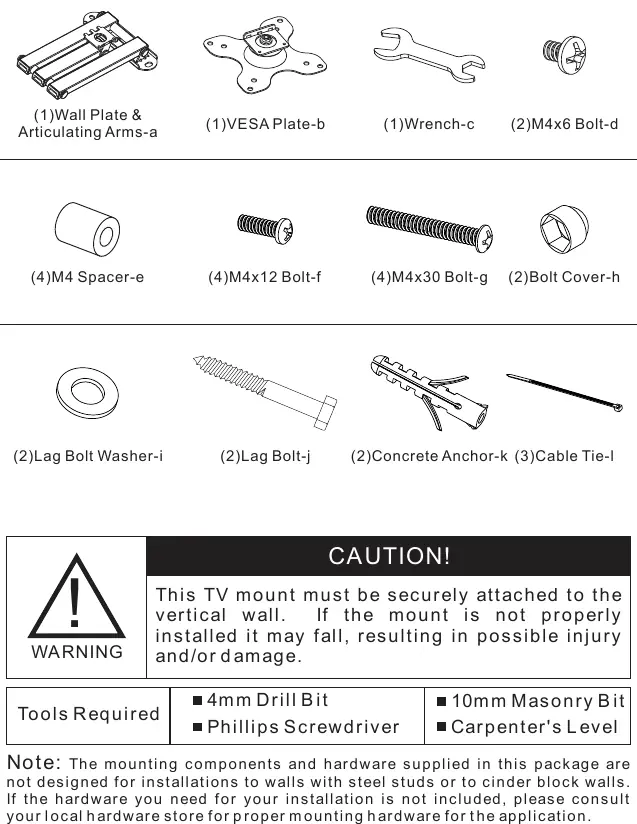
This document provides instructions for installing the WALI 1330LM TV wall mount. Before beginning, ensure you have all the parts listed in the supplied parts list and the necessary tools. If you are unsure about the nature of your wall or the installation process, consult a qualified installation contractor.
Important safety information
Read all instructions before attempting installation. Use proper safety equipment during the process. Do not use this product for any purpose or in any configuration not explicitly specified in this instruction. The manufacturer disclaims all liability for injury or damage arising from incorrect assembly, mounting, or use.
Tools required
- 4mm Drill Bit
- Phillips Screwdriver
- 10mm Masonry Bit
- Carpenter's Level
Installation steps
Step 1: Install the wall plate
Choose the appropriate mounting method based on your wall type:
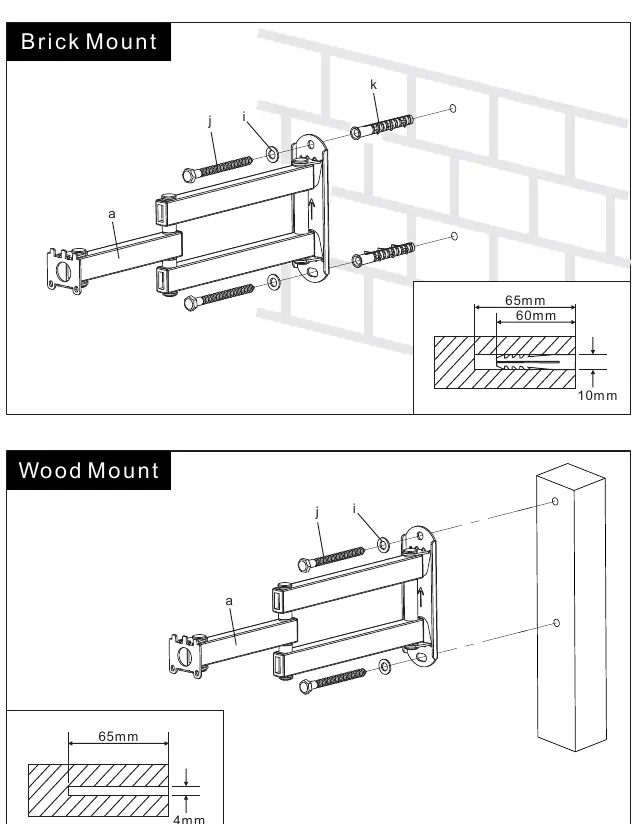
- Brick Mount: Use the provided concrete anchors (k). Drill holes to a depth of 65mm using a 10mm masonry bit.
- Wood Mount: Drill holes to a depth of 65mm using a 4mm drill bit.
Ensure the wall plate is level before securing it to the wall.
Step 2: Attach VESA plate to TV
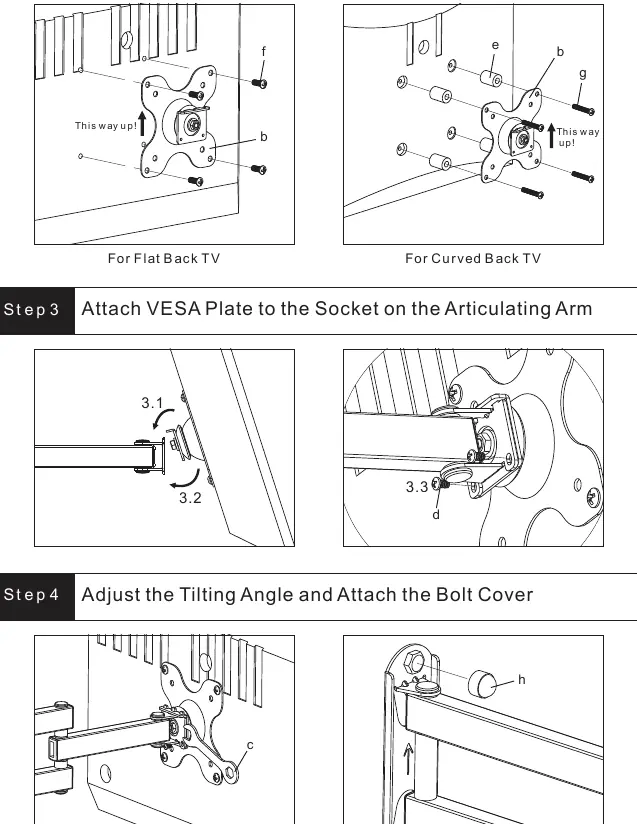
Attach the VESA plate (b) to the mounting holes on the back of your TV. Use the appropriate bolts (M4x12 or M4x30) and spacers (e) if necessary, particularly for curved back TVs. Ensure the arrow labeled 'This way up!' is pointing upwards.
Step 3: Attach VESA plate to the articulating arm
Secure the VESA plate to the socket on the articulating arm using the provided hardware.
Step 4: Adjust tilt and finish
Adjust the tilting angle as desired and attach the bolt cover (h) to finish the installation.
Practical help
Common problems
Mounting on steel studs or cinder block walls
The supplied hardware is not designed for these wall types. Please consult your local hardware store for appropriate mounting hardware.
Before use
- Check package contents against the Supplied Parts List
- Verify your wall type (Brick or Wood)
- Ensure you have a 4mm drill bit, 10mm masonry bit, Phillips screwdriver, and carpenter's level
- Read all safety instructions before starting
Specs in practice
- M4x12 Bolt-f
- Standard bolt for flat back TVs
- M4x30 Bolt-g
- Longer bolt, typically used with spacers for curved back TVs
Images and diagrams
- Step 1 diagrams illustrate the drilling depth of 65mm for both brick and wood installations.
- Step 2 shows the correct orientation of the VESA plate with the 'This way up!' arrow.
Model compatibility
- Not designed for steel studs or cinder block walls.

Manual page author
Emily Carter
User documentation editor
Prepares concise manual descriptions and highlights the most useful setup, operation, and maintenance information for readers.