Lighting / Fixtures
Installation Guide for Wayfair 0890-SF Wall Sconce
Quick installation guide for the Wayfair 0890-SF wall sconce. Includes wiring diagrams, mounting steps, and safety precautions for a secure setup.
Table of contents
Manual images
Click an image to enlargeQuick Guide and Safety
This document provides installation instructions for the Wayfair 0890-SF lighting fixture. All installation work should be performed by an accredited professional. Before beginning, ensure the power supply is shut off at the fuse or circuit breaker. Use only the specified bulbs and do not exceed the maximum wattage.
Preparing for Installation
Carefully remove the fixture from the carton and locate the yellow bag containing all parts. Remove the old fixture from the wall, including the old mounting strap.
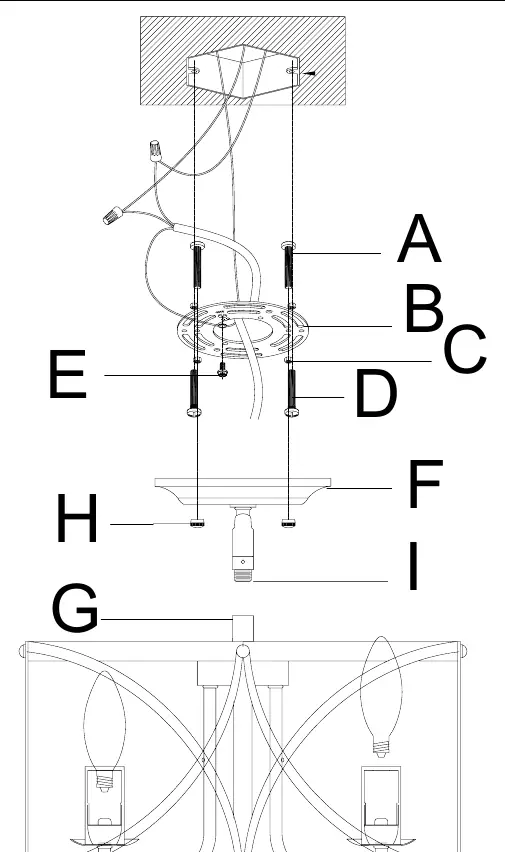
- Hold the canopy (F) up to the mounting strap (B) to align the holes.
- Insert mounting screws (A) through the canopy and strap to test the fit.
- Remove the canopy and secure the mounting screws (A) to the mounting strap (B) using nuts (C).
- Place the mounting strap (B) over the junction box and secure it with mounting screws (D).
- Pull the house wires through the center of the mounting strap.
Assembling the Fixture
Feed the fixture wires from the top post (G) into the swivel (I) located on the canopy (F) until the wires emerge from the canopy. Pull the wires until taut. Thread the top post (G) into the swivel and twist the lock on the swivel (I) to secure it.
Connecting the Wires
Have an assistant support the fixture's weight during wiring. Refer to the wiring diagram to connect the fixture wires to the power supply wires from the junction box:
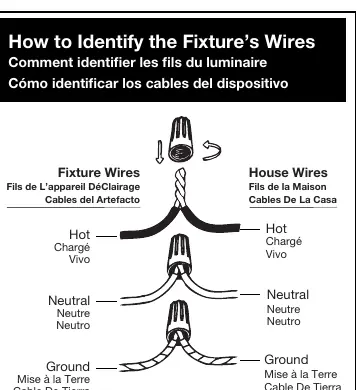
- Hot to Hot: Connect the transparent wire with black inner thread, black wire, or smooth wire.
- Neutral to Neutral: Connect the transparent wire with white inner thread, white wire, or ribbed wire.
- Ground to Ground: Connect the transparent wire with green inner thread, green wire, or copper wire.
Twist the ends of the wire pairs together and secure with a wire connector. Ensure all twists are in the same direction. If there is no house ground wire, attach the fixture's ground wire to the ground screw (E) on the mounting bracket.
Finishing the Installation
Push the canopy (F) up to the ceiling and thread the nuts (H) onto the exposed threads of the mounting screws (A) until the canopy is snug against the ceiling. Install the light bulbs (not included) according to the fixture's specifications. Turn on the power and test the fixture.
Lighting Placement Guidelines
For optimal lighting, consider the following placement tips:
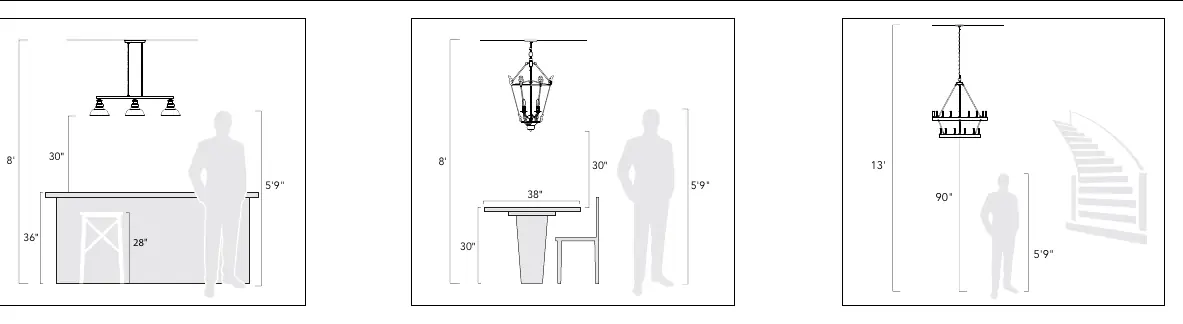
- Kitchen Islands: Center linear pendants over the island. Use one pendant for every 24 inches of island length. Fixtures should hang at least 30 inches above the countertop.
- Dining Tables: Fixtures should hang at least 30 inches above the table. Use a fixture that is 12 inches narrower than the width of the table.
- Open Areas: The bottom of the fixture should hang at least 7.5 feet from the floor. Ensure clearance for any opening doors.
Manufacturer information
Wayfair LLC
Practical help
Common problems
Fixture does not turn on
Verify the power is on at the circuit breaker, check that the bulb is installed correctly, and ensure all wire connections are secure.
No ground wire in junction box
Locate the ground screw (E) on the mounting bracket and wrap the fixture's ground wire around it, then tighten.
Before use
- Shut off power at the circuit breaker.
- Ensure you have an assistant to support the fixture's weight.
- Verify all parts are present in the yellow bag.
- Check bulb specifications (do not exceed max wattage).
- Ensure the mounting strap is securely fastened to the junction box.
Specs in practice
- Neutral Wire
- Ribbed, white, or transparent wire with white inner thread.
Images and diagrams
- Wiring Diagram: Illustrates how to connect fixture wires to house wires using wire connectors.
- Assembly Diagram: Identifies components A through I, showing the mounting strap, canopy, and swivel assembly.
Model compatibility
- Requires an accredited professional for installation.
- Use only specified bulbs; do not exceed maximum wattage.

Manual page author
Emily Carter
User documentation editor
Prepares concise manual descriptions and highlights the most useful setup, operation, and maintenance information for readers.