Mobile / Smartphones
User Guide for Xiaomi 15T
Quick start guide for the Xiaomi 15T smartphone. Learn how to set up your device, safety precautions, maintenance tips, and technical specifications.
Quick answers from the manual
Quick answer
- This guide provides instructions for setting up, safely operating, and maintaining the Xiaomi 15T smartphone, along with technical specifications and warranty details. p. 2, 14
Key actions
- Power on the device by pressing and holding the power button until it vibrates. p. 2
- Access the E-label for certification information via Settings > About Phone > Certification. p. 13
- Charge the device using the provided USB cable and a Mi-branded charger. p. 6
First start
- Power on the device, select your language and region, and follow the on-screen instructions to configure network and settings. p. 2
Problems and fixes
Device overheating
The device may automatically slow down, close apps, or shut down to prevent damage. This is often normal during long operations.
p. 10Maintenance and reset
- The device does not require periodic maintenance. Clean the surface using only a soft, clean, and dry cloth. p. 9, 10
Technical specifications
| Parameter | Value | Meaning | Pages |
|---|---|---|---|
| Processor | MediaTek Dimensity 8400-Ultra | Main chipset | p. 14 |
| Operating System | Android 15 + Xiaomi HyperOS 2 | Software platform | p. 14 |
| Screen Size | 6.83” | Display diagonal | p. 14 |
| Camera | 50MP+50MP+12MP | Rear camera configuration | p. 14 |
| Front Camera | 32MP | Selfie camera | p. 14 |
Where to find it in the PDF
- Device Overview p. 1
- Setup and Power On p. 2
- Safety Information p. 3, 4, 5, 6
- Technical Specifications p. 14
- Warranty and Service p. 15, 16, 22, 23
Table of contents
Quick Start Guide
To turn on your Xiaomi 15T, press and hold the power button until the device vibrates. Once the device is on, follow the on-screen instructions to configure your language, region, and network settings.
Device Overview
The device features the following physical controls and ports:
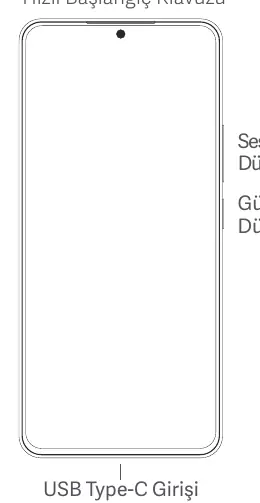
- Power Button: Located on the side of the device.
- Volume Buttons: Located on the side of the device.
- USB Type-C Port: Located at the bottom of the device for charging and data transfer.
Safety Information
Please read all safety information before using your device:
- Operating Temperature: The device should be used within the 0°C to 40°C range.
- Charging: Use only the provided or approved cables and power adapters. Do not charge the device for more than 12 hours.
- Battery Safety: Do not attempt to replace the battery yourself. Do not disassemble, crush, or expose the battery to high temperatures.
- Emergency Calls: Do not rely solely on your phone for critical emergency communication.
- Interference: Keep the device at least 15 cm away from medical devices like pacemakers.
Maintenance and Care
- Keep the device dry. Moisture and liquids can damage electronic circuits.
- Clean the surface of the device using only a soft, clean, and dry cloth.
- Do not paint the device or use magnets near it.
- If the device overheats during heavy tasks, it may automatically slow down or close applications to cool down. This is normal.
Technical Specifications
- Processor: MediaTek Dimensity 8400-Ultra
- Operating System: Android 15 + Xiaomi HyperOS 2
- Display: 6.83"
- Rear Camera: 50MP + 50MP + 12MP
- Front Camera: 32MP
- Storage/Expansion: No MicroSD support
- Radio: No FM Radio
Warranty and Service
The device comes with a 2-year warranty. For service, maintenance, or support, please visit the official Xiaomi service centers or contact support via the official website at www.mi.com/tr.
Official resources from the manual
Manufacturer information
Xiaomi Corporation
Practical help
Common problems
Device overheating
The device may automatically slow down or close apps to manage temperature. This is normal during intensive use.
Charging issues
Use only approved chargers and cables. Do not charge for more than 12 hours.
Emergency calls not connecting
Do not rely solely on the phone for critical emergency communication as connections cannot be guaranteed in all conditions.
Before use
- Insert SIM card correctly into the slot.
- Charge the device using the provided cable and adapter.
- Ensure the device is within the 0°C to 40°C operating temperature range.
- Read all safety information provided in the manual.
Specs in practice
- Operating Temperature
- 0°C to 40°C; usage outside this range may damage the device.
Images and diagrams
- The device features a USB Type-C port at the bottom.
- Power and volume buttons are located on the side.
Model compatibility
- Supports 5G, 4G LTE, Wi-Fi, and Bluetooth.
- No MicroSD card slot.

Manual page author
Michael Turner
Technical manual editor
Reviews PDF manuals for structure, safety notes, and practical product details so readers can find the right information quickly.