Mobile / Smartphones
User Manual for POCO F7 Ultra Smartphone
Quick guide and safety information for the POCO F7 Ultra smartphone. Includes charging instructions, factory reset steps, and safety precautions.
Quick answers from the manual
Quick answer
- This manual provides safety, regulatory, and warranty information for the POCO F7 Ultra, including instructions for powering on, charging, and performing a factory reset. p. 1, 3, 34
Key actions
- Power on the device p. 34
- Charge the device p. 3, 34
- Perform a factory reset p. 3, 34
- Access E-label p. 3, 34
First start
- Power on and configure p. 34
Problems and fixes
Hearing damage
Do not listen at high volume levels for long periods.
p. 3, 34
Radio interference
Reorient or relocate the receiving antenna, increase separation, or consult a technician.
p. 2, 34Maintenance and reset
- Factory reset p. 3, 34
Technical specifications
| Parameter | Value | Meaning | Pages |
|---|---|---|---|
| Model | 24122RKC7G | Product model identifier | p. 3, 34 |
| Operating Temperature | 0°C to 40°C | Safe operating temperature range | p. 34 |
| Max Charging Power | 120W | Maximum supported charging power | p. 3, 34 |
| SAR Limit (EU) | 2.0 W/Kg | Localized 10-gram SAR limit for head and trunk | p. 2 |
| SAR Limit (FCC) | 1.6 W/Kg | SAR limit set by the FCC | p. 3 |
Where to find it in the PDF
- Safety Information p. 1
- EU Regulations p. 2
- FCC Regulations and Safety p. 3
- Warranty and Safety (English) p. 34, 35
Table of contents
Manual images
Click an image to enlargeQuick Guide
This guide provides essential safety and operational information for your POCO F7 Ultra smartphone. To turn on the device, long-press the power button. Follow the on-screen instructions to complete the initial setup.
Safety Precautions
Please read and observe all safety information before using your device:
- Medical Devices: Maintain a minimum distance of 15 cm between your phone and medical devices like pacemakers to avoid potential interference. Do not carry the phone in a breast pocket.
- Explosive Environments: Turn off your phone in areas with potential explosion hazards, such as petrol stations, fuel storage facilities, or areas with chemical particles in the air.
- Usage Restrictions: Do not use the phone in hospital operating rooms, emergency rooms, or intensive care units. Observe aircraft safety regulations and turn off the phone when required.
- Environment: Do not use the phone in high-humidity areas like bathrooms to prevent electric shock, injury, or fire. Avoid using the phone outdoors during thunderstorms.
Charging Instructions
To charge your device, use one of the following methods:

- Connect the POCO F7 Ultra to a computer using a USB data cable.
- Use the USB cable included in the box with a Mi brand charger and connect it to a power strip.
Charging Compatibility: The device supports chargers with a maximum output of 120W (Xiaomi HyperCharge). You may use third-party chargers that comply with USB 2.0 or higher protocol standards and meet international safety standards (IEC 60950 or IEC 62368-1). For optimal charging speed, the charger power should be between 10W and 100W.
Factory Reset
To quickly erase local data on your device, follow these steps:
- Go to Settings.
- Select About phone.
- Tap Factory reset.
Note: This will erase accounts, contacts, photos, videos, apps, backups, and SD card data.
Regulatory Information
This device has an electronic label for certification information. To access it, go to Settings > About phone > Certification, or open Settings and type "Certification" in the search bar.
Manufacturer information
Xiaomi Corporation
Practical help
Common problems
Device not charging or charging slowly
Ensure you are using a compatible charger (10W-100W) and the included USB cable. The device supports up to 120W (Xiaomi HyperCharge).
Interference with medical devices
Maintain a minimum distance of 15 cm from pacemakers. Do not carry the phone in a breast pocket.
Before use
- Ensure the device is charged using a compatible charger.
- Read all safety precautions regarding explosive environments.
- Keep the device away from medical equipment if you have a pacemaker.
- Do not use the device in high humidity areas like bathrooms.
Specs in practice
- SAR (Specific Absorption Rate)
- A measure of the rate at which energy is absorbed by the human body when exposed to a radio frequency (RF) electromagnetic field.
- 120W (Xiaomi HyperCharge)
- The maximum power output supported by the device for fast charging.
Images and diagrams
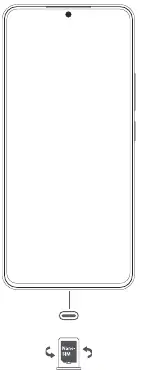
- The diagram on page 1 shows the phone layout, including the power button, volume buttons, and SIM card slot location.
Model compatibility
- Compatible with USB 2.0 or higher protocol chargers.
- Must meet IEC 60950 or IEC 62368-1 safety standards.

Manual page author
Michael Turner
Technical manual editor
Reviews PDF manuals for structure, safety notes, and practical product details so readers can find the right information quickly.