Electronics / Televisions
Owner's Manual for Yamaha 01V96 Digital Mixing Console
Quick guide and user manual for the Yamaha 01V96 Digital Mixing Console. Learn about setup, routing, effects, scene memories, and remote control.
Table of contents
Manual images
Jump to the sectionQuick guide from the manual
The Yamaha 01V96 is a compact digital mixing console featuring 24-bit/96 kHz processing. Before using the unit, ensure it is placed on a strong, stable surface. Always ground the unit before connecting power. When turning on your audio system, follow this order to prevent damage to speakers: sound sources, multitrack/master recorders, the 01V96, and finally, power amplifiers. Reverse this order when turning the system off.
Device Overview
The 01V96 features a comprehensive control surface including 17 motorized 100mm faders, a 320x240 dot LCD display, and dedicated sections for input, output, scene memory, and selected channel editing. The rear panel houses analog and digital I/O, including ADAT optical connectors and an expansion slot for optional mini-YGDAI cards.
Connections and Setup
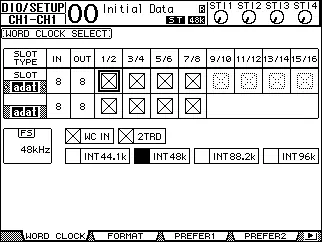
The console supports various configurations, including analog mixing, recording with hard disk recorders, and DAW integration. Digital audio equipment must be synchronized using wordclock to prevent audible noise or clicks. You can distribute wordclock signals via dedicated cables or derive them from digital audio connections. Use the DIO/Setup | Word Clock page to specify the wordclock source.
Input and Output Patching
The 01V96 allows flexible signal routing. You can patch input signals to any input channel and output signals to various connectors. Use the [PATCH] button to access the Patch pages. By default, inputs are patched to channels 1–16, but these can be reassigned. Similarly, output connectors can be patched to different bus or direct out signals.
Operation and Monitoring
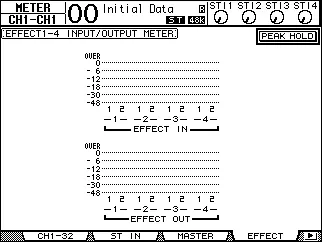
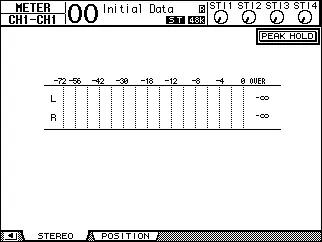
Input channels feature phase, gate, compressor, attenuator, 4-band EQ, and input delay. You can adjust these parameters via the display or the selected channel controls. Monitoring is handled via the Monitor Out and Phones jacks. The Solo function allows you to monitor specific channels, with modes for Recording or Mixdown.
Advanced Features
- Surround Sound: Supports 3-1, 5.1, and 6.1 surround production.
- Internal Effects: Four multi-effects processors can be used via Aux Sends or channel inserts.
- Scene Memories: Store and recall up to 99 snapshots of mix settings.
- Libraries: Store and recall channel, EQ, compressor, and patch settings.
- Remote Control: Control external DAWs (Pro Tools, Nuendo) via USB.
- MIDI: Supports Program Changes, Control Changes, and Bulk Dumps for data backup.
Maintenance
The unit includes an internal data backup battery. If a "WARNING Low Battery!" message appears, contact your dealer for replacement. Fader calibration can be performed if motorized fader positions shift over time.
Manufacturer information
Yamaha
Practical help
Common problems
Low Battery warning
Contact your dealer as soon as possible to replace the internal data backup battery.
Noise in speakers
Turn down power amplifiers before changing wordclock settings.
Interference with other devices
Relocate the affected equipment or move mobile phones away from the unit.
Sync Error message
Check ADAT connections, digital I/O card connections, and ensure sampling frequency settings match on all devices.
Before use
- Ensure the unit is placed on a strong and stable surface.
- Check the power cord for any damage.
- Ground the unit before connecting the power plug to an AC outlet.
- Turn off the power before connecting or disconnecting any cables.
- Follow the correct power-on sequence: sound sources -> recorders -> console -> power amplifiers.
Specs in practice
- 24-bit/96 kHz
- High-resolution digital audio processing capability.
- Motorized faders
- 100mm faders that automatically move to saved positions for scenes.
- Phantom power (+48V)
- Provides power for condenser microphones and direct boxes.
Images and diagrams
- Control Surface: Overview of faders, buttons, and display sections.
- Rear Panel: Layout of inputs, outputs, and digital I/O.
- Signal Flow: Diagrams showing how signals route from inputs to outputs.
Model compatibility
- Supports optional mini-YGDAI cards for expanded I/O.
- Two 01V96 units can be cascaded to integrate buses and aux sends.

Manual page author
David Miller
Documentation analyst
Organizes user manual content into clear summaries, with attention to model details, product context, and everyday usability.