Power / Solar Inverters
User Manual for ECO-WORTHY 12V 600W Pure Sine Wave Off-Grid Inverter
Comprehensive user guide for the ECO-WORTHY 12V 600W Pure Sine Wave Off-Grid Inverter. Includes installation instructions, wiring diagrams, safety precautions, LED indicator explanations, fault code troubleshooting, and technical...
Table of contents
Manual images
Click an image to enlargeQuick Guide from the Manual
This inverter is designed for 12V battery systems only. Before installation, ensure the battery voltage is correct and the positive/negative poles are identified. The unit must be installed in a well-ventilated area, away from flammable materials, and must not be installed in the same compartment as the battery bank. Always ensure the inverter is in the OFF position before making any connections.
Product Overview
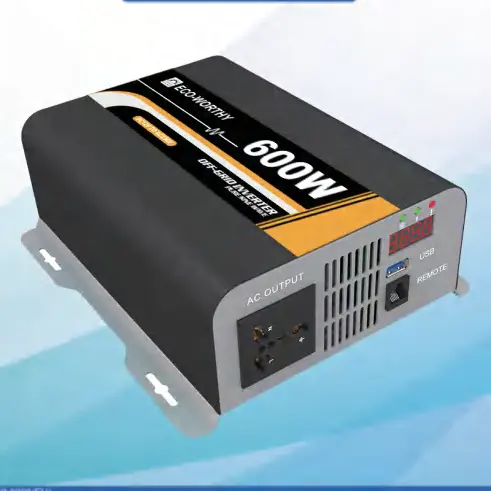
The ECO-WORTHY 12V 600W inverter provides pure sine wave power, suitable for sensitive electronics. It features intelligent fan control that activates when the load exceeds 40% of rated output, and includes protections against low/high input voltage, overload, short circuits, and over-temperature.
Panel Functions
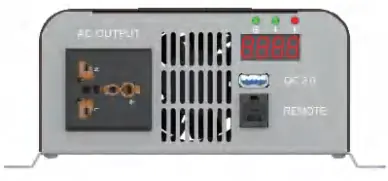
The inverter features a front panel with an AC output socket, LED display, USB port, and remote switch connection. The rear panel contains the ON/OFF switch, battery negative/positive terminals, ground terminal, and cooling fan.
Installation and Wiring
Installation must be performed by a certified technician in compliance with local and national electric codes. Grounding: Use the grounding lug to connect to earth or a designated ground (e.g., RV metal frame) using 10 AWG insulated copper wire. DC Connection: Ensure the inverter is OFF. Connect cables to the battery terminals, ensuring correct polarity (red to positive, black to negative). Tighten terminals securely. AC Connection: Connect electronic devices to the AC output socket. Turn on the inverter only after devices are connected. When finished, switch off devices before turning off the inverter.
LED Indicators and Display
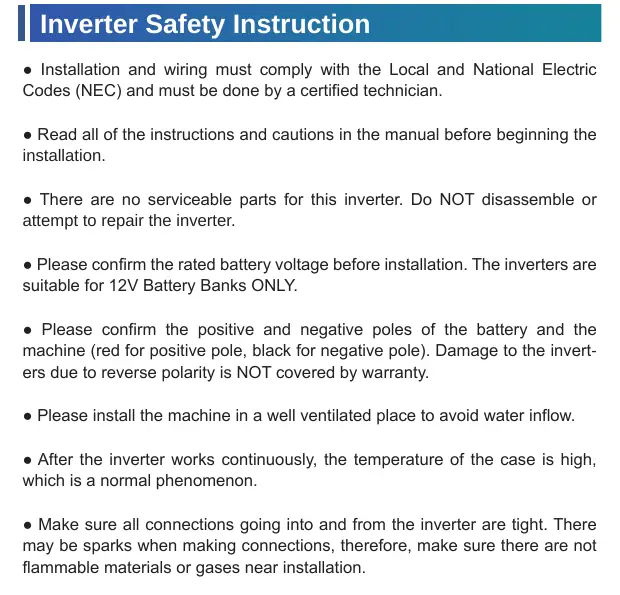
The LED display shows battery voltage, output power, or fault codes. Indicator lights on the front panel signify what is currently being displayed: the battery icon for voltage, the lightning icon for output power, and the exclamation mark for fault codes.
Troubleshooting and Fault Codes
If the inverter fails to operate, check the fault code on the display:
- 1-3: BUS soft start failed or voltage issues. Restart the inverter.
- 4-6: Inverter start failure or voltage issues. Restart the inverter and check battery connections.
- 7: Output short circuit. Disconnect load and restart.
- 8-9: Battery over/low voltage. Check battery voltage range.
- 10: Over temperature. Ensure air inlet/outlet are not blocked and turn off for 10 minutes.
- 11: Overload. Ensure load does not exceed rated power.
Technical Specifications
Input: 12V DC, 56A rated current. Output: 600W rated power, 220V/110V AC, 50Hz/60Hz, Pure Sine Wave. Efficiency: 92%. Operating Environment: 0-40°C, 0-80% humidity.
Support
If technical issues persist, contact ECO-WORTHY support. US: 1-866-939-8222. UK: +44 20 7570 0328. Email: [email protected].
Practical help
Common problems
Inverter displays fault code 7 (Output short circuit)
Check the load status, disconnect the load, and restart the inverter.
Inverter displays fault code 10 (Over temperature)
Ensure air inlet and outlet are not blocked, and turn off the inverter for 10 minutes.
Inverter displays fault code 11 (Overload)
Check that the connected load does not exceed the rated power of 600W.
Sparks when connecting cables
This is normal due to capacitors charging. Ensure connections are tight and no flammable materials are nearby.
Before use
- Confirm battery bank is 12V only.
- Verify positive and negative poles (Red +, Black -).
- Ensure installation area is well-ventilated.
- Check that the inverter is in the OFF position.
- Ensure all connections are tight.
- Verify that no flammable materials are near the installation site.
Specs in practice
- Rated Power: 600W
- The maximum continuous power the inverter can supply.
- Input Voltage: 12V
- Must be used with 12V battery systems only.
- Efficiency: 92%
- The ratio of output power to input power; higher is better.
- Operating Temperature: 0-40°C
- The ambient temperature range for safe operation.
Images and diagrams
- Front panel includes AC output, LED display, USB port, and remote connection.
- Rear panel includes ON/OFF switch, battery terminals, ground terminal, and cooling fan.
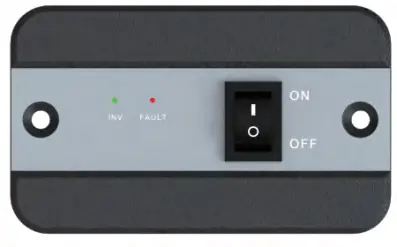
- Remote control unit features an ON/OFF switch and status LEDs (INV, FAULT).
Model compatibility
- Suitable for 12V Battery Banks ONLY.
- Do not install in a sealed enclosure with flooded batteries.
- Do not connect AC output directly to an Electrical Breaker Panel fed by utility power.

Manual page author
David Miller
Documentation analyst
Organizes user manual content into clear summaries, with attention to model details, product context, and everyday usability.