Power / Solar Inverters
Installation Guide and User Manual for Sol-Ark 15K-2P-N Hybrid Inverter
Comprehensive installation and user guide for the Sol-Ark 15K-2P-N hybrid inverter. Includes mounting, wiring, battery integration, system settings, and troubleshooting.
Table of contents
Manual images
Click an image to enlargeQuick Guide
The Sol-Ark 15K-2P-N is a residential hybrid inverter. Before operating, ensure the utility voltage is checked, the grid type is verified, and the unit is programmed for 120/240V Split-Phase at 60Hz by default. Always de-energize the equipment before servicing. For support, contact Sol-Ark at (972) 575-8875 ext. 2 or [email protected].
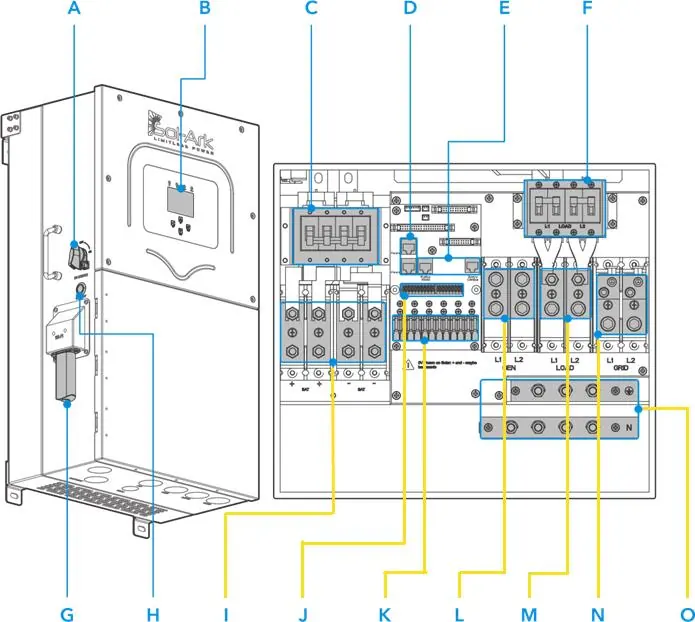
Installation
The inverter is rated for outdoor (NEMA 3R - IP65) and indoor installation. Ensure at least 6 inches of vertical clearance and 2 inches of side clearance for heat dissipation. Protect the LCD screen from direct UV exposure. Use appropriate anchors for the mounting surface (concrete, wood, or metal framing).
Battery Integration
The system is a 48VDC nominal system. Connect batteries in parallel or series as specified. Ensure battery breakers are OFF during wiring. If using both sets of battery terminals, the max charge/discharge is 275A; if using one set, it is limited to 160A.
PV and Generator Connection
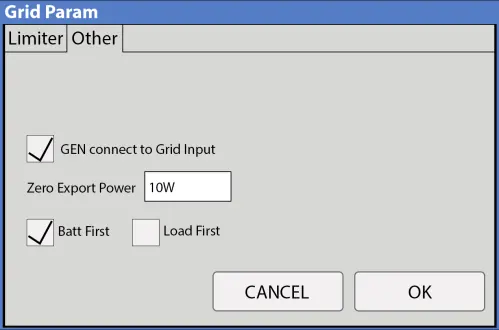
The inverter has 3 independent MPPTs. Max input voltage is 500VDC. For generators, connect to the GEN terminal for units smaller than 19.2kW, or the GRID terminal for larger units. Ensure proper CT sensor installation for Grid Peak-Shaving or Limited Power to Home modes.
Operation
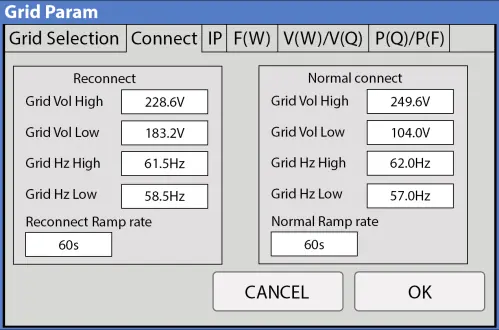
Power up the unit by turning on battery breakers, pressing the power button, and programming settings. The user interface allows configuration of work modes including Grid Sell, Limited Power to Home, Limited Power to Load, and Time of Use. The main screen displays power generation, grid usage, load consumption, and battery status.
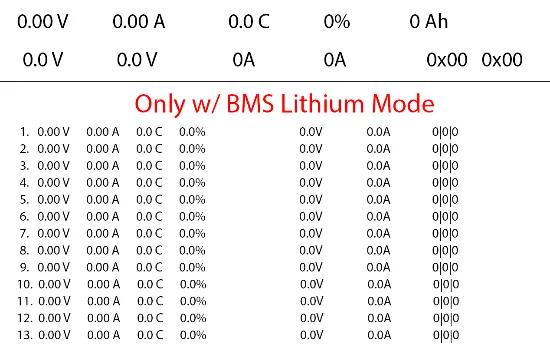
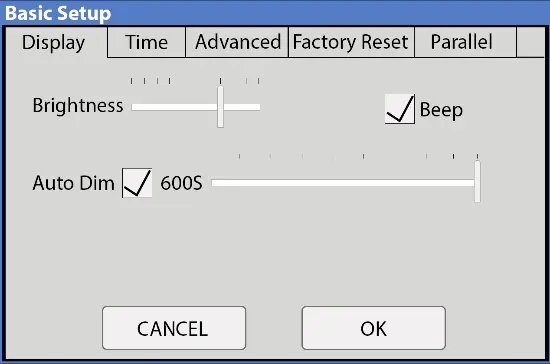
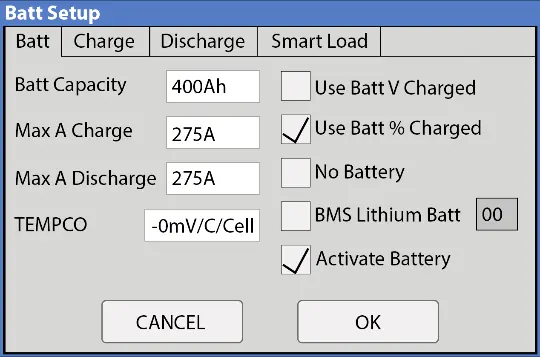
Parallel Systems
For parallel operation, all units must share a joint battery bank. Program one unit as Master (Modbus SN: 1) and others as Slaves (Modbus SN: 2, 3, etc.). Set DIP switches according to the configuration table in the manual. Connect communication cables in a daisy-chain configuration.
Troubleshooting
If the LCD does not power on, check power sources. If the "Normal" LED is not on, the unit may be in pass-through mode or an alarm state. For "Grid Phase Wrong" errors, verify phase sequence (AB-BC-CA). Refer to the error code table for specific faults like F15 (AC Overcurrent) or F63 (Arc Fault).
Maintenance
Do not use solvents to clean the equipment. Regularly inspect for damage. Ensure fans are running and clear of obstructions. Keep the system firmware updated via MySolArk.
Practical help
Common problems
LCD not powering on
Check connections to PV, Grid, or Battery; press the power button.
Panels not producing
Check PV disconnect is ON, verify voltage > 125V, and check string polarity.
Grid Phase Wrong error
Check phase sequence (AB-BC-CA) and wiring on GRID and LOAD terminals.
System beeping
Check the System Alarms menu to identify the trigger; perform a power cycle if necessary.
Before use
- Verify utility voltage before turning ON.
- Check inverter grid type settings.
- Ensure battery voltage is 43V-63V.
- Confirm PV input voltage is below 500V.
- Check CT sensor orientation (arrows must point toward the grid).
Specs in practice
- Max PV Power
- 19.5 kW
- Max Grid Passthrough
- 200A
- Battery Voltage Range
- 43V - 63V
- Max MPPT Voltage
- 500V
Images and diagrams
- Standard Wiring Diagram: Shows connections for PV, Battery, Grid, Load, and Generator.
- Parallel Wiring: Shows daisy-chain communication and shared AC/DC connections.
Model compatibility
- Requires 48V battery bank.
- Compatible with 120/240V split-phase generators.
- Requires CT sensors for Grid Peak-Shaving or Limited Power to Home modes.

Manual page author
Emily Carter
User documentation editor
Prepares concise manual descriptions and highlights the most useful setup, operation, and maintenance information for readers.