Home Appliances / Dehumidifiers
User Manual for Abestorm Hurricane 160P Dehumidifier
Quick guide for the Abestorm Hurricane 160P commercial dehumidifier. Learn how to operate the control panel, understand error codes, perform maintenance, and troubleshoot common issues.
Table of contents
Manual images
Click an image to enlargeQuick Guide
The Abestorm Hurricane 160P is a commercial dehumidifier designed to remove excess moisture from the air. For optimal performance, ensure the unit is placed on a stable surface with windows and doors closed. Always verify the power supply is a 115V/60Hz circuit protected by a GFCI outlet. Before moving or storing the unit, use the Manual Drain button to empty the pump reservoir.
Safety Instructions
- Do not adjust or alter the unit in any way.
- The use of unauthorized parts will void your warranty.
- Always unplug the unit before removing the cover.
- Inspect the power cord for damage before use.
- The unit must be used with a 115V/60Hz circuit protected by a GFCI outlet.
- Do not use an extension cord or plug adapter.
Operation and Control Panel
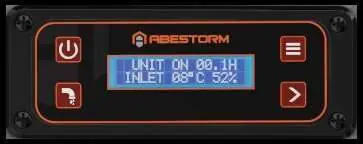
The control panel allows you to monitor and adjust settings. Use the Power Button to turn the unit on and off. The Confirm Button is used to select settings and adjust the humidity level (35% to 90%). The Manual Drain Button clears the pump reservoir, and the Mode Button switches between standard dehumidifier mode and duct mode.
Display Screens
- Main Screen: Shows unit status, hours, inlet temperature, and humidity.
- Defrosting Screen: Indicates the unit is in defrost mode; wait for completion.
- Sub-Menus: Access via the menu to view Job Hours, Life Hours, Inlet/Outlet Temperatures, Humidistat Mode, Humidity Setpoint, Temperature Units, Language, Coil Temperature, Compressor Current, and Grains Per Pound.
Maintenance
Regular maintenance is essential for longevity:
- Cleaning the Body: Use a soft, damp cloth. Do not use soaps or solvents.
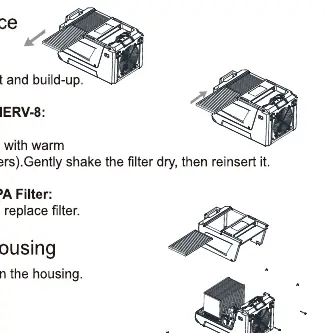
- Filter Maintenance: Unplug the unit, slide out the filter, and check for dirt. Clean the pre-filter/MERV-8 filter with water or vacuum. Replace Carbon or HEPA filters if dirty.
- Coil Maintenance: Clean coils once per year using an approved, self-rinsing, foaming coil cleaner.
- Pump Maintenance: Remove housing screws to access the pump. Unplug the drain line and wipe out the base of the pump reservoir.
Troubleshooting and Error Codes
If the unit displays an error code, refer to the following:
- E1: Humidity sensor error.
- LO: Incoming air temperature is below operating range (below 33°F).
- HI: Incoming air temperature is above operating range (above 105°F).
- E5: Refrigerant leak detected.
- E4: Pump issue.
- E3: Abnormal coil temperature.
If the display is blank, check the power connection and reset the power. If there is no airflow, check for a dirty filter or blocked inlet/outlet.
Storage
For extended storage: turn off the unit, allow it to dry, clean the pump reservoir, wrap the power cord, cover the filter mesh, and store in a clean, dry space.
Manufacturer information
Abestorm
Practical help
Common problems
Display is blank
Check that both ends of the power cord are plugged in or reset the power.
No Airflow
Clean the filter or clear the air inlet/outlet of obstructions.
Error Code E1
Humidity sensor or communication error. Check sensor wire connections.
Error Code E4
Problem with pump. Verify pump is properly installed and functioning; unplug for two minutes and restart.
Error Code LO/HI
Room temperature is outside operating range (33°F - 105°F). Adjust room temperature.
Before use
- Ensure the unit is on a stable surface.
- Keep all windows and doors closed for maximum efficiency.
- Check the power cord for signs of damage.
- Ensure the drain hose is not blocked and is not higher than 15 feet.
- Verify the unit is connected to a 115V/60Hz GFCI protected circuit.
- If transported vertically, let the unit sit for 30 minutes before use.
Specs in practice
- Power Supply
- 110-120V, 60 Hz, Single Phase.
- Circuit Protector
- 15 Amp requirement.
- Humidity Setpoint
- Adjustable between 35% and 90%.
Images and diagrams
- Control Panel: Features Power, Confirm, Manual Drain, and Mode buttons.
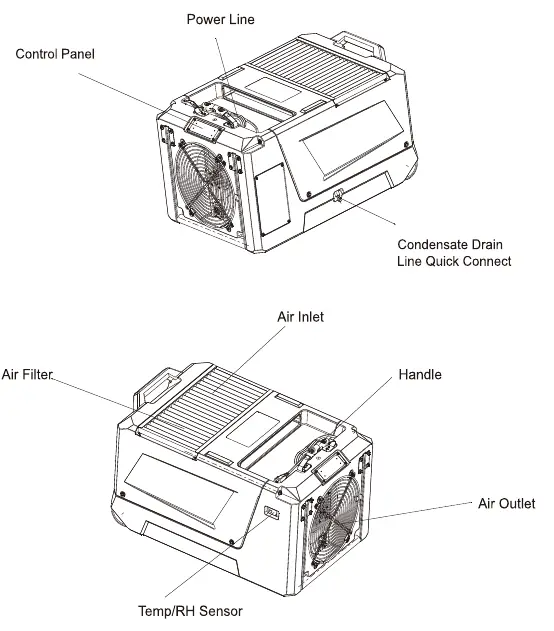
- Parts: Includes Air Inlet, Air Outlet, Control Panel, and Condensate Drain Quick Connect.
Model compatibility
- Do not use in SPA or rooms with outdoor pools as this voids the warranty.

Manual page author
Michael Turner
Technical manual editor
Reviews PDF manuals for structure, safety notes, and practical product details so readers can find the right information quickly.