Electronics / Remote Controls
User Manual for ACiQ Platinum Air Handler Remote Controller
Quick guide for the ACiQ Platinum Air Handler remote controller. Learn how to operate modes, set timers, adjust fan speeds, and use advanced features like Eco, Turbo, and Follow Me.
Table of contents
Manual images
Click an image to enlargeQuick Start Guide
To begin using your ACiQ remote controller, follow these steps:
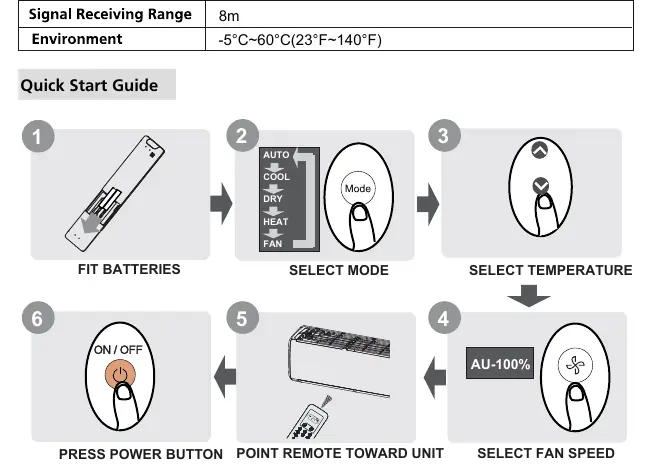
- Insert Batteries: Slide the back cover down and insert two R03/LR03 batteries, matching the (+) and (-) symbols.
- Power On: Ensure the air conditioner is plugged in and has power. Point the remote toward the indoor unit and press the ON/OFF button.
- Select Mode: Press the MODE button to cycle through AUTO, COOL, DRY, HEAT, and FAN modes.
- Adjust Settings: Use the TEMP up/down buttons to set your desired temperature. Use the FAN SPEED button to adjust airflow.
Remote Controller Overview
The remote features several key buttons for operation:
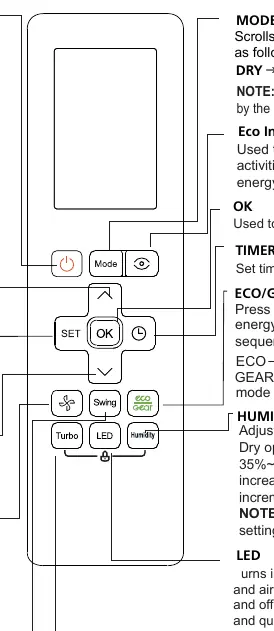
- ON/OFF: Turns the unit on or off.
- MODE: Cycles through operation modes.
- TEMP (Up/Down): Adjusts temperature in 0.5°C (1°F) increments. Press both simultaneously for 3 seconds to toggle between °C and °F.
- FAN SPEED: Adjusts fan speed (AU, 20%, 40%, 60%, 80%, 100%).
- SWING: Controls horizontal louver movement. Hold for 2 seconds for vertical auto swing.
- TURBO: Enables the unit to reach the preset temperature as quickly as possible.
- LED: Turns the indoor unit's display and buzzer on or off.
- ECO/GEAR: Enters energy-efficient modes.
- TIMER: Sets the timer for automatic on/off.
- SET: Scrolls through advanced functions like Breeze Away, Active Clean, Fresh/UV-C, Sleep, Follow Me, and AP mode.
Screen Indicators
The remote display provides feedback on the current status of your air conditioner:
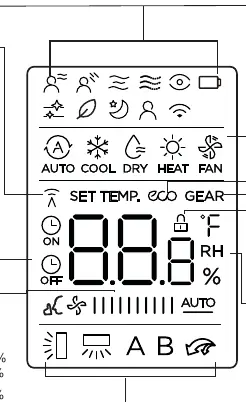
- Mode Display: Shows the active mode (AUTO, COOL, DRY, HEAT, FAN).
- Fan Speed: Indicates the current fan intensity.
- Timer: Shows active TIMER ON or TIMER OFF settings.
- Feature Icons: Displays active features like ECO, GEAR, LOCK, TURBO, and SLEEP.
- Transmission Indicator: Lights up when the remote sends a signal to the unit.
Basic Operation
The remote supports several standard operating modes:
- AUTO Mode: The unit automatically selects COOL, FAN, or HEAT based on the set temperature. Fan speed cannot be adjusted in this mode.
- COOL/HEAT Mode: Allows manual selection of temperature and fan speed.
- DRY Mode: Used to dehumidify the room. Fan speed is automatically controlled.
- FAN Mode: Circulates air without heating or cooling. Temperature cannot be set.
Advanced Functions
- Timer Setting: Press the TIMER button to initiate the sequence. Use the TEMP buttons to set the time (increments of 30 minutes up to 10 hours, then 1-hour increments).
- Swing Function: Press SWING for automatic horizontal movement. Hold for 2 seconds for vertical swing (model dependent).
- Eco/Gear: Press to enter energy-efficient modes (ECO or GEAR 75%/50%). Only available in COOL mode.
- Follow Me: The remote measures the temperature at its current location and sends the signal to the unit every 3 minutes for optimized comfort.
- Active Clean: Automatically freezes and thaws the heat exchanger to wash away dust and mold.
- AP Mode: Used for wireless network configuration.
Maintenance and Troubleshooting
For optimal performance:
- Battery Care: Do not mix old and new batteries. Remove batteries if the remote will not be used for more than 2 months.
- Signal Interference: Ensure the remote is within 8 meters of the unit. Curtains, other materials, and direct sunlight can interfere with the infrared signal.
- Function Availability: If the indoor unit does not support a specific function (e.g., Fresh, Intelligent Eye), pressing the corresponding button will have no effect.
Manufacturer information
ACiQ
Practical help
Common problems
Remote control not responding
Check if batteries are inserted correctly. Ensure you are within 8 meters of the unit and there are no obstacles like curtains blocking the signal.
Function button does not work
The indoor unit may not support that specific function. If the unit lacks the feature, the button will have no effect.
Insufficient cooling or heating
Ensure the unit is not in ECO mode or Silence mode, as these may limit capacity. Check that the set temperature is appropriate.
Before use
- Insert two R03/LR03 batteries into the remote.
- Ensure the air conditioner is plugged in and powered.
- Verify the remote is within 8 meters of the indoor unit.
- Remove any obstacles (curtains, furniture) that might block the infrared signal.
- Check if the desired mode is supported by your specific unit.
Specs in practice
- Rated Voltage
- 3.0V (requires two R03/LR03 batteries).
- Signal Receiving Range
- The remote must be used within 8 meters of the indoor unit.
- Operating Environment
- The remote functions within a temperature range of -5°C to 60°C (23°F to 140°F).
Images and diagrams
- The remote layout includes a central navigation cluster (SET, OK, Temp arrows) surrounded by function buttons like Mode, Fan Speed, Swing, and Turbo.
- The screen display provides real-time feedback on mode, fan speed, temperature, and active features like ECO or LOCK.
Model compatibility
- Some features, such as Fresh, Intelligent Eye, and Vertical Swing, are model-dependent.
- HEAT mode is not supported by cooling-only appliances.
- The SLEEP function is not available in FAN or DRY modes.

Manual page author
Michael Turner
Technical manual editor
Reviews PDF manuals for structure, safety notes, and practical product details so readers can find the right information quickly.