HVAC / Air Conditioners
Remote Controller Owner's Manual for ACiQ Wall-Mounted Ducted Air Handler
Comprehensive user guide for the ACiQ remote controller. Learn how to operate your air handler, set modes, adjust temperature, use advanced features like Timer, ECO/GEAR, and troubleshooting tips.
Table of contents
Manual images
Click an image to enlargeQuick Start Guide
To get started with your ACiQ air conditioner remote controller, follow these steps:
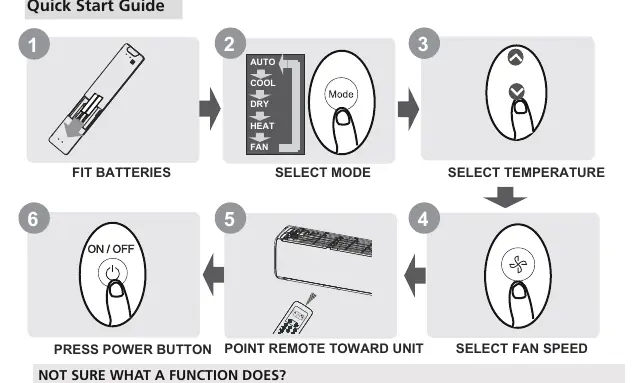
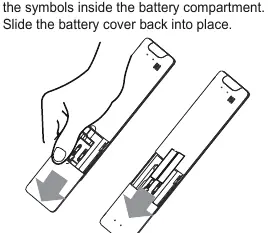
- Fit Batteries: Insert two R03/LR03 batteries into the remote.
- Select Mode: Press the Mode button to cycle through AUTO, COOL, DRY, HEAT, and FAN modes.
- Select Temperature: Use the up and down arrows to set your desired temperature.
- Select Fan Speed: Press the Fan Speed button to adjust airflow.
- Point and Power: Point the remote toward the indoor unit and press the Power button.
Handling the Remote Controller
For optimal performance, ensure the remote is used within 8 meters of the unit. Curtains, doors, and direct sunlight can interfere with the infrared signal. The unit will beep when it receives a signal. If the remote will not be used for more than 2 months, remove the batteries.
Buttons and Functions
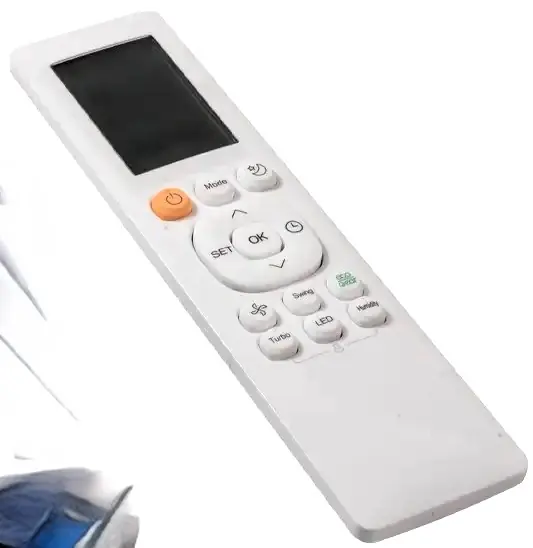
The remote features several buttons to control your air conditioner:
- ON/OFF: Turns the unit on or off.
- MODE: Cycles through operation modes.
- TEMP (Up/Down): Adjusts temperature in 1°C/1°F increments.
- FAN SPEED: Adjusts fan speed (AU, 20%, 40%, 60%, 80%, 100%).
- SWING: Controls horizontal louver movement. Hold for 2 seconds for vertical auto swing.
- ECO/GEAR: Enters energy-efficient modes.
- TIMER: Sets the timer to turn the unit on or off.
- CLEAN: Activates Self Clean or Active Clean functions.
- TURBO: Enables the unit to reach the preset temperature quickly.
- LED: Turns the indoor unit's display and buzzer on or off.
Basic Operation
AUTO Mode: The unit automatically selects COOL, FAN, or HEAT based on the set temperature. Fan speed cannot be adjusted in this mode.
COOL/HEAT/DRY Modes: Select the desired mode, set the temperature, adjust fan speed (except in DRY mode), and turn the unit on.
FAN Mode: Only the fan speed can be adjusted; temperature settings are not available.
Advanced Functions
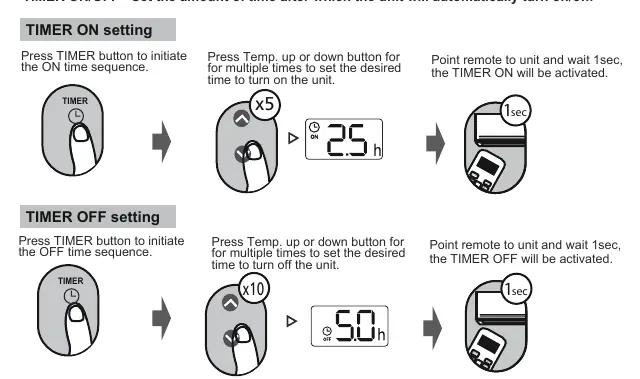
- Timer Setting: Press the TIMER button to initiate the sequence. Use the Temp buttons to set the desired time (increments of 30 minutes up to 10 hours, then 1-hour increments).
- Swing Function: Press SWING for horizontal movement. Hold for 2 seconds for vertical swing (model dependent).
- LED Display: Press the LED button to toggle the indoor unit display. Hold for 5 seconds to display the actual room temperature.
- Lock Function: Press Clean and Turbo buttons simultaneously for 5 seconds to lock the remote. Repeat to unlock.
- ECO/GEAR: Press to enter energy-efficient modes. ECO adjusts temperature automatically; GEAR limits electrical energy consumption.
- Silence Function: Hold the Fan button for 2 seconds to activate/disable.
- FP Function: Press the down arrow button twice within one second under HEAT mode to set the unit to 8°C/46°F (heat pump models only).
Remote Screen Indicators
The remote display shows the current status, including:
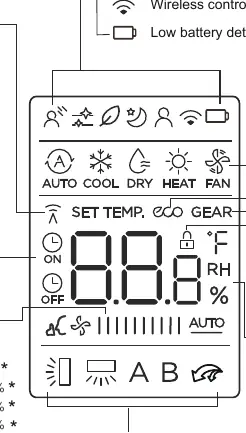
- Mode Display: Shows current operation mode (AUTO, COOL, DRY, HEAT, FAN).
- Fan Speed: Displays selected fan speed.
- Temperature/Timer: Shows set temperature or timer settings.
- Feature Icons: Indicators for ECO, GEAR, LOCK, SLEEP, FOLLOW ME, and wireless control features.
Manufacturer information
ACiQ
Practical help
Common problems
Remote not working
Check batteries, ensure you are within 8 meters of the unit, and remove any obstructions like curtains between the remote and the unit.
Insufficient cooling or heating
Check if ECO or Silence mode is active, as these modes limit compressor capacity to save energy.
Unit won't turn on
Ensure the air conditioner unit is plugged in and power is available.
Before use
- Insert two R03/LR03 batteries into the remote.
- Ensure the air conditioner unit is plugged in.
- Point the remote directly at the indoor unit.
- Remove any obstructions between the remote and the unit.
Specs in practice
- Rated Voltage
- 3.0V (Requires two R03/LR03 batteries).
- Signal Receiving Range
- 8 meters.
- Operating Environment
- -5°C to 60°C (23°F to 140°F).
Images and diagrams
- Quick Start Guide: 1. Fit batteries, 2. Select Mode, 3. Select Temperature, 4. Select Fan Speed, 5. Point at unit, 6. Press Power.
Model compatibility
- Compatible with various RG10 series remote controllers.
- Some features like Breeze Away, Fresh, and UV-C are model-dependent.
- HEAT mode is not supported by cooling-only appliances.

Manual page author
David Miller
Documentation analyst
Organizes user manual content into clear summaries, with attention to model details, product context, and everyday usability.