General / Accessories
AcuRite Atlas 06104M Display Quick Setup Guide
Quick setup guide for the AcuRite Atlas 06104M display, covering sensor battery installation, display power connection, configuration settings, and backup battery installation.
Table of contents
Manual images
Jump to the sectionQuick guide from the manual
This document provides the essential steps to set up your AcuRite Atlas display. It covers the initial connection between the display and the outdoor sensor, power requirements, and basic system configuration.
Install sensor batteries
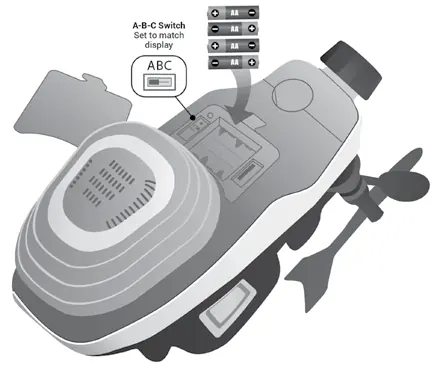
- Locate the A-B-C switch in the outdoor sensor battery compartment and note its channel setting.
- Install four AA alkaline or lithium batteries. Lithium batteries are recommended for temperatures below -4ºF (-20ºC).
- The display does not have an A-B-C switch; ensure the sensor is on the same channel as the display. Once connected, confirm the channel designation via the Connections menu on the display.
Plug in display and configure settings
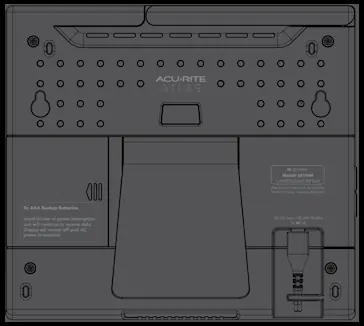
- Connect the power adapter to the port on the back of the display (bottom right corner). Route the cord behind the plastic tab and plug into an electrical outlet.
- Ensure the antenna is completely upright to maintain communication with the sensor.
- (Optional) Install three AAA batteries in the back compartment to maintain settings and historical data during power outages.
- Configuration starts automatically upon power-up. Use the menu navigation buttons to set:
- Clock (Hour/Minute/Daylight Saving Time)
- Date (Month/Day/Year)
- Units of Measurement (U.S. Standard/Metric)
- Adjustments can be made at any time via the General Setup menu.
Mount sensor
Please refer to the separate AcuRite Atlas Instruction Manual for detailed guidance on outdoor sensor installation.
Manufacturer information
AcuRite
Practical help
Common problems
Display not receiving sensor data
Ensure the antenna is completely upright and verify that the sensor and display are set to the same channel designation in the Connections menu.
Settings lost during power outage
Install three AAA backup batteries in the compartment on the back of the display.
Before use
- Ensure you have the AcuRite Atlas sensor (requires 4 AA batteries, not included).
- Prepare 3 AAA batteries for the display backup (recommended, not included).
- Verify the A-B-C switch position on the outdoor sensor.
- Ensure the power adapter is connected and the antenna is upright.
Specs in practice
- A-B-C Switch
- Used to set the communication channel between the sensor and the display.
- AAA Backup Batteries
- Optional power source to retain settings and data during AC power loss.
Images and diagrams
- The display features menu navigation buttons on the front for configuration.
- The back of the display includes the power port, battery compartment, and integrated keyholes for mounting.
- The outdoor sensor battery compartment houses the A-B-C channel switch.
Model compatibility
- Compatible with AcuRite Atlas sensors.
- Requires 4 AA batteries for the sensor and 3 AAA batteries for display backup.

Manual page author
David Miller
Documentation analyst
Organizes user manual content into clear summaries, with attention to model details, product context, and everyday usability.