Home Appliances / Refrigerators
Acurite 00986M Digital Refrigerator/Freezer Thermometer User Manual
Quick guide for the Acurite 00986M digital thermometer, covering battery installation, sensor placement, alarm configuration, and troubleshooting steps for accurate temperature monitoring.
Table of contents
Quick guide from the manual
This document provides instructions for the Acurite 00986M digital thermometer, designed to monitor temperatures in refrigerators and freezers. Key operations include setting up wireless sensors, configuring programmable temperature alarms, and managing high/low temperature records.
Setup
Before use, remove the protective film from the LCD screen. Install batteries in the display unit (2 x AAA) and both sensors (2 x AA each). For freezer use, lithium batteries are recommended for temperatures below -4°F (-20°C) to ensure proper performance.
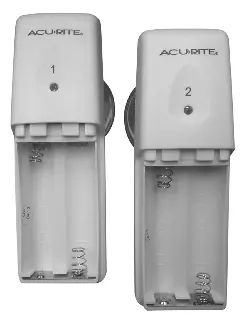
Placement
The display unit can be mounted using the built-in magnet or the rear keyhole. Place Sensor #1 in the refrigerator and Sensor #2 in the freezer. Sensors can be attached to shelves using the spring-action clip or to interior surfaces using the provided suction cup. Ensure the display and sensors are within 75 ft (23 m) of each other.
Operation
The device records high and low temperatures since the last reset. Press the CLR button to clear these records. To set programmable alarms, hold the alarm button for the respective sensor until the maximum temperature setting appears. Use the + or - buttons to adjust, then confirm with the alarm button. Repeat the process for the minimum temperature setting. The alarm will trigger if the temperature stays out of range for more than 15 minutes.
Care and Maintenance
Clean the device with a soft, damp cloth. Avoid using caustic cleaners or abrasive materials.
Troubleshooting
If the display shows E or dashes, perform a hard reset: bring all units together, remove all batteries, and reinstall them starting with the display unit, followed by the sensors. Ensure you are using fresh alkaline or lithium batteries as specified.
Manufacturer information
AcuRite
Practical help
Common problems
Temperature shows E or dashes
Perform a hard reset: bring all units together, remove all batteries, and reinstall them starting with the display unit, then sensors.
Inaccurate temperature readings
Ensure you are using standard alkaline batteries (or lithium for freezer temperatures below -4°F). Do not use heavy-duty or rechargeable batteries.
Display screen not working
Check battery installation or press the RESET button on the back of the display unit.
Before use
- Remove protective film from the LCD screen.
- Install 2 x AAA batteries in the display unit.
- Install 2 x AA batteries in each sensor.
- Use lithium batteries for freezer sensors if temperatures drop below -4°F (-20°C).
- Ensure sensors are within 75 ft (23 m) of the display unit.
Specs in practice
- Temperature Range
- -40°F to 100°F (-40°C to 37°C).
- Wireless Frequency
- 433 MHz.
- Data Reporting
- Updates every 120 seconds.
Images and diagrams
- Sensor #1 is intended for the refrigerator, Sensor #2 for the freezer.
- The display unit features a magnet mount and a wall-hanging keyhole.
- Sensors include a spring-action clip for shelves and a detachable suction cup.
Model compatibility
- Suction cups do not adhere well to freezing surfaces.
- Default alarm settings are pre-configured for refrigerator (Sensor 1) and freezer (Sensor 2) use.

Manual page author
Michael Turner
Technical manual editor
Reviews PDF manuals for structure, safety notes, and practical product details so readers can find the right information quickly.