Documents / Warranty Safety
AcuRite 13003A1 Alarm Clock User Guide
Quick start guide for the AcuRite 13003A1 alarm clock, featuring Intelli-Time technology, setup instructions, alarm configuration, and battery backup maintenance.
Table of contents
Quick guide from the manual
The AcuRite 13003A1 alarm clock features Intelli-Time technology, which automatically sets the time and date once plugged in. Before use, ensure you remove the clear protective film from the display by pulling the clear tab. The device requires a 110V AC power outlet and includes a pre-installed CR2032 backup battery to maintain internal settings during power outages.
Setup
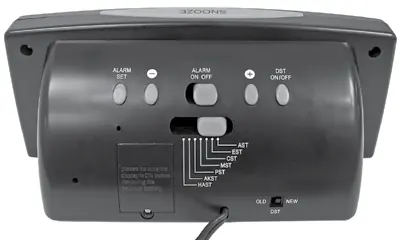
Plug the AC power cord into a 110V AC outlet. The clock will automatically set itself to the Eastern Standard Time (EST) zone. To adjust to your local time zone, use the selection switch located on the bottom of the unit. If your region does not observe Daylight Saving Time (DST), you can disable it using the switch on the back of the clock.
Custom Time Setting
If you need to manually adjust the time or if the internal memory battery has expired, follow these steps:
- Press and hold the TIME SET button for 3 seconds until the hour blinks.
- Use the - or + buttons to adjust the hour, noting the PM indicator.
- Press TIME SET to confirm and proceed to minutes.
- Adjust minutes using - or + buttons, then press TIME SET to confirm.
- Repeat the process to set the month, date, and year.
- Press TIME SET to exit. The clock will automatically return to normal mode after 7 seconds of inactivity.
Alarm Operation
To set the alarm time, press and hold the ALARM SET button for 3 seconds. Adjust the hour and minutes using the - or + buttons, confirming each step with the ALARM SET button. To activate the alarm, slide the ALARM switch to the ON position; an indicator will appear on the display. To use the snooze function, press the SNOOZE button to silence the alarm for 8 minutes.
Maintenance
The backup battery (CR2032 3V Lithium) should be replaced every 5 years, or every 1-2 years if the unit is frequently unplugged. Always keep the unit plugged into power while changing the battery to ensure the internal calendar memory is preserved. Access the battery compartment on the bottom of the clock by loosening the screw on the cover.
Manufacturer information
AcuRite
Practical help
Common problems
Clock display is incorrect or Intelli-Time is not working.
Ensure the unit is plugged into a 110V AC outlet. If the internal memory battery is dead, replace the CR2032 battery while the unit is plugged in.
Alarm is not sounding.
Verify that the ALARM switch on the back of the unit is set to the ON position and that the alarm indicator is visible on the display.
Before use
- Remove the clear protective film from the display.
- Plug the AC power cord into a 110V AC outlet.
- Select your correct time zone using the switch on the bottom of the clock.
- Adjust the DST switch on the back if your region does not observe Daylight Saving Time.
Specs in practice
- Intelli-Time Technology
- Pre-programmed internal clock that sets the time automatically upon power-up.
- CR2032 3V Lithium Battery
- Backup battery that maintains internal time and calendar settings during power outages; does not power the display.
Images and diagrams
- The back of the clock contains the ALARM SET, time adjustment buttons, ALARM ON/OFF switch, and DST ON/OFF switch.
- The bottom of the clock houses the time zone selection switch and the Intelli-Time memory battery compartment.
Model compatibility
- Requires 110V AC power outlet.
- Not intended for use with extension cords if the plug blades cannot be fully inserted.

Manual page author
Emily Carter
User documentation editor
Prepares concise manual descriptions and highlights the most useful setup, operation, and maintenance information for readers.