Home / Security
AcuRite 06010RM Water Detector User Guide
Quick guide for the AcuRite 06010RM Water Detector. Learn how to install, connect to your monitor, and place the sensor for optimal leak detection.
Table of contents
Manual images
Jump to the sectionQuick guide from the manual
The AcuRite 06010RM Water Detector is an accessory designed to detect water leaks. It requires a compatible AcuRite Monitor (sold separately) to function. The device can be placed on the floor near appliances or hung in sump pump wells. You can connect multiple detectors in a series to monitor larger areas.
Product Overview
The device includes the following features:
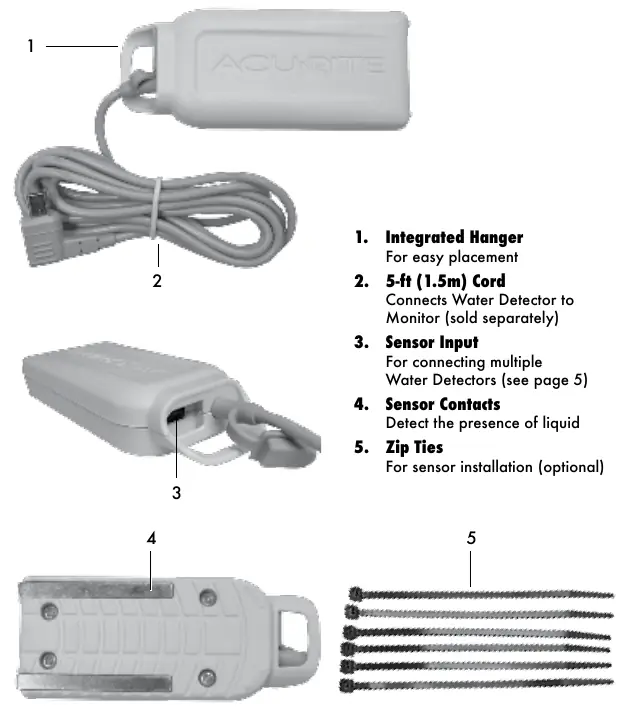
- Integrated Hanger: Allows for easy placement.
- 5-ft (1.5m) Cord: Connects the detector to the monitor.
- Sensor Input: Used for connecting multiple water detectors in a series.
- Sensor Contacts: Detects the presence of liquid.
- Zip Ties: Included for optional installation.
Sensor Installation
To set up the Water Detector:
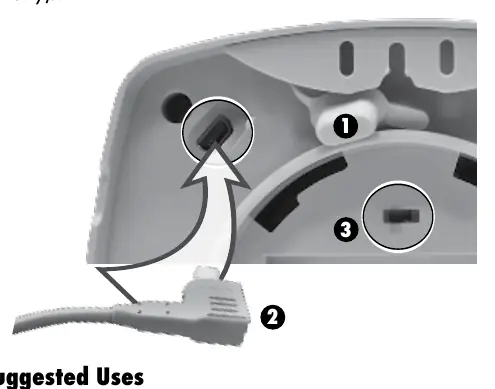
- Remove the rubber plug from the back of your compatible AcuRite Monitor.
- Plug the Water Detector cord into the monitor.
- If using the Room Monitor (Model 00276RM), slide the alarm switch to the ON position to activate the audible alert.
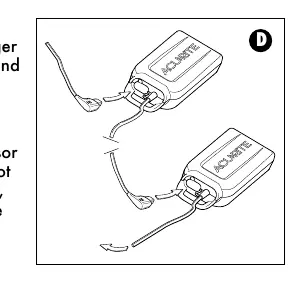
Connecting Multiple Detectors: You can connect multiple water detectors in a series using the sensor input. To maintain signal strength, do not connect more than 5 detectors together. Ensure the sensor input plug remains in place when not in use to prevent damage.
Placement Options
Water naturally flows to the lowest point. For best results, place the detector where water is most likely to collect.
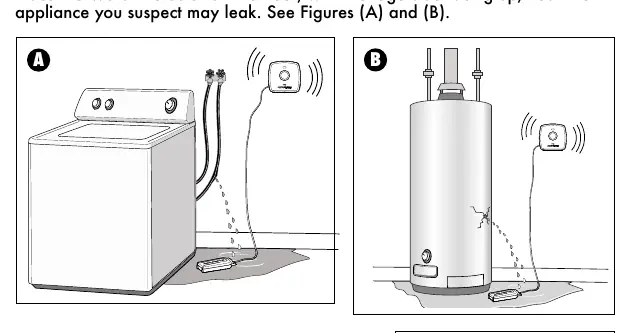
- Appliance Leaks: Place the detector on the floor with the logo side facing up, near the appliance you suspect may leak.
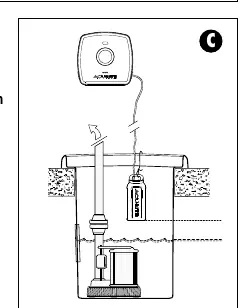
- Sump Pump Failure: Hang the detector halfway down the sump pump well. Ensure it is placed above the water height where the pump would normally turn on.
Note: The sensor is water-resistant, but to extend its life, avoid placing it in areas where it will remain submerged in liquid.
Operation
The Water Detector requires either a Room Monitor or an Outdoor Temperature and Humidity Monitor to operate. When using the Room Monitor, the display will toggle between temperature/humidity data and the Water Detector's status. The display will indicate if the sensor is plugged in, if the audible alert is active, and whether liquid is detected (WET/DRY).
Specifications
- Cord Length: 5-ft (1.5m); water-resistant.
- Data Reporting: 1-second updates when water is detected.
Customer Support
If your product does not operate properly, visit www.AcuRite.com or call (877) 221-1252 for assistance. You can also visit the Knowledge Base at http://www.AcuRite.com/kbase.
Official resources from the manual
Manufacturer information
AcuRite
Practical help
Common problems
Monitor not alerting when water is detected
Ensure the sensor is properly plugged into the monitor and the monitor's alarm switch is set to the ON position.
Reduced signal strength when using multiple sensors
Do not connect more than 5 water detectors in a series.
Sensor not detecting water
Ensure the sensor is placed at the lowest point where water is likely to collect and that the logo side is facing up.
Before use
- Ensure you have a compatible AcuRite Monitor (sold separately).
- Remove the rubber plug from the back of the monitor.
- Plug the water detector cord into the monitor.
- Slide the monitor alarm switch to the ON position (if using Model 00276RM).
- Verify the sensor is placed in an area prone to leaks.
Specs in practice
- Data Reporting
- Provides 1-second updates once water is detected.
- Compatibility
- Requires an AcuRite Room Monitor or Outdoor Temperature and Humidity Monitor.
Images and diagrams
- Figure A/B: Shows correct floor placement near appliances with the logo facing up.
- Figure C: Shows correct hanging placement inside a sump pump well.
- Figure D: Illustrates how to daisy-chain multiple water detectors together.
Model compatibility
- Requires an AcuRite Monitor to be operational.
- Compatible with Room Monitor (Model 00276RM) and Outdoor Temperature and Humidity Monitor.
- Maximum of 5 water detectors can be connected in a series.

Manual page author
David Miller
Documentation analyst
Organizes user manual content into clear summaries, with attention to model details, product context, and everyday usability.