Electronics / Monitors
User Guide for AcuRite 06103M Direct-to-Wi-Fi Color Display
Quick setup guide for the AcuRite 06103M display. Learn how to configure settings, install sensor batteries, mount the outdoor sensor, and connect to Wi-Fi for remote monitoring.
Table of contents
Quick Start Guide
This guide provides the essential steps to set up your AcuRite 06103M display. Key points to remember: the Wi-Fi setup page is only active for 30 minutes after the display is powered on (press the set button to reactivate), and the A-B-C switch inside the sensor battery compartment must match the setting on the display for proper synchronization.
Setup Requirements
- AcuRite 06103M Display
- Power Adapter
- AcuRite Iris (5-in-1) Sensor (may be sold separately)
- 3 AAA backup batteries (recommended)
- 2.4 GHz Wireless Network
- Phone, tablet, or computer with Wi-Fi
Display Configuration
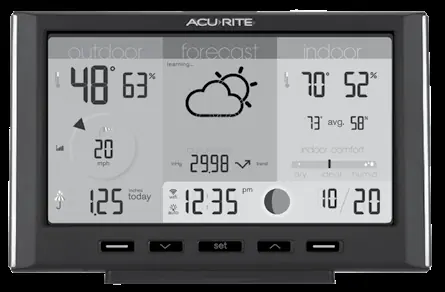
Plug in the power adapter to begin the automatic configuration process. Use the Up and Down buttons to navigate options and the set button to confirm your selections. You can configure the following settings:
- 12 or 24 Hour Clock Display
- Clock Hour and Minute
- Calendar Month, Date, and Year
- Temperature Units (°F / °C)
- Wind Speed Units (mph, km/h, knots)
- Rainfall Units (inches / mm)
- Pressure Units (inHg / hPa)
These settings can be adjusted at any time by pressing the set button.
Sensor Installation and Mounting
In the outdoor sensor battery compartment, install four AA alkaline or lithium batteries. Ensure the small A-B-C switch in the battery compartment matches the selection on the display (default is A). Once installed, the display should automatically sync with the sensor within a minute.
For mounting the outdoor sensor:
- Place at least 5 feet (1.5 meters) off the ground.
- Ensure the front solar cell is facing south.
- Keep away from heat and humidity sources.
- Use the bubble level on top of the sensor to ensure it is level for accurate rain reporting.
- Remove the rain gauge stabilizer from the sensor after mounting.
Wi-Fi Setup and Remote Monitoring
To connect your display to the My AcuRite network:
- Connect to the Wi-Fi signal broadcast by your display using your phone or Wi-Fi-compatible device.
- Open a web browser and type 192.168.4.1 in the address bar to access the AcuRite Wi-Fi display settings website.
- Select your local Wi-Fi network name, enter your network password, and press Save.
- Reconnect your device to your normal Wi-Fi network.
- Download the My AcuRite mobile app or visit www.myacurite.com to complete the account setup. You will need the device ID located on the back of the display or inside the battery compartment.
Additional Notes
To retain Wi-Fi configuration details during power outages, backup batteries in the display are strongly recommended. The display can be power cycled at any time to clear Wi-Fi credentials if needed.
Official resources from the manual
Manufacturer information
AcuRite
Practical help
Common problems
Wi-Fi setup page is not accessible
The setup page is only active for 30 minutes after power-up. Press the 'set' button on the display to reactivate the setup page.
Sensor is not syncing with the display
Verify that the A-B-C switch inside the sensor battery compartment matches the setting on the display.
Data loss during power failure
Install 3 AAA backup batteries in the display to retain configuration details.
Before use
- Ensure power adapter is connected
- Install 3 AAA backup batteries in the display
- Install 4 AA batteries in the outdoor sensor
- Verify A-B-C switch matches on sensor and display
- Ensure 2.4 GHz Wi-Fi network is available
Specs in practice
- A-B-C Switch
- A physical switch that must be set to the same position on both the sensor and the display to ensure wireless communication.
- Rain Gauge Stabilizer
- A plastic piece used for shipping that must be removed from the sensor after mounting for accurate rain measurement.
Images and diagrams
- The display unit features Up, Down, and Set buttons for configuration.
- The sensor battery compartment contains the A-B-C switch and battery slots.
- A bubble level is located on top of the sensor for accurate positioning.
Model compatibility
- Requires a 2.4 GHz wireless network for remote monitoring.
- Compatible with AcuRite Iris (5-in-1) Sensor.

Manual page author
Michael Turner
Technical manual editor
Reviews PDF manuals for structure, safety notes, and practical product details so readers can find the right information quickly.