Home / Security
Acurite 06003RM 5-in-1 Sensor Pro Add-On Installation Guide
Installation and maintenance guide for the Acurite 06003RM 5-in-1 Sensor Pro Add-On. Includes step-by-step assembly instructions and fan lubrication procedures.
Table of contents
Quick guide from the manual
The Acurite 06003RM 5-in-1 Sensor Pro Add-On is designed to optimize sun exposure for your 5-in-1 sensor, allowing the solar-powered aspirating fan to run more frequently. This improves temperature measurement accuracy. Note that an existing 5-in-1 sensor is required for this installation.
Installation
Before beginning, ensure you have a Phillips head screwdriver. Follow these steps to install the Pro Add-On:
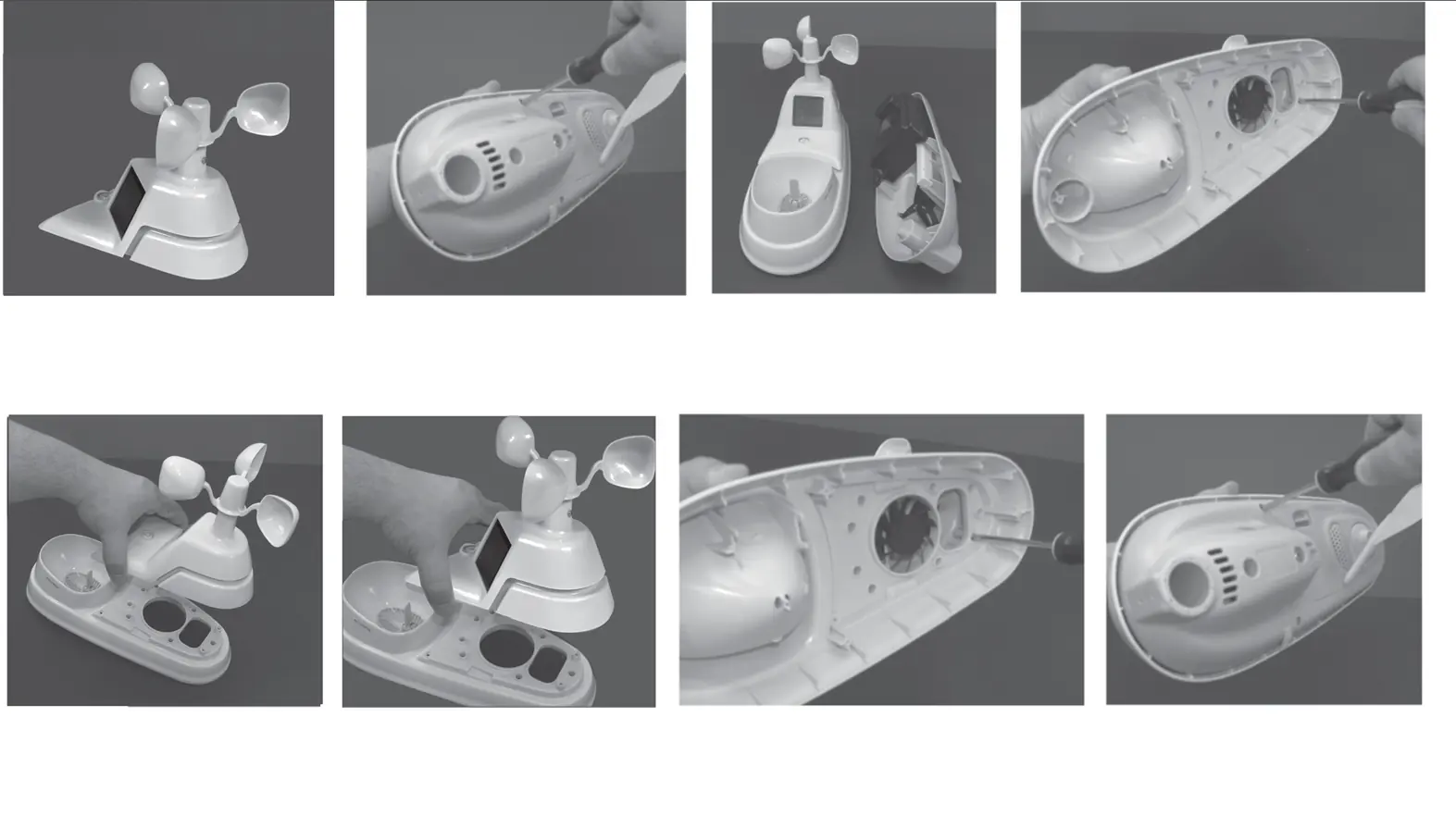
- Remove the batteries from the 5-in-1 sensor to prevent erroneous data during handling.
- Remove the 4 long screws and separate the upper white portion from the lower gray portion of the sensor.
- Set aside the lower gray portion and the screws for reassembly.
- Remove the 4 short screws located on the upper white portion near the fan assembly.
- Gently remove the old upper wind speed/solar assembly from the rain gauge assembly and discard it.
- Line up the screw holes on the new Pro Add-On with the rain gauge assembly.
- Turn the upper white portion over and reinstall the 4 short screws; tighten by hand.
- Reinstall the 4 long screws to connect the upper white portion and lower gray portion of the sensor.
Maintenance
To lubricate the sensor fan:
- Remove the screw located below the sensor's wind cups. Keep the screw.
- Spray a small amount of lubricant into the hole.
- Tip the 5-in-1 sensor upside down (wind cups on the bottom), then right side up several times.
- Reinsert the screw into the hole.
Safety and handling
The electronic components inside the 5-in-1 sensor are sensitive. Handle the device with care during the installation process.
Manufacturer information
AcuRite
Practical help
Common problems
Erroneous data during installation
Remove batteries from the 5-in-1 sensor before handling or transporting.
Fan not running frequently
Install the Pro Add-On to optimize sun exposure for the solar-powered fan.
Before use
- 5-in-1 sensor (required)
- Phillips head screwdriver
- Spray lubricant
Images and diagrams
- The installation process involves separating the sensor housing, removing the old wind speed assembly, and attaching the Pro Add-On.
- Lubrication requires removing the screw below the wind cups and cycling the sensor orientation.
Model compatibility
- Requires an existing Acurite 5-in-1 sensor.

Manual page author
Michael Turner
Technical manual editor
Reviews PDF manuals for structure, safety notes, and practical product details so readers can find the right information quickly.