Electronics / Video Lighting
AGM 10-inch LED Ring Light
A quick guide to setting up and using your AGM 10-inch LED Ring Light. Includes assembly instructions, Bluetooth remote shutter pairing, lighting mode adjustments, and essential safety precautions.
Table of contents
Quick guide from the manual
The AGM 10-inch LED Ring Light is designed for professional-looking photos and videos. It features adjustable brightness and color modes, making it suitable for vlogs, live streaming, and social media content. The unit includes a tabletop tripod, a phone holder, and a wireless Bluetooth remote shutter for hands-free operation.
Product Specifications
- External diameter: 255mm
- Power: 12W
- Power supply: USB 5V-2A
- Color temperature: 3000K-6000K
- Color Rendering Index (CRI): 85 Ra
- Number of beads: 128 pcs
- Compatibility: Smartphones with a width between 2.3 and 3.6 inches
Assembly and Setup
- Flexible Mount: Screw the flexible stand mount into the ring light. Do not over-tighten.
- Ball Head: Screw the ball head into the bottom of the ring light.
- Tripod: Screw the tripod into the bottom of the ball head. Ensure the tripod legs are fully extended and secure on a flat surface.
- Phone Holder: Secure your smartphone into the holder by opening the spring-adjusted flaps.
Remote Shutter Pairing
- Install the battery in the remote shutter with the positive electrode facing up.
- Turn on the power button on the side of the remote control; the LED indicator will flash.
- On your smartphone, search for the device named "AB Shutter3" and pair it. Pairing is automatic once selected.
Lighting Modes
Use the controller on the power cable to adjust your lighting:
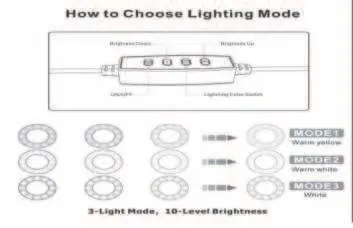
- ON/OFF: Power the light on or off.
- Lighting Color Switch: Cycle through the 3 available light modes (Warm yellow, Warm white, White).
- Brightness Up/Down: Adjust the brightness across 10 levels.
Care and Maintenance
- Clean the product frequently using a soft, dry cloth.
- Do not use in humid environments or near water sources.
- Avoid placing the unit near heat sources, appliances, or direct sunlight to maintain performance.
Safety Information
- Indoor use only.
- Ensure the voltage is consistent with the rated specifications.
- Never change the light bulb while the unit is plugged into a power source.
- Do not open the unit or alter the wiring.
- Keep the product away from children.
- Do not insert metal objects into the cooling holes.
- Stop using the unit immediately if it is damaged, especially the power cord.
Manufacturer information
AGM Mobile
Practical help
Common problems
Remote shutter not connecting
Ensure the battery is installed with the positive side facing up. Search for 'AB Shutter3' in your phone's Bluetooth settings.
Phone does not fit in the holder
Verify that your phone width is between 2.3 and 3.6 inches. Large cases may need to be removed.
Light does not turn on
Ensure the USB power source provides the required 5V-2A output.
Before use
- Check that your USB power source provides 5V-2A.
- Ensure the tripod legs are fully extended on a flat surface.
- Verify your smartphone width is compatible (2.3-3.6 inches).
- Install the battery in the remote shutter (positive side up).
- Check that the power cord is not damaged.
Specs in practice
- Color Temperature (3000K-6000K)
- Adjustable range from warm yellow light to cool white light.
- Power Supply (USB 5V-2A)
- Requires a standard USB power adapter capable of delivering 2 Amps.
- Color Rendering Index (85 Ra)
- A measure of how accurately the light reveals the true colors of objects.
Images and diagrams
- Assembly sequence: Flexible mount -> Ball head -> Tripod -> Phone holder.
- Remote control: Button A/B for shutter, ON/OFF switch.
Model compatibility
- Compatible with smartphones 2.3 to 3.6 inches wide.
- Indoor use only.
- Requires 5V-2A USB power source.

Manual page author
David Miller
Documentation analyst
Organizes user manual content into clear summaries, with attention to model details, product context, and everyday usability.