Power / Batteries & Chargers
User Manual for Anko 10-Inch LED Ring Light
Quick guide for the Anko 10-Inch LED Ring Light. Learn how to assemble the stand, adjust lighting modes, pair the Bluetooth controller, and set up your phone for recording.
Table of contents
Quick Guide
This 10-inch LED Ring Light is designed for content creation and photography. It features 3 lighting modes (White, Natural, Warm) and 10 levels of adjustable brightness. The device requires a USB power source with an output of at least 5V 2A. It includes a Bluetooth remote controller for hands-free operation.
Safety Instructions
- Do not use in moist or underwater conditions.
- Keep away from heaters or high-temperature environments.
- Avoid exposure to direct and strong sunshine.
- Do not use chemical solvents for cleaning.
Packing Accessories
- 1.6m Floor Stand
- 10-inch LED Ring Light
- Universal Phone Clip
- 60CM Phone Reflector
- 360° Hot Hose Ball Head
- Bluetooth Controller
Installation
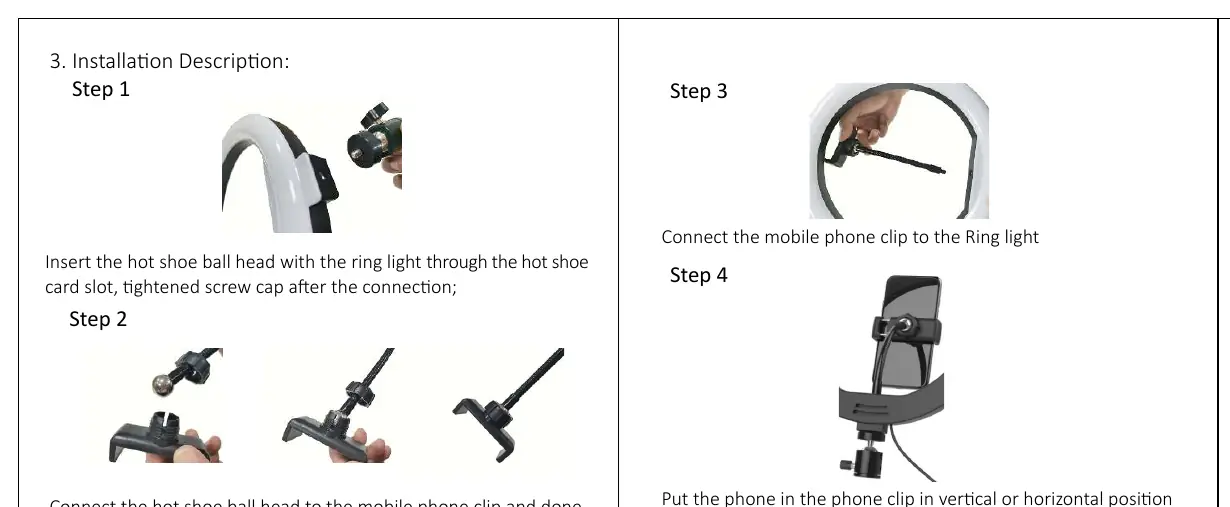
- Step 1: Insert the hot shoe ball head with the ring light through the hot shoe card slot and tighten the screw cap.
- Step 2: Connect the hot shoe ball head to the mobile phone clip.
- Step 3: Connect the mobile phone clip to the ring light.
- Step 4: Place your phone in the phone clip in either a vertical or horizontal position.
Operation
Connect the USB cable to a USB wall charger rated at DC 5V 2A or above. Press the on/off button on the cable controller to turn the light on. Use the control panel to select your desired color mode and adjust the brightness level.
Bluetooth Controller
The Bluetooth controller (Model: RU-B02) requires 2 AAA batteries (not included). To pair:
- Turn on your mobile phone's Bluetooth function.
- Press the button on the controller to turn it on.
- When the light starts flashing, wait a few seconds and search for "Selfie" in your phone's Bluetooth device list.
- Select "Selfie" to establish the connection. The light will stay on once successfully connected.
Specifications
- LED Numbers: 120pcs
- Input: DC 5V 2A
- Power: 13W (Max)
- Controller Model: RU-B02
- Controller Size: 58mm x 28mm x 13mm
- Controller Weight: 8g (without batteries)
Manufacturer information
Anko
Practical help
Common problems
Light does not turn on
Ensure the USB power source is rated at DC 5V 2A or higher. Lower amperage chargers may not provide sufficient power.
Bluetooth controller not connecting
Ensure 2 fresh AAA batteries are installed. Ensure the controller is in pairing mode (light flashing) and that your phone's Bluetooth is enabled.
Before use
- Verify you have all 6 packing accessories.
- Ensure you have a USB wall charger with at least 5V 2A output.
- Install 2 AAA batteries into the Bluetooth controller.
- Check that the hot shoe screw cap is tightened securely.
Specs in practice
- Input: DC 5V 2A
- Requires a power adapter capable of delivering 2 Amperes of current.
Images and diagrams
- The cable controller features buttons for ON/OFF, mode switching, and brightness adjustment (+/-).
- The Bluetooth controller is a separate unit requiring batteries.
Model compatibility
- Requires USB power source (5V 2A or above).
- Bluetooth controller requires 2x AAA batteries (not included).

Manual page author
Emily Carter
User documentation editor
Prepares concise manual descriptions and highlights the most useful setup, operation, and maintenance information for readers.