Electronics / Video Lighting
Fiilex QUAD Color Video Light User Manual
A comprehensive user guide for the Fiilex QUAD Color video light. This manual covers parts identification, safety instructions, fixture operation, mode selection, DMX/Ethernet settings, and fan/dimming configurations.
Table of contents
Manual images
Click an image to enlargeQuick Start Guide
The Fiilex QUAD Color is a professional-grade video light. Before operation, ensure the fixture is not installed in damp or wet locations and that air vents are not obstructed. Always use a safety cable when rigging the fixture overhead and use only Fiilex-approved power supplies.
Parts Identification
The fixture features 18 key components, including:
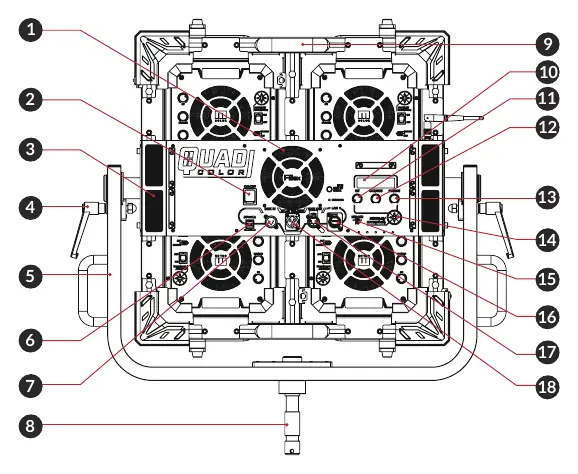
- Controls: Intensity Control Knob, CCT/HUE Knob, GN/SAT Knob, and Navigation Pad.
- Connectivity: USB Type-A (5V/1A Power), USB Type-C (Firmware updates), LAN Port, DMX Input/Output (XLR 5-pin), and AC Input.
- Physical: Fan Intake Vent, ON/OFF Switch, Tilt Lock Lever, Yoke, and Junior Pin Receiver.
- Display: OLED screen for status and settings.
Fixture Operation
To operate the fixture, use the Navigation Pad to enter the MODES menu and select the desired mode.
Manual / Local Control
Use the Intensity Control Knob or the Navigation Pad to adjust parameters. For CCT and HSI modes, use the CCT/HUE Knob and GN/SAT Knob or the Navigation Pad.
DMX / RDM / Ethernet
The display indicates connection status as either DMX OK or NO DMX. The fixture supports ArtNet and sACN protocols.
Settings and Configuration
Use the Navigation Pad to enter and edit the SETTINGS menu.
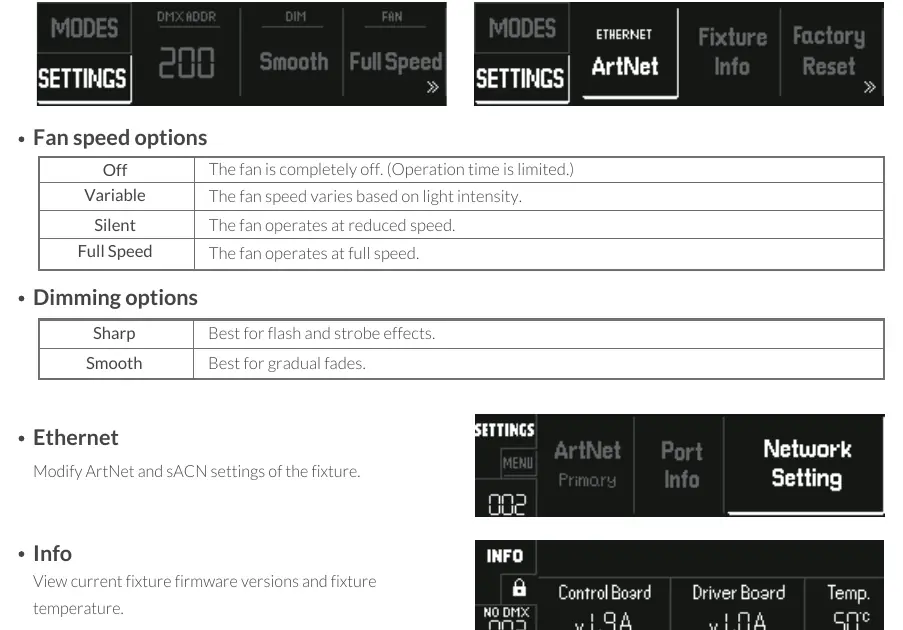
Fan Speed Options
- Off: Fan is completely off (limited operation time).
- Variable: Speed varies based on light intensity.
- Silent: Operates at reduced speed.
- Full Speed: Operates at maximum speed.
Dimming Options
- Sharp: Optimized for flash and strobe effects.
- Smooth: Optimized for gradual fades.
System Info
Access the Info menu to view current firmware versions and fixture temperature.
Safety Instructions
- Do not disassemble the fixture; this voids the warranty.
- Do not look directly into the light source with magnifying instruments.
- This fixture is classified as Risk Group 1 (EN 62471/EN 62778) regarding photobiological risks.
- Prolonged staring at the light output can cause eye injury.
Practical help
Common problems
Fixture not responding to DMX
Check the display for connection status. If it shows 'NO DMX', verify your DMX cable connections and settings.
Fan noise is too loud
Adjust the fan speed setting in the menu to 'Silent' or 'Variable' if the light intensity allows.
Light flickering during fades
Ensure the Dimming option is set to 'Smooth' for gradual fades, rather than 'Sharp'.
Before use
- Ensure the fixture is not installed in damp or wet locations.
- Verify that all air vents are clear and unobstructed.
- Attach a safety cable when rigging the fixture overhead.
- Use only Fiilex-approved power supplies and accessories.
- Check that the firmware is up to date via the USB Type-C port if necessary.
Specs in practice
- Fan Speed: Off
- Fan is disabled; note that operation time is limited in this mode.
- Dimming: Sharp
- Best suited for flash and strobe effects.
- Dimming: Smooth
- Best suited for gradual fades.
Images and diagrams
- The parts diagram identifies 18 specific points on the fixture, including the location of the OLED screen, control knobs, and various input/output ports.
- The operation section illustrates the menu navigation for modes and settings.
Model compatibility
- Supports DMX, RDM, and Ethernet (ArtNet/sACN) control protocols.
- USB Type-A port provides 5V/1A power.
- USB Type-C port is dedicated to firmware updates.

Manual page author
Emily Carter
User documentation editor
Prepares concise manual descriptions and highlights the most useful setup, operation, and maintenance information for readers.