Computers / PC Components
User Manual for Enermax PlatiGemini 1200W Power Supply
Comprehensive user manual for the Enermax PlatiGemini 1200W power supply. Includes installation instructions, cable connection guides, D.F. switch usage, technical specifications, and safety warnings.
Table of contents
Manual images
Click an image to enlargeQuick Guide from the Manual
The Enermax PlatiGemini 1200W is a high-performance power supply unit. Before installation, it is recommended to test the PSU using the included tester. The unit features a Dust-Free Rotation (D.F.) function to clean the fan and supports both ATX and ATX12VO motherboard standards.
Product Introduction
The PSU includes a D.F. Switch button and an I/O switch. Pressing the D.F. Switch initiates the Dust-Free Rotation function, which reverses the fan direction to remove accumulated dust. The I/O switch acts as the main power toggle (I=ON, O=OFF).
Testing Your PSU
Before connecting the PSU to your PC system, perform a test:
- Take the AC cord and the motherboard cable.
- Insert the 18-pin and 10-pin connectors into the PSU.
- Plug the 24-pin connector into the included PSU tester.
- Connect the AC cord and set the I/O switch to 'I'.
- The fan will spin clockwise to clean itself, then counterclockwise, and finally stop to activate the semi-fanless function.
Installation
Important: Only use the modular cables provided in the package. Using other cables may cause pin configuration damage.
Cable Connections
- ATX Motherboard: Connect the 24-pin cable.
- ATX12VO Motherboard: Connect the 10-pin cable.
- CPU: Connect the 4+4 pin cable.
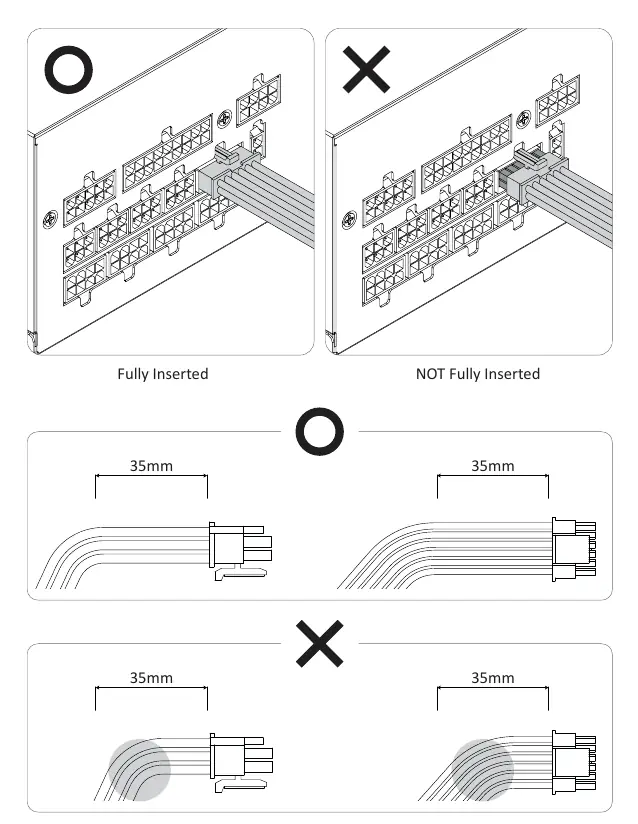
- GPU: Connect the 12V-2x6 12+4 pin connector or PCIe 6+2 pin connectors as required. Ensure the 12V-2x6 connector is fully inserted and avoid bending the cable within 35mm of the connector.
- SATA/Molex: Connect as needed for your peripherals.
PSU Mounting
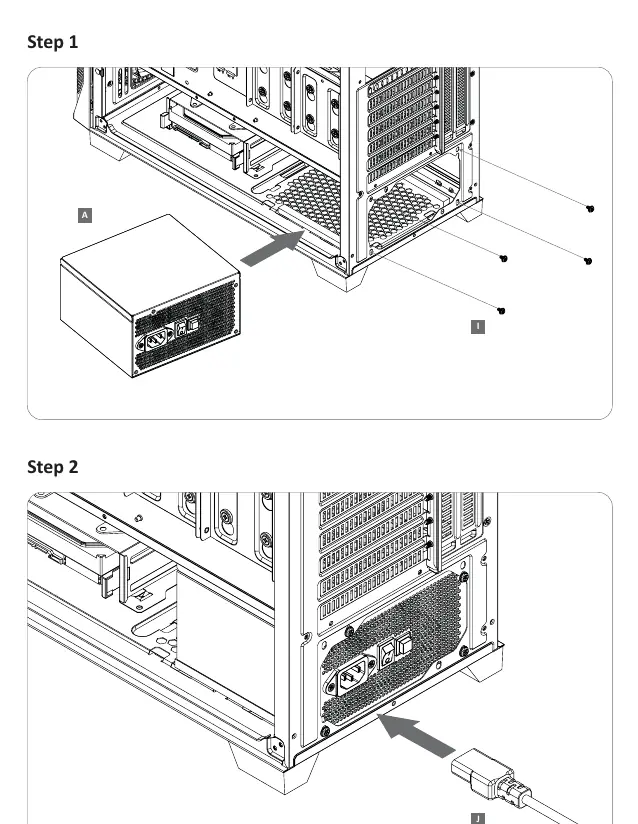
- Place the PSU into the PC case.
- Secure the PSU using the provided mounting screws.
- Connect the AC power cord.
Technical Specifications
- Model: EGN1200P
- Total Power: 1200W
- AC Input: 100-240VAC, 50-60Hz
- Cooling: 13.5cm Dual-Ball Bearing Fan
- Dimensions: 150(W) x 150(D) x 86(H) mm
Protection Features
The PSU includes several safety protections:
- OCP (Over Current Protection): Keeps DC voltage rails within safe limits.
- OVP (Over Voltage Protection): Shuts down the PSU if DC outputs exceed a set level.
- UVP (Under Voltage Protection): Shuts down the PSU if voltage drops below a standard.
- OPP (Over Power Protection): Shuts down the PSU if power draw exceeds 115%-135% of rated power.
- OTP (Over Temperature Protection): Shuts down the PSU if internal temperature is too high.
- SCP (Short Circuit Protection): Shuts down the PSU in the event of a short circuit.
Practical help
Common problems
PSU fails to power up
Check if the CPU connectors are connected to the motherboard and PSU correctly.
System crashes frequently after installing a new GPU
The PSU may be inadequate for the new GPU; refer to the PSU calculator tool on the Enermax website.
Fan stops spinning after a few seconds
This is normal behavior due to the Dust-Free Rotation (DFR) function and the semi-fanless mode.
Before use
- Verify all modular cables are from the original package
- Test the PSU using the included tester before installation
- Ensure proper ventilation in the PC case
- Check GPU power requirements before connecting cables
Images and diagrams
- D.F. Switch: Initiates dust-free fan rotation
- I/O Switch: Main power toggle
- 12V-2x6 connector: High-power GPU connection
Model compatibility
- Supports both ATX and ATX12VO motherboards
- Use only provided modular cables to prevent pin configuration damage

Manual page author
Michael Turner
Technical manual editor
Reviews PDF manuals for structure, safety notes, and practical product details so readers can find the right information quickly.