Computers / PC Components
User Manual for COUGAR GEX 1050W Power Supply Unit
Get started with your COUGAR GEX 1050W Power Supply Unit. This guide covers installation steps, safety precautions, technical specifications, and troubleshooting tips to ensure optimal performance.
Table of contents
Manual images
Click an image to enlargeQuick guide from the manual
Before installing the COUGAR GEX 1050W power supply, ensure the power switch is set to the 0 position. The installation process involves securing the PSU in the case, connecting the 24-pin motherboard cable, CPU cables, disk drive cables, and PCI-E cables for graphics cards. Always ensure the ventilation slots are not covered to prevent overheating.
Safety warnings
- Never open the PSU cover; high voltage inside poses a danger to life.
- Do not operate the PSU in environments with high moisture.
- Ensure the PSU is used within the specified operating temperature range of 10°C to 40°C.
- If the PSU is damaged or emits smoke, disconnect it immediately and do not attempt to use it.
- Only use the provided cables to avoid damage to the PSU or your components.
Installation
- Turn off your PC and disconnect the power cord.
- Secure the PSU into the designated space in your computer case using the provided screws.
- Connect the 24-pin main power connector to the motherboard.
- Connect the 8-pin or 4+4 pin CPU power connectors as required by your motherboard.
- Connect the necessary PCI-E cables to your graphics cards.
- Connect the S-ATA and peripheral cables to your drives and other components.
- Verify all connections are secure before turning on the power switch.
Safety functions
The GEX 1050W includes several protection mechanisms to ensure system safety:
- OVP (Overvoltage Protection): Shuts down the PSU if voltage exceeds tolerance on single lines.
- SCP (Short-circuit Protection): Prevents damage to core components in case of a short-circuit.
- OPP (Overload Protection): Activates if the system draws more power than the PSU can provide.
- OCP (Overcurrent Protection): Protects against current exceeding specified limits.
- OTP (Over Temperature Protection): Shuts down the PSU if the temperature becomes too high.
- UVP (Undervoltage Protection): Shuts down the PSU if voltage falls below tolerance on single lines.
Troubleshooting
If your system does not start after installing the PSU:
- Check that the power cord is properly connected to the wall socket and the PSU.
- Ensure the PSU power switch is set to the I position.
- Verify that all internal cables are firmly connected to the motherboard and components.
- Check if the wall socket is providing power.
- If the issue persists, contact COUGAR customer service.
Manufacturing date
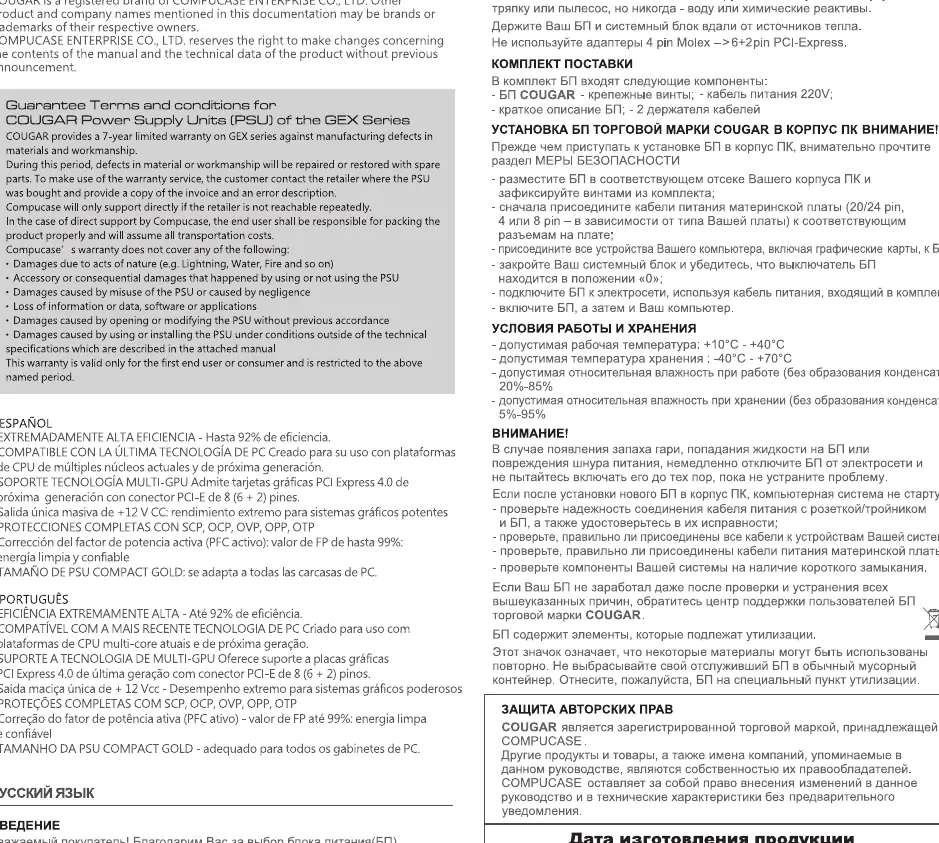
The manufacturing date can be determined by the serial number (S/N) on the product. The first two letters after the S/N indicate the production year and month based on the provided table in the manual (e.g., A=1, B=2, etc.).
Practical help
Common problems
System does not start after installation
Check the power cord connection, ensure the wall socket has power, verify the PSU switch is set to 'I', and ensure all internal cables are securely connected.
Overheating or system instability
Ensure the ventilation slots are not blocked and the ambient temperature is within the 10°C to 40°C range.
Before use
- Ensure the PSU power switch is set to '0' before starting installation.
- Verify the wall socket provides the necessary power.
- Check that all cables are securely connected to the motherboard and components.
- Ensure the PSU is protected against moisture.
- Verify that the ventilation slots are not covered.
Specs in practice
- OVP (Overvoltage Protection)
- Shuts down the PSU if voltage exceeds tolerance on single lines.
- SCP (Short-circuit Protection)
- Prevents damage to core components in case of a short-circuit.
- OPP (Overload Protection)
- Activates if the system draws more power than the PSU can provide.
- Operating Temperature
- The PSU is designed to operate between 10°C and 40°C.
Images and diagrams
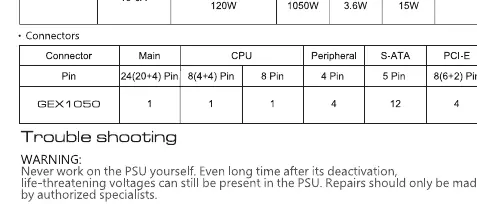
- The connector table details the quantity of available cables: 1x 24-pin, 1x 8-pin CPU, 1x 4+4 pin CPU, 4x Peripheral, 12x S-ATA, and 4x PCI-E (6+2 pin).
- The manufacturing date code table explains how to decode the serial number to find the production month and year.
Model compatibility
- Supports PCI Express 4.0 graphics cards.
- Compatible with 100-240V 47-63Hz power input.

Manual page author
Michael Turner
Technical manual editor
Reviews PDF manuals for structure, safety notes, and practical product details so readers can find the right information quickly.