Computers / PC Components
User Manual for Antec TruePower Quattro 1200-Watt Power Supply
Quick guide for the Antec TruePower Quattro 1200-Watt power supply. Learn about installation, cable management, technical specifications, and safety features.
Table of contents
Manual images
Click an image to enlargeQuick Guide
The Antec TruePower Quattro 1200-Watt power supply (TPQ-1200) is a high-performance unit designed for servers and high-end workstations. It features a continuous power output of 1200W, six +12V rails, and an Advanced Hybrid Cable Management system. The unit is 80 PLUS Silver certified, ensuring at least 85% efficiency.
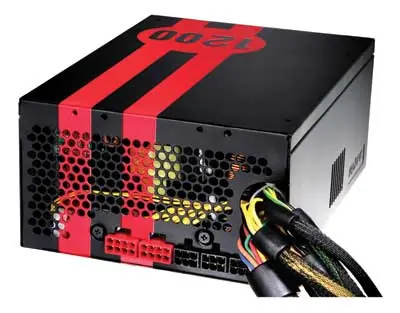
Features and Protection
The TPQ-1200 includes several industrial-grade protective circuits to ensure system stability:
- OCP (Over Current Protection)
- OVP (Over Voltage Protection)
- UVP (Under Voltage Protection)
- SCP (Short Circuit Protection)
If the PSU enters a protected state (latches), you must clear the fault and turn the power off to the unit before it will function again. There are no user-replaceable fuses inside the unit. The PSU also features Universal Input (100~240V) and Active Power Factor Correction (Active PFC).
Installation
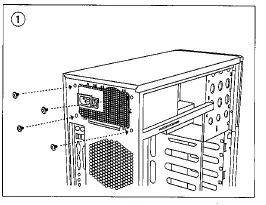
- Install the TPQ-1200 PSU into your computer case using the four provided screws.
- Connect the 24-pin main power connector to your motherboard.
- Connect the 8-pin or 4-pin ATX12V connector for the CPU to the appropriate socket on your motherboard. If your motherboard has an 8-pin socket with a cover, remove the cover to use the 8-pin connector.
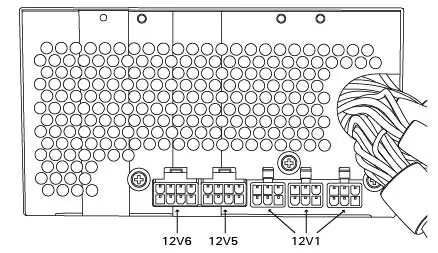
- Connect the required cables from the cable pack to the modular sockets on the back of the power supply. If using the additional PCI-E cable, plug it into the red socket.
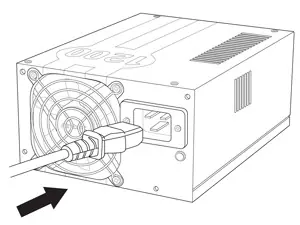
- Connect the AC power cord to the power supply AC inlet. Always use the heavy-duty cord supplied with the unit.
Cable Management
The TPQ-1200 utilizes an Advanced Hybrid Cable Management system. Mandatory cables are connected directly to the PSU, while additional cables can be connected to the modular sockets on the back of the unit as needed. Using only the necessary cables helps reduce clutter and improves airflow inside your computer case.
Technical Specifications
The TPQ-1200 is compatible with ATX12V v2.3 and EPS12V v2.91 specifications. It features six separate +12V rails to prevent voltage sags. The continuous maximum total output power is 1200W. The +12V rails combined maximum output is 1200W (100A), and the +3.3V and +5V combined maximum output is 170W.
Support
For technical support, you can contact Antec via the following channels:
US & Canada: 1-800-22ANTEC, [email protected]
Europe: +31 (0) 10 462-2060, [email protected]
Website: www.antec.com
Official resources from the manual
Practical help
Common problems
PSU latches into a protected state
Clear the fault and turn the power off to the PSU before it will function again.
Voltage sags in devices
The PSU uses six separate +12V rails to prevent voltage sags caused by sudden power demands from other devices.
Before use
- Ensure the motherboard has an 8-pin socket if using the 8-pin CPU connector.
- Use the heavy-duty AC power cord supplied with the unit.
- Connect only necessary modular cables to improve airflow.
- Verify the AC power source is between 100~240V.
Specs in practice
- 80 PLUS Silver
- Certified at least 85% efficient at a wide range of operating loads.
- Universal Input
- Automatically senses AC power source between 100~240V without needing a voltage switch.
Images and diagrams
- Installation steps show mounting the PSU with four screws.
- Cable connection diagrams illustrate connecting the 24-pin and CPU power cables.
- Rear panel diagram identifies the modular connector layout.
Model compatibility
- Compatible with ATX12V v2.3 and EPS12V v2.91 specifications.
- NVIDIA SLI-Ready certified for use with multiple high-end graphics cards.

Manual page author
Emily Carter
User documentation editor
Prepares concise manual descriptions and highlights the most useful setup, operation, and maintenance information for readers.