Electronics / Cameras
User Manual for AKASO Brave 7 LE Action Camera
Quick guide for the AKASO Brave 7 LE action camera. Learn how to set up, use shooting modes, connect to the AKASO GO app, manage files, and maintain your device.
Quick answers from the manual
Quick answer
- The AKASO Brave 7 LE is an action camera. To start, insert a U3 memory card, format it in the camera, and power on by holding the Power button for 3 seconds. p. 7, 8
Key actions
- Powering on/off p. 8
- Connecting to App p. 16
First start
- Insert memory card, format it, charge battery, power on. p. 7, 8
Show 4 more answers Show less
Problems and fixes
No sound in video
Camera does not record sound when in the waterproof case.
p. 5Maintenance and reset
- Factory Reset: Yes/No in System settings. p. 16
Technical specifications
| Parameter | Value | Meaning | Pages |
|---|---|---|---|
| Memory Card | U3, up to 64GB | Required for recording | p. 8 |
Where to find it in the PDF
- Camera Overview p. 4, 5
- Remote Control p. 21, 22, 23
Table of contents
Manual images
Click an image to enlargeQuick Guide
The AKASO Brave 7 LE is an action camera designed for capturing high-quality video and photos. To get started, ensure you have a U3 memory card (up to 64GB), format it within the camera, and charge the battery. Power the camera on by holding the Power button for 3 seconds.
Camera Overview
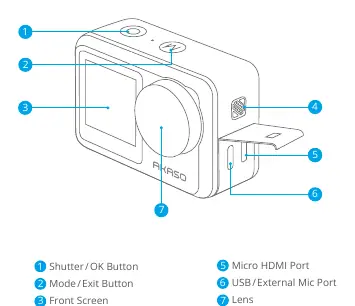
The camera features a front screen, a touch screen, and various buttons for operation. The Shutter/OK button is used for recording and confirming selections, while the Mode/Exit button allows you to switch between modes. The camera includes a Micro HDMI port and a USB/External Mic port for connectivity.
Modes
The camera offers several modes: Video, Photo, Playback, System Setup, Video Setup, and Photo Setup. You can switch between these modes by tapping the mode icon on the screen or using the Mode button.
Connecting to the AKASO GO App
To control your camera remotely, download the AKASO GO app. Turn on the camera's Wifi, connect your phone to the camera's Wifi network using the password 1234567890, and add the device in the app to enable live preview, playback, and file transfer.
File Management
You can view, delete, and offload your content directly on the camera or via the AKASO GO app. To transfer files to a computer, use a USB cable or a card reader. Always format your memory card regularly to keep it in good condition.
Maintenance and Battery
To maintain performance, keep the camera away from drops, bumps, and extreme temperatures. Do not touch the lens with fingers. If the battery reaches 0%, the camera will save the file and power off. Avoid storing the battery with metal objects to prevent fire hazards.
Remote Control
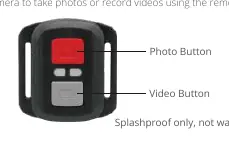
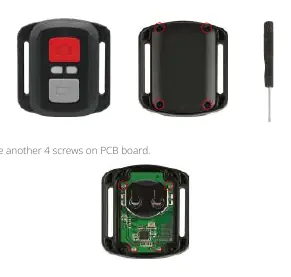
The included remote control allows for photo and video capture. Note that the remote is splashproof only, not waterproof. To replace the CR2032 battery, use a 1.8mm Phillips screwdriver to open the back cover and replace the battery with the '+' pole facing up.
Mounting
The camera comes with a waterproof case. Ensure there is no gap between the waterproof strips when closing the case to maintain its integrity. Various mounts are included for helmets, gear, and equipment.


Practical help
Common problems
No sound in recorded video
The camera does not record sound when it is inside the waterproof case.
Memory card errors or recording stops
Ensure you are using a U3 memory card (up to 64GB) and format it in the camera before use.
Remote control not working
Check the CR2032 battery. The remote is splashproof only, not waterproof.
Before use
- Insert a U3 memory card (up to 64GB)
- Format the memory card in the camera
- Charge the battery
- Download the AKASO GO app
- Ensure the waterproof case is sealed correctly if using underwater
Show more Show less
Specs in practice
- Video Resolution
- Higher resolutions (e.g., 4K30fps) may cause the camera to consume more power and become hot.
- Image Stabilization (EIS2.0)
- Smooths out lens shakes. Not available at certain high frame rates like 1080P120fps.
Images and diagrams
- Page 4: Camera button and port layout
- Page 21: Remote control button functions
- Page 22-23: Remote battery replacement steps
- Page 24: Waterproof case opening and closing procedure
Model compatibility
- Remote is splashproof only, not waterproof
- App requires AKASO GO
- Memory card must be U3 type

Manual page author
Michael Turner
Technical manual editor