Electronics / Cameras
User Guide for Polaroid Mint Shoot + Print 2-in-1 Camera and Printer
Comprehensive user guide for the Polaroid Mint 2-in-1 camera and printer. Learn how to charge, load ZINK paper, take photos, use modes, create collages, and download images.
Quick answers from the manual
Quick answer
- The Polaroid Mint is a 2-in-1 instant camera and printer. It allows you to take photos, print them immediately on ZINK paper, and save digital copies to a microSD card. p. 1, 12
Key actions
- Charging the camera p. 10
- Loading ZINK paper p. 10, 11
- Taking a photo p. 13, 14
First start
- Charge the camera fully, load the ZINK paper with the blue calibration sheet facing down, and power on by holding the button for two seconds. p. 10, 13
Show 3 more answers Show less
Problems and fixes
Paper jam or misprinting
Ensure paper is not pushed in too far and the blue calibration sheet is loaded correctly.
p. 10, 12
Camera overheating
Disconnect from power source immediately and let it cool down.
p. 5Maintenance and reset
- Use the Reset button (9) if necessary. p. 8
Where to find it in the PDF
- Getting to know the camera p. 6, 7, 8, 9
- Getting Ready p. 10, 11
Table of contents
Manual images
Click an image to enlargeQuick Start Guide
The Polaroid Mint is a 2-in-1 instant camera and printer. Before first use, charge the device fully using the provided cable. Load the ZINK paper with the blue calibration sheet facing down. Power on by holding the power button for two seconds. Use the Mode and Frame buttons to customize your photos before shooting.
Safety Information
- Seizure Warning: This device uses flashing LED lights which may trigger seizures in people with photosensitive epilepsy.
- Heat and Sun: Do not leave the camera or ZINK paper in hot areas or direct sunlight to prevent overheating.
- Water: Keep the camera dry. Do not submerge in water. Clean only with a soft, slightly dampened cloth.
- Viewfinder: Do not look directly through the viewfinder when LED lights are active.
- Charging: Only use the provided charging cable. If the camera overheats while charging, disconnect immediately.
Getting to Know Your Camera
The camera features a variety of controls and indicators:
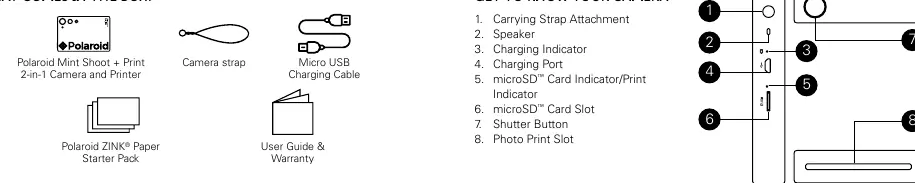

- Buttons 1-8: Carrying strap attachment, speaker, charging indicator, charging port, microSD card/print indicator, microSD card slot, shutter button, and photo print slot.
- Buttons 9-18: Reset button, paper tray, viewfinder/LED light, selfie mirror, camera lens, mode display lights, mode button, frame toggle, 10-second delay toggle, and power button.
Getting Ready
Charging
Plug the USB cable into your computer or a USB charging block with an output of 1A or higher. The charging indicator will be red while charging and turn green when fully charged. Keep the camera off during the first charge.
Loading ZINK Paper
- Open the paper tray by pressing the latch and pulling it toward you.
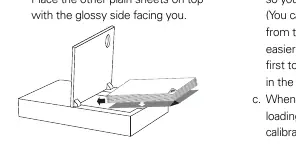
- Load the blue calibration sheet with the barcode facing down and the ZINK logo in the bottom right corner.
- Place the plain sheets on top with the glossy side facing you.
- Close the tray. The calibration sheet will eject automatically when you take your first photo.
Using Your Polaroid Mint
Turn the camera on by holding the power button for two seconds. Use the Mode button to cycle through color, black & white, or sepia options. Use the Frame button to add a classic Polaroid border. Use the selfie mirror or viewfinder to frame your shot, then press the shutter button.
Advanced Features
10-Second Delay
Press the 10 SEC button to activate the timer. The white indicator light will illuminate. Press the shutter button to start the countdown. The camera will beep and flash the LED as it counts down.
Collage Feature
Press and hold the shutter button for three seconds to start the collage mode. The camera will guide you through taking two photos, which will be printed together on a single sheet.
Downloading Photos
If a microSD card is installed, photos are saved digitally. Connect the camera to a computer via USB. The camera will appear as an external storage device. Access the DCIM folder to find your photos in the MINT_CAM subfolder.
Specifications
- Camera: 8MP (16MP via interpolation)
- Battery: 700mAh Lithium-ion
- Storage: MicroSD cards up to 256GB
- Paper: Polaroid ZINK 2x3" sticky-back photo paper
- Prints Per Charge: Approximately 40
Practical help
Common problems
Camera won't print
Ensure ZINK paper is loaded correctly with the blue calibration sheet facing down. Do not push paper too far into the slot.
Camera overheating while charging
Disconnect immediately from the power source and let it cool down before turning it back on.
Photos not printing as seen in viewfinder
The viewfinder is a general guide. Use the inner circle to center your image, as outside edges may be cut off.
Red light flashing in viewfinder
The camera is out of paper. Load more ZINK paper to continue printing.
Before use
- Charge the camera fully using the provided cable
- Load ZINK paper with the blue calibration sheet facing down
- Ensure a microSD card is inserted if you wish to save digital copies
- Keep the camera off during the initial charge
Show more Show less
Specs in practice
- Camera Resolution
- 8MP native, up to 16MP via interpolation
- Battery Capacity
- 700mAh Lithium-ion, provides ~40 prints per charge
Images and diagrams
- Buttons 1-8 cover the side and back ports/indicators including charging and microSD slots.
- Buttons 9-18 cover the top and front controls including mode selection, frame toggle, and the selfie mirror.
Model compatibility
- Requires Polaroid ZINK 2x3 inch sticky-back photo paper.
- USB charging block must have an output of 1A or higher.
- Compatible with Windows/Mac computers as an external storage device.

Manual page author
Michael Turner
Technical manual editor