Electronics / Video Lighting
User Manual for Aputure amaran 200x S LED Light
Comprehensive user guide for the Aputure amaran 200x S LED light. Includes setup instructions, manual control settings, app connectivity, safety precautions, and technical specifications.
Quick answers from the manual
Quick answer
- The amaran 200x S is a 200W LED light. It is controlled manually via INT and CCT knobs or wirelessly via the Sidus Link app. p. 2, 8, 10
Key actions
- Remove protective cover before use p. 2, 6
- Reset Bluetooth connection p. 9
First start
- Remove protective cover, mount on tripod, connect power, and press power button. p. 6, 7
Show 4 more answers Show less
Problems and fixes
Bluetooth connection issues
Long press the Bluetooth reset button.
p. 9Maintenance and reset
- Use a dry microfiber cloth for cleaning. p. 2
Technical specifications
| Parameter | Value | Meaning | Pages |
|---|---|---|---|
| Output Power | 200 W | Maximum power output of the lamp. | p. 10 |
| CCT Range | 2700K - 6500K | Adjustable color temperature range. | p. 10 |
Where to find it in the PDF
- Safety Instructions p. 2, 3
- Installation p. 5, 6, 7
- Specifications p. 10, 11
Table of contents
Manual images
Click an image to enlargeQuick guide from the manual
The amaran 200x S is a 200W full-color LED light designed for professional lighting. Before using the unit, ensure you remove the protective cover from the light source. The device supports manual control via onboard knobs and wireless control via the Sidus Link app. Always operate the light in a well-ventilated area and connect it to a grounded outlet.
Components List
Ensure all items are present before use:
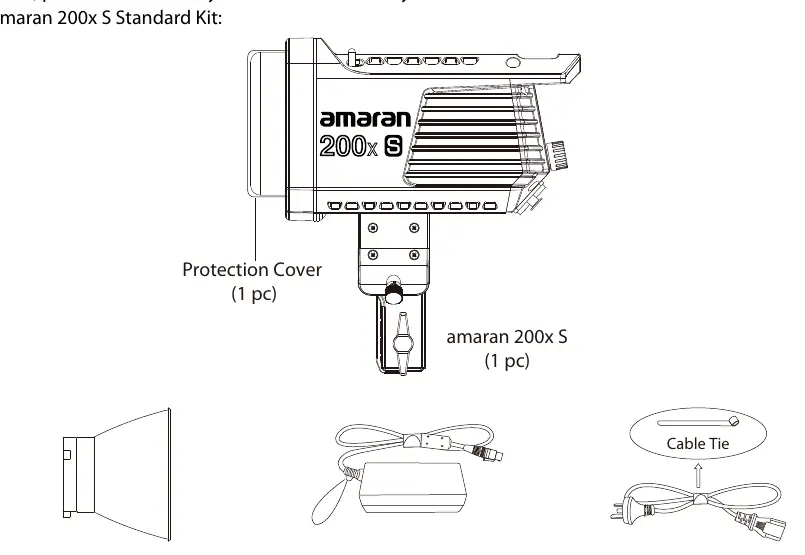
- amaran 200x S light fixture
- Protection cover
- Hyper-reflector
- Power adapter
- Power cable
- Cable tie
Installations
Detaching/Attaching the Protection Cover
Push the handle of the lever in the direction of the arrow shown on the fixture, and rotate the cover to pull it out. Reverse the rotation to re-attach the cover. Always remove the protection cover prior to turning on the light.
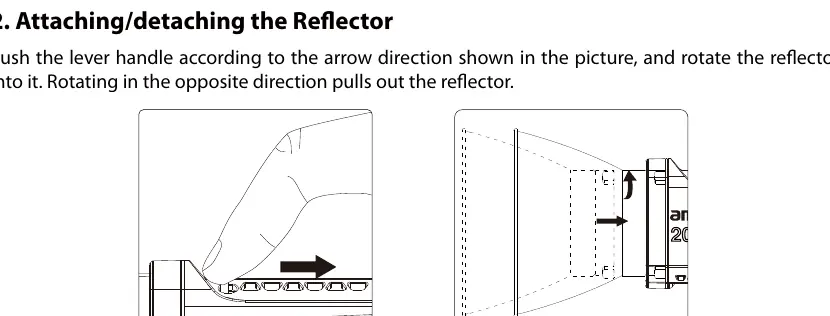
Attaching/Detaching the Reflector
Push the lever handle according to the arrow direction and rotate the reflector into the mount. Rotate in the opposite direction to detach.
Setting up the light
Adjust the lamp body to the desired height on your tripod, tighten the tie-down to secure it, and use the locking handle to set the angle.
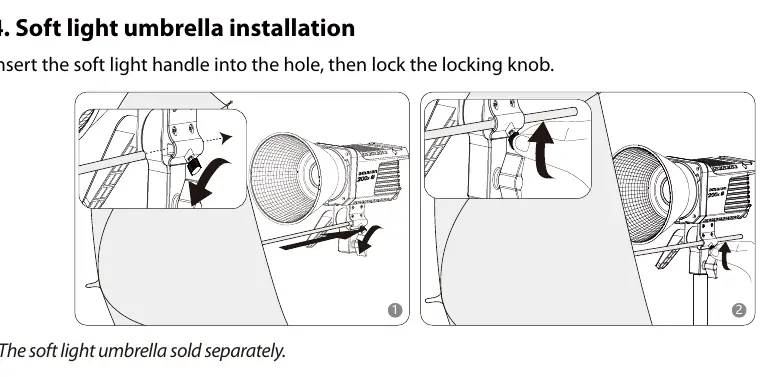
Soft light umbrella installation
Insert the umbrella handle into the designated hole on the fixture and tighten the locking knob.
Operations
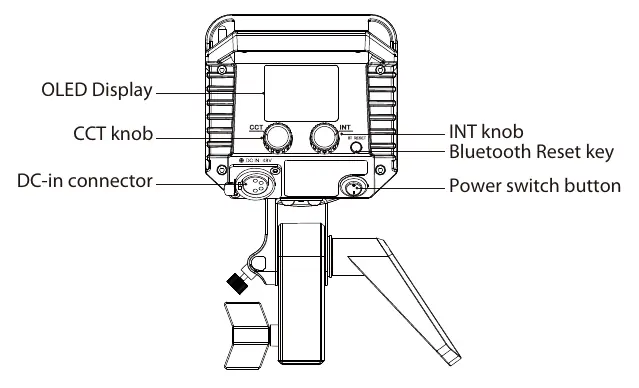
Power ON/OFF
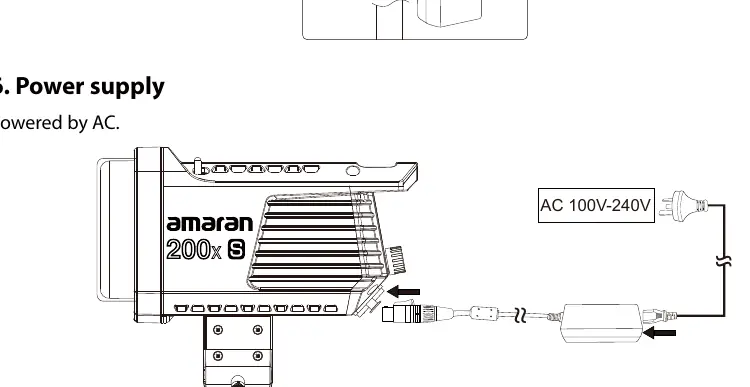
Press the power button to turn the light on or off. Ensure the power cable is securely connected to the DC-in connector.
Manual Control
- INT knob: Rotate to adjust brightness (0-100%). Click to cycle through preset levels: 20%, 40%, 60%, 80%, 100%.
- CCT knob: Rotate to adjust color temperature (2700K-6500K). Click to cycle through presets: 2700K, 3200K, 4300K, 5600K, 6500K.
Bluetooth Settings
To reset the Bluetooth connection, long-press the Bluetooth reset button. The LCD will display "BT Reset" and show progress. "Success" indicates the reset is complete.
Sidus Link App
Download the Sidus Link app to control the light wirelessly. The app allows for firmware updates (OTA) and access to 9 lighting effects (FX): Paparazzi, Fireworks, Faulty Bulb, Lightning, TV, Pulsing, Strobe, Explosion, and Fire.
Safety Instructions
- Do not block ventilation.
- Do not touch the LED light source.
- Use only a dry microfiber cloth for cleaning.
- Do not use in wet conditions.
- Use only original Aputure cable accessories.
Manufacturer information
Aputure
Practical help
Common problems
Light does not turn on
Check if the power cable is securely connected to the DC-in port and the AC outlet.
Bluetooth connection failed
Long press the Bluetooth reset button on the control panel to reset the connection.
Reflector or cover stuck
Ensure the lever handle is pushed in the direction of the arrow before rotating.
Before use
- Remove the protective cover from the LED source
- Verify all components from the standard kit are present
- Connect the power adapter to a grounded outlet
- Ensure the light is securely mounted on a tripod
- Check that ventilation is not blocked
Show more Show less
Images and diagrams
- Control panel layout showing INT and CCT knobs
- Reflector and protection cover attachment mechanism
- Soft light umbrella mounting point
Model compatibility
- Compatible with Sidus Link App for iOS and Android
- Requires AC 100V-240V power supply

Manual page author
David Miller
Documentation analyst