Electronics / Video Lighting
Bower 24-Inch Flexible White and RGB Ring Light User Manual
Quick guide for the Bower 24-inch Flexible White and RGB Ring Light. Learn how to set up, use the remote control, adjust brightness, and select special lighting effects.
Quick answers from the manual
Quick answer
- The Bower 24-inch Flexible White and RGB Ring Light is a USB-powered lighting solution. It is operated via an in-line remote to control power, 12 levels of brightness, 9 RGB colors, and 16 special effects. p. 1
Key actions
- Connect the ring light to a USB power source. p. 1
- Use the in-line remote to adjust brightness and lighting modes. p. 1
First start
- Attach the smartphone holder to the flexible arm, clamp the light to a surface, and connect to USB power. p. 1
Show 2 more answers Show less
Technical specifications
| Parameter | Value | Meaning | Pages |
|---|---|---|---|
| Size | 24-inch | Diameter of the ring light | p. 1 |
| Lighting Modes | 9 RGB colors + 16 Special Effects | Available color and effect options | p. 1 |
Where to find it in the PDF
- Product Manual p. 1
Table of contents
Manual images
Click an image to enlargeQuick Guide from the Manual
This guide provides instructions for setting up and operating the Bower 24-inch Flexible White and RGB Ring Light. This device is designed for content creation, offering adjustable brightness and various RGB color modes.
Product Parts
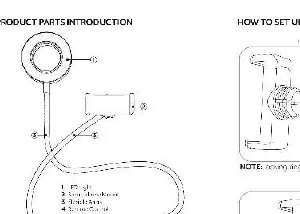
- Ring Light
- Flexible Arm
- Smartphone Holder
- Screw Clamp
Setup Instructions
- Smartphone Holder: Snap the smartphone holder into the flexible arm.
- Mounting: Attach the ring light to a stable surface using the screw clamp.
- Power Connection: Plug the USB cable into a powered USB source, such as a computer port or a USB wall adapter.
- Power On: Press the On/Off button on the in-line remote to turn the light on.
Using the Remote Control
The in-line remote allows you to control the lighting settings:
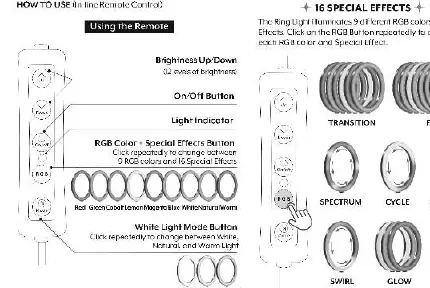
- Brightness Up/Down: Adjust the light intensity with 12 levels of brightness.
- On/Off Button: Toggles the power.
- RGB Color/Special Effects: Click repeatedly to cycle through 9 RGB colors and 16 special effects.
- White Light Mode: Click repeatedly to switch between White, Natural, and Warm light settings.
Special Effects
The ring light features 16 special effects, including:
- Cycle, Spectrum, Fade, Transition
- Spectrum 2, Spectrum 3, Spectrum 4, Spectrum 5, Spectrum 6
- Strobe, Strobe 2, Swirl, Glow, Duo-Tone, Shuffle
Note: Pressing the Up/Down button while a special effect is selected will change the speed, color, or brightness depending on the specific effect.
Specifications
- Size: 24-inch
- Lighting: LED beads
- Features: 9 RGB colors, 16 special effects, 12 brightness levels, smartphone holder compatible with most mobile devices.
Practical help
Common problems
Light does not turn on
Ensure the USB cable is securely connected to a powered USB source (e.g., computer, wall charger).
Smartphone holder is loose
Ensure the holder is properly snapped into the flexible arm mechanism.
Before use
- Verify the USB power source provides sufficient power.
- Ensure the screw clamp is tightened securely to the mounting surface.
- Check that the smartphone holder is correctly attached to the flexible arm.
Show more Show less
Specs in practice
- 12 Levels of Brightness
- Adjustable intensity to suit different lighting conditions.
Images and diagrams
- The remote control features buttons for brightness adjustment, power, and color/effect cycling.
- The screw clamp allows mounting the light to desks or tables.
Model compatibility
- Smartphone holder is compatible with most mobile devices.

Manual page author
Michael Turner
Technical manual editor