Electronics / Video Lighting
User Manual for Amaran Halo 200x/300x/600x LED Light
Comprehensive user guide for the Amaran Halo 200x, 300x, and 600x LED lights. Includes setup instructions, menu navigation, DMX control, fan modes, app connectivity, and technical specifications.
Quick answers from the manual
Quick answer
- The Amaran Halo 200x/300x/600x are bi-color COB LED lights. They are operated via rear knobs for CCT and intensity, support DMX control via an adapter, and offer multiple fan modes and app connectivity. p. 3, 5, 6
Key actions
- Powering On/Off p. 7
- Resetting Bluetooth p. 9
- Installing Accessories p. 8
First start
- Connect power, press the power button, and follow the on-screen language selection prompt. p. 7
Show 4 more answers Show less
Problems and fixes
Overheating or fan noise
Adjust fan mode to 'Smart' or 'High Speed' for better cooling.
p. 11Maintenance and reset
- Bluetooth reset: Enter Bluetooth menu, long press CCT knob. p. 9
Technical specifications
| Parameter | Value | Meaning | Pages |
|---|---|---|---|
| Input Power (Max) | 200W / 305W / 610W | Maximum power consumption for 200x, 300x, and 600x models respectively. | p. 14, 15, 16 |
| CCT Range | 2,700K - 6,500K | Adjustable color temperature range. | p. 14, 15, 16 |
Where to find it in the PDF
- Product Overview p. 3, 5
- Installation p. 8
- Technical Specifications p. 14, 15, 16
Table of contents
Manual images
Click an image to enlargeQuick Guide
The Amaran Halo 200x, 300x, and 600x are professional bi-color COB LED lights designed for studio and production use. This guide covers the essential setup and operation of these fixtures.
Product Overview
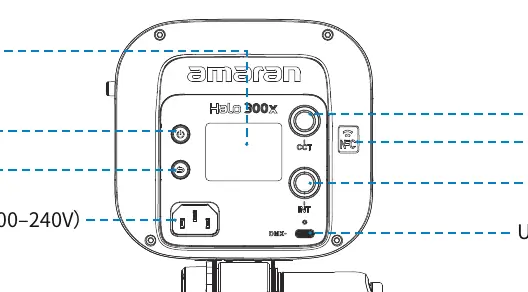
The rear control panel features a display screen, power switch, CCT knob (for color temperature and menu navigation), INT knob (for intensity), and a USB-C port for DMX control. The light includes a standard Bowens mount for attaching modifiers.
Installation
Mounting the Light: Attach the mounting bracket to a light stand, adjust the angle, and tighten the locking knob and handle. The handle angle can be adjusted by pulling it out.
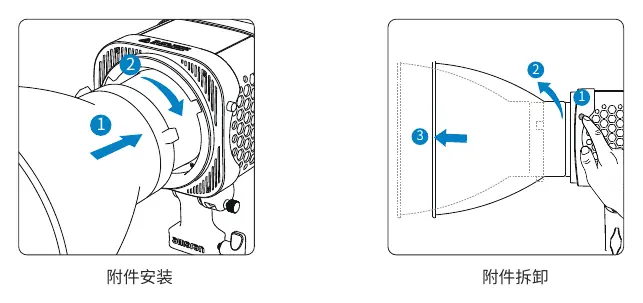
Attaching Accessories: Align the accessory with the Bowens mount, insert it, and rotate clockwise until the release button clicks into place. To remove, press the release button and rotate counter-clockwise.
Operation
Powering On/Off: Connect the AC power cable to the light and a power outlet. Short press the power button to turn the light on or off.
Main Menu: Use the CCT knob to navigate the menu and the INT knob to adjust intensity. Key modes include:
- CCT Mode: Adjust color temperature (2,700K - 6,500K) and brightness (0-100%).
- Effects Mode: Access various lighting effects like Fireworks, Lightning, TV, etc.
- Bluetooth Reset: Long press the CCT knob in the Bluetooth menu to reset the connection.
- Studio Mode: Enables the light to turn on automatically when power is connected.
- Fan Modes: Choose between Silent (limited power), Smart (automatic), or High Speed (maximum cooling).
Advanced Features
DMX Control: Requires a USB-C to 5-pin DMX adapter (sold separately). Connect to the USB-C port to enable DMX control.
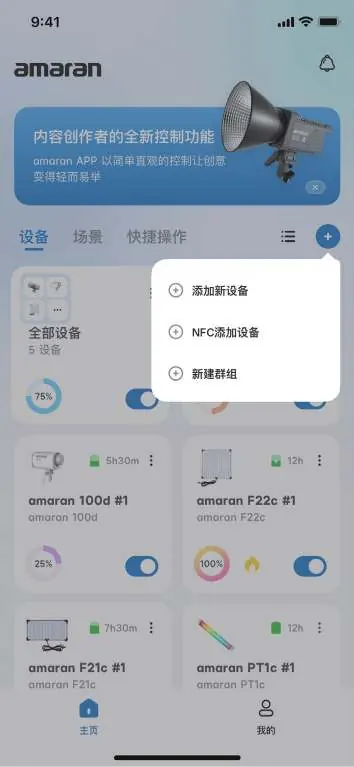
NFC Pairing: Use the Amaran app to add the device via NFC. Bring your phone close to the NFC area on the light to trigger pairing.
Safety
- Always ensure the light is connected to a grounded power outlet.
- Do not block the air intake vents.
- The light is for professional use only.
- Do not touch the LED light source directly.
- If the power cable or light is damaged, stop using it immediately.
Manufacturer information
Amaran
Practical help
Common problems
Light does not turn on
Ensure the power cable is securely connected to both the light and a live AC outlet.
Bluetooth connection failed
Go to the Bluetooth menu on the light and perform a Bluetooth reset by long-pressing the CCT knob.
Fan is noisy
Switch the fan mode to 'Silent' in the menu. Note that this will limit the maximum power output of the light.
Before use
- Check that all accessories are present according to the packing list.
- Ensure the AC power source is within the 100-240V range.
- Verify the light is securely mounted on a stable light stand.
- Remove any protective covers from the light head before operation.
Show more Show less
Specs in practice
- Bowens Mount
- Standard industry mount for attaching softboxes, reflectors, and other light modifiers.
Images and diagrams
- The rear panel contains the CCT and INT knobs for parameter control.
- The Bowens mount release button is located on the side of the light head.
Model compatibility
- Compatible with standard Bowens mount accessories.
- DMX control requires a specific USB-C to 5-pin DMX adapter (sold separately).
- App control is available via the Amaran app.

Manual page author
Emily Carter
User documentation editor