Power / Solar Charge Controllers
User Manual for ALLPOWERS 200W Flexible Solar Panel AP-SF-200
Quick guide for the ALLPOWERS 200W Flexible Solar Panel (AP-SF-200). Includes installation instructions, wiring diagrams for series and parallel connections, maintenance tips, and technical specifications.
Quick answers from the manual
Quick answer
- The AP-SF-200 is a 200W flexible solar panel. It can be connected in series to increase voltage or in parallel to increase current, depending on your power system requirements. p. 1
Key actions
- Connect panels in series to increase voltage. p. 1
- Connect panels in parallel to increase current. p. 1
Problems and fixes
Low power output
Clean the panel surface and ensure it is not shaded.
p. 1Maintenance and reset
- Clean the surface regularly with a soft cloth and water. p. 1
Technical specifications
| Parameter | Value | Meaning | Pages |
|---|---|---|---|
| Max Power | 200W | Peak power output | p. 1 |
| Voc | 23.5V | Open Circuit Voltage | p. 1 |
| Isc | 10.8A | Short Circuit Current | p. 1 |
Where to find it in the PDF
- User Manual p. 1
Table of contents
Important Information from the Manual
The ALLPOWERS 200W Flexible Solar Panel (AP-SF-200) is designed for portable power generation. This document provides essential guidelines for safe installation, electrical connection methods, and maintenance to ensure optimal performance and longevity of the panel.
Safety Information
- Do not bend the solar panel excessively, as this may damage the internal cells.
- Ensure the panel is kept away from sharp objects, fire, and corrosive substances.
- Do not attempt to disassemble or modify the panel.
- Ensure all electrical connections are secure and protected from moisture.
- Do not step on the solar panel.
Installation Procedures
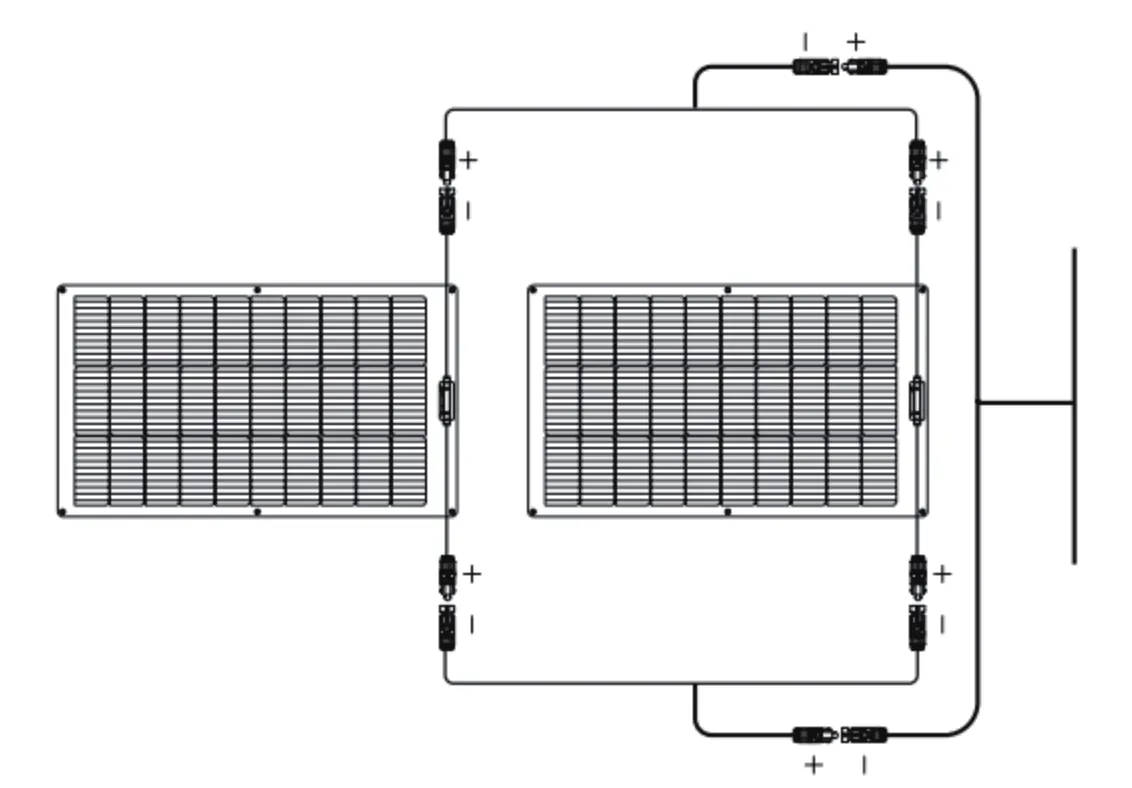
The solar panels can be connected in different configurations depending on your power requirements:
Series Connection
Connect the positive terminal of one panel to the negative terminal of the next panel. This configuration increases the total voltage output while keeping the current the same.
Parallel Connection
Connect the positive terminals together and the negative terminals together. This configuration increases the total current output while keeping the voltage the same.
Maintenance
- Clean the surface of the solar panel regularly using a soft cloth and water.
- Avoid using abrasive cleaners or chemicals that could scratch or damage the surface.
- Periodically inspect the cables and connectors for signs of wear, corrosion, or damage.
- Ensure the panel is stored in a cool, dry place when not in use.
Troubleshooting
If the panel is not producing the expected power, check the following:
- Connections: Ensure all cables are firmly connected and free of corrosion.
- Sunlight Exposure: Verify that the panel is positioned in direct sunlight and not obstructed by shade, dust, or debris.
- Compatibility: Ensure the solar generator or charge controller is compatible with the panel's voltage and current specifications.
Technical Specifications
- Maximum Power (Pmax): 200W
- Open Circuit Voltage (Voc): 23.5V
- Short Circuit Current (Isc): 10.8A
- Voltage at Max Power (Vmp): 19.8V
- Current at Max Power (Imp): 10.1A
Manufacturer information
ALLPOWERS
Practical help
Common problems
Output power is lower than expected
Check for shading on the panel, clean the surface of dust or dirt, and ensure the panel is angled directly toward the sun.
No power output
Verify that all cable connections are secure and that the solar generator or battery is compatible with the panel's output.
Before use
- Inspect the panel for any physical damage, cracks, or deep scratches.
- Ensure the connectors are clean, dry, and free of debris.
- Verify that the solar generator or charge controller supports the panel's voltage and current ratings.
- Ensure you have the correct cables for your desired connection type (series or parallel).
Images and diagrams
- Series Connection: Connects panels in a chain (Positive to Negative) to increase total voltage.
- Parallel Connection: Connects panels side-by-side (Positive to Positive, Negative to Negative) to increase total current.
Model compatibility
- Ensure the connected device (solar generator/controller) can handle the voltage and current output of the panel configuration.

Manual page author
Michael Turner
Technical manual editor
Reviews PDF manuals for structure, safety notes, and practical product details so readers can find the right information quickly.