Plumbing / Sinks Faucets
User Guide for Alpha PowerFuel 6,000mAh Power Bank
Quick start guide and safety instructions for the Alpha PowerFuel 6,000mAh Power Bank. Learn how to charge your devices, check battery levels, and maintain your power bank.
Table of contents
Quick Guide
This guide provides essential information for operating your Alpha PowerFuel 6,000mAh Power Bank. Always ensure the device is used within the recommended temperature range of 0°C to 40°C. If the device has not been used for three months or longer, it may require 3-4 charge and discharge cycles to restore its normal battery capacity.
Device Overview
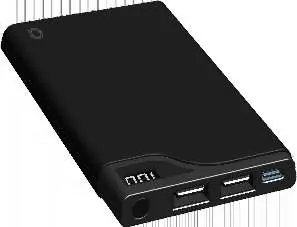
The power bank features an LED screen to display battery percentage, an On/Off button, a Type-C input port for charging the power bank, and two USB output ports for charging your mobile devices.
Specifications
- Input: Type-C DC 5V/2A
- Output 1: USB 1 DC 5V/1A
- Output 2: USB 2 DC 5V/2.1A
- Total Output: DC 5V/2.1A MAX
- Working Temperature: 0°C ~ 40°C
- Dimensions: 129 x 68 x 12.5mm
- Weight: 178g
- Certifications: FCC, CE
Charging the Power Bank
To charge the power bank, connect a compatible charger to the Type-C input port. The LED screen will display the current power level and continue to flash while charging. When the screen displays "100", the power bank is fully charged.
Charging Your Device
- Press the button on the top of the power bank once to turn it on.
- Connect the USB end of your charging cable to the power bank and the other end to your mobile device.
- Your device will begin charging automatically.
- Once your device is fully charged, disconnect it from the power bank.
- Press the button on the top of the power bank twice to turn it off.
Safety Warnings
- Do not leave the device unattended while in use.
- Keep the device away from humidity, liquids, and direct sunlight.
- Do not expose the device to heat sources such as radiators, stoves, or high temperatures (above 40°C), as this may cause overheating or explosion.
- Do not use the device in areas with high static electricity.
- Stop using the device immediately if it emits an odor, becomes excessively hot, discolored, or distorted.
- Do not attempt to open, disassemble, or repair the device yourself.
- Dispose of the device at a designated battery recycling station; do not dispose of it in domestic waste.
Warranty
Alpha Comm Enterprises, Inc. provides a one-year limited warranty covering mechanical and electrical problems, excluding issues arising from abuse or tampering. For warranty service, contact Alpha Comm at 1-888-951-0909 or email [email protected]. You can also visit quikcell.com/warranty for more information.
Official resources from the manual
Manufacturer information
Alpha Home Appliances
Practical help
Common problems
Device not charging
Ensure the cable is securely connected to both the power source and the power bank. Verify the power source is active.
Reduced battery capacity
If the device has been stored for 3+ months, perform 3-4 full charge and discharge cycles to restore capacity.
Device overheating or emitting odor
Stop using the device immediately and contact customer support.
Before use
- Ensure the power bank is fully charged before first use.
- Use the included Type-C cable or a compatible charging cable.
- Verify the operating environment is between 0°C and 40°C.
- Check the device casing for any damage before use.
Specs in practice
- Input: Type-C DC 5V/2A
- The power specification required to charge the power bank itself.
- Output: USB 1 DC 5V/1A
- Standard charging port suitable for smaller mobile devices.
- Output: USB 2 DC 5V/2.1A
- High-speed charging port suitable for smartphones and tablets.
- Total Output: DC 5V/2.1A MAX
- The maximum combined power output when using both USB ports simultaneously.
Images and diagrams
- LED Screen: Shows the current battery percentage.
- On/Off Button: Press once to turn on, press twice to turn off.
- Type-C Input: Port used to charge the power bank.
- USB Output 1 & 2: Ports used to charge your mobile devices.
Model compatibility
- Compatible with various mobile phones and devices.
- Not suitable for children under 3 years due to small parts.

Manual page author
Emily Carter
User documentation editor
Prepares concise manual descriptions and highlights the most useful setup, operation, and maintenance information for readers.