Electronics / Video Lighting
User Manual for amaran Halo 200x/300x/600x LED Light
Quick guide for the amaran Halo 200x, 300x, and 600x bi-color LED lights. Learn about setup, Bowens mount installation, DMX control, fan modes, and app pairing.
Quick answers from the manual
Quick answer
- The amaran Halo 200x/300x/600x are bi-color COB LED lights. They are operated via on-board knobs, DMX, or the amaran mobile app. p. 3, 5, 9
Key actions
- Power On/Off p. 7
- Adjust Brightness p. 9
- Adjust Color Temperature p. 9
First start
- Connect power, press the power button, and select your preferred language using the CCT knob. p. 7
Show 4 more answers Show less
Problems and fixes
Bluetooth Reset
Enter BT mode from the main menu and hold the CCT knob until the progress bar finishes.
p. 9, 10Maintenance and reset
- Firmware updates can be performed online via the amaran app. p. 12
Technical specifications
| Parameter | Value | Meaning | Pages |
|---|---|---|---|
| Operating Voltage | AC 100V - 240V / 50-60Hz | Supports universal voltage range. | p. 15, 16, 17 |
Where to find it in the PDF
- Product Overview p. 5
- Specifications p. 15, 16, 17
Table of contents
Manual images
Click an image to enlargeQuick guide from the manual
The amaran Halo 200x, 300x, and 600x are bi-color COB LED lights designed for studio and content creation. This manual covers the setup, operation, and maintenance of these fixtures. Key features include on-board controls, DMX compatibility, and app-based control via Bluetooth and NFC.
Components List
Ensure all items are present before use:
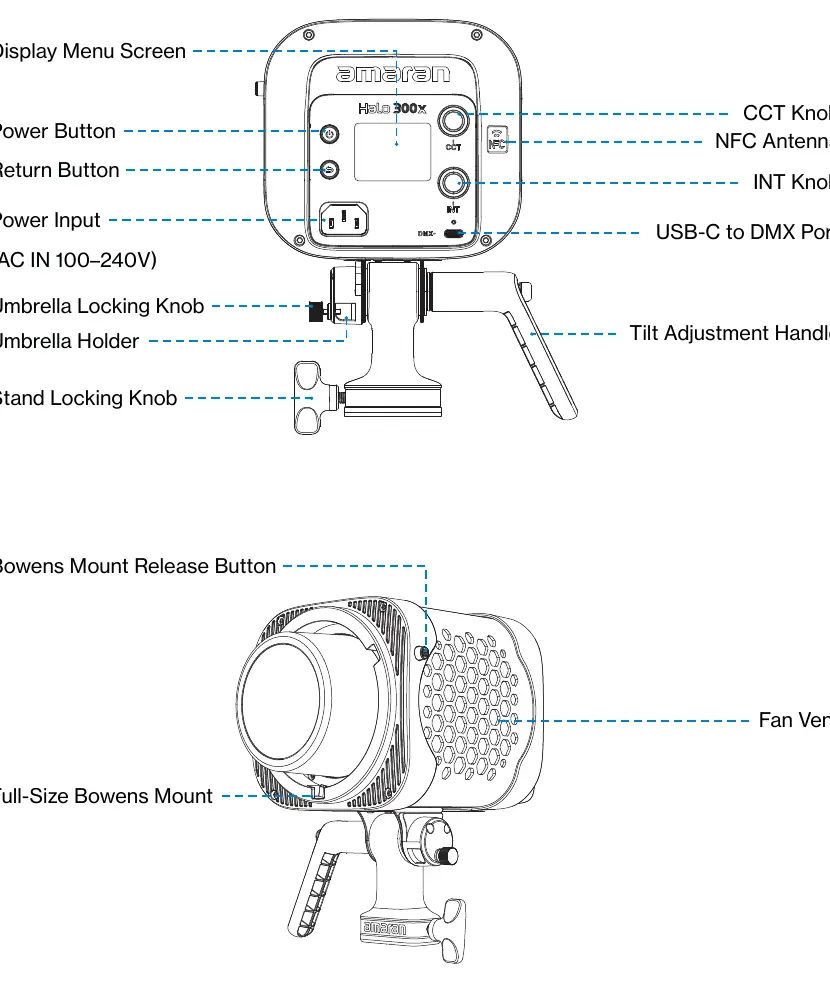
- Light fixture (200x, 300x, or 600x)
- AC Power Cable (5m)
Light Installation
To mount the light:
- Install the mounting bracket onto the light.
- Place the bracket onto a light stand and tighten the locking knob.
- Adjust the angle using the tilting bracket knob.
- Pull out the handle to reposition the angle for easier operation.
Bowens Mount Modifier Installation
To attach modifiers:
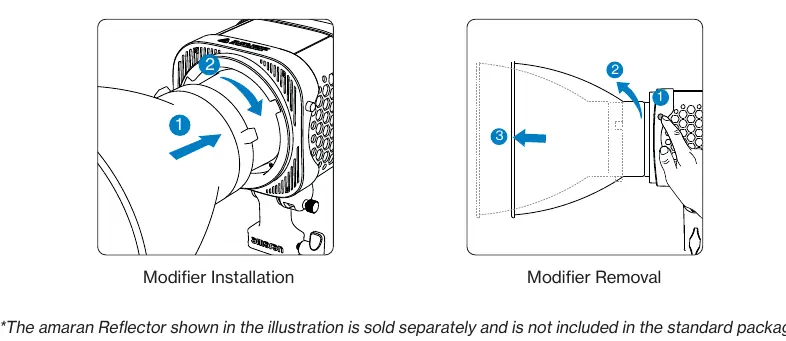
- Align the modifier pins with the Bowens Mount on the fixture.
- Insert the modifier and rotate clockwise until the release button pops out.
- To remove, press and hold the Bowens Mount Release Button and rotate the modifier counterclockwise.
Operations
Power Supply
Connect the AC power cable to the light's input port and an AC outlet. Short press the power button to turn the device on or off.
Main Menu
Use the CCT knob to navigate menus and the INT knob to adjust brightness. Press the CCT knob to confirm selections.
- CCT Mode: Adjust color temperature (2,700K - 6,500K) and brightness (0%-100%).
- FX Mode: Access lighting effects like Fireworks, Faulty Bulb, Lightning, TV, Pulsing, Strobe, Explosion, Fire, and Paparazzi.
- Studio Mode: When enabled, the light automatically turns on when connected to power.
- Fan Mode: Choose between Silent, Smart, and High. Note: Silent mode limits maximum power (40W for 200x, 42W for 300x).
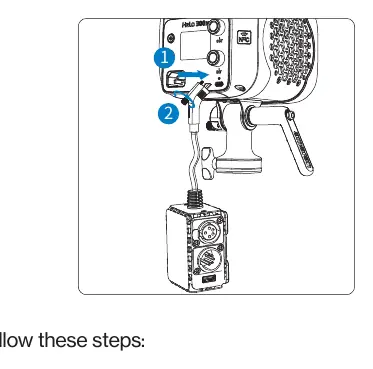
- DMX Control: Requires the optional USB-C to 5-Pin DMX In&Out Adapter.
App Pairing
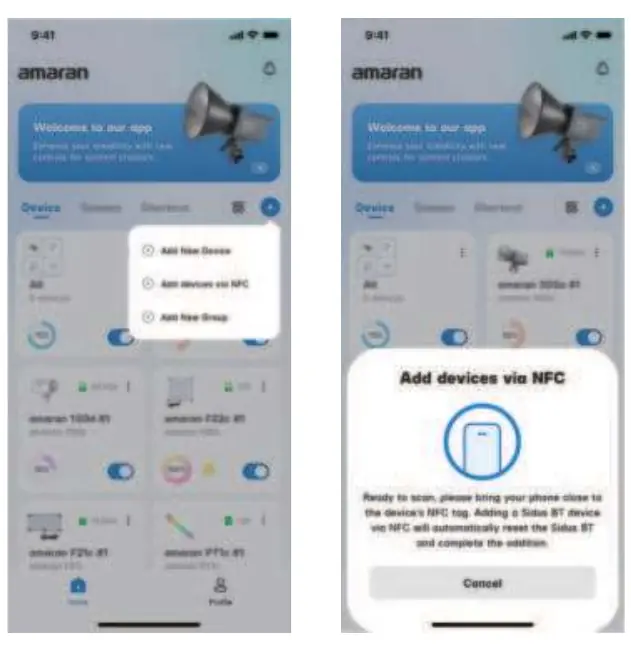
You can pair the light with the amaran app via NFC. Open the app, select NFC Add Device, and place your phone near the fixture's NFC tag.
Safety Instructions
- Do not block ventilation openings.
- Do not look directly at the LED light source.
- Always unplug the fixture before cleaning or servicing.
- Do not immerse in water.
- For service, contact [email protected].
Manufacturer information
Amaran
Practical help
Common problems
Light does not turn on
Ensure the power cable is securely connected to both the fixture and the AC outlet.
Bluetooth connection issues
Perform a Bluetooth Reset via the main menu by holding the CCT knob until the progress bar completes.
Fan noise
Switch to Silent Mode in the Fan Mode menu. Note that this will limit the maximum power output.
Before use
- Verify all accessories are included in the package
- Ensure the light stand is stable and secure
- Check that the power cable is undamaged
- Ensure the fan vent is not blocked
Show more Show less
Images and diagrams
- Product Overview: Identifies the location of CCT/INT knobs, NFC antenna, and ports.
- Modifier Installation: Shows how to align and lock Bowens mount accessories.
- DMX Connection: Illustrates the connection of the USB-C to DMX adapter.
Model compatibility
- Compatible with standard Bowens Mount accessories.
- USB-C to 5-Pin DMX In&Out Adapter is sold separately.
- Compatible with amaran mobile app for iOS and Android.

Manual page author
Michael Turner
Technical manual editor