Power / Batteries & Chargers
Amazon Basics 1500VA Line-Interactive UPS User Manual
Quick guide for the Amazon Basics 1500VA Line-Interactive UPS (ABMT1500). Includes setup, battery replacement, operation, sensitivity adjustment, and troubleshooting steps.
Table of contents
Manual images
Click an image to enlargeQuick guide from the manual
This UPS provides battery backup and surge protection for connected equipment. Before using the device for the first time, it is recommended to charge the battery for at least 24 hours. The product features a delivery safety lock and must be connected to a power supply before the initial start-up. Ensure the total power consumption of connected devices does not exceed 1500 VA / 900 W.
Product overview
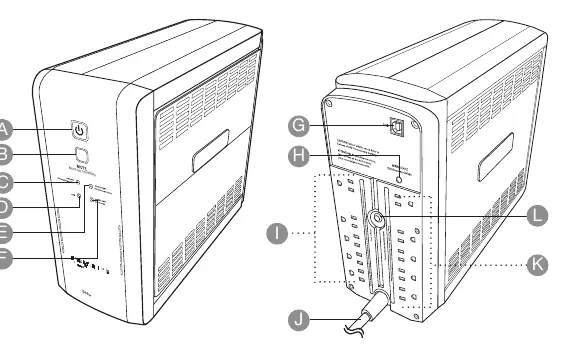
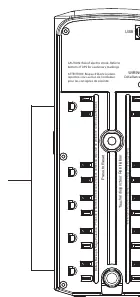
The UPS features a front panel with a power button, mute button, and status indicators (Online, AVR, On Battery, Overload). The rear panel contains 10 outlets: 5 outlets provide battery backup and surge protection, while the other 5 provide surge protection only. A USB type B socket is available for computer connectivity.
Operation
To switch the unit on, press the power button. The product will beep and the Online indicator will light up. In the event of a power outage, the unit automatically switches to battery power for the backup outlets, and the On Battery indicator will illuminate.
Sensitivity adjustment
If the AC input voltage is unstable, you can adjust the sensitivity to prevent damage to connected equipment:
- Switch the product on in line mode.
- Press and hold the MUTE button for 6 seconds until all indicators flash rapidly.
- Press the MUTE button repeatedly to cycle through sensitivity settings (Low, Medium, High).
- Press and hold the MUTE button to save the setting.
Connecting to a computer
Use a USB type B to type A cable to connect the UPS to a computer. Download the PowerPanel Personal software from the Amazon website by searching for the product number (B07RWMLKFM) to monitor energy consumption and configure settings.
Replacing the battery
The battery should be replaced after 3-6 years of use. Always use the specified replacement battery (amazonbasics/ABRB1290X2).
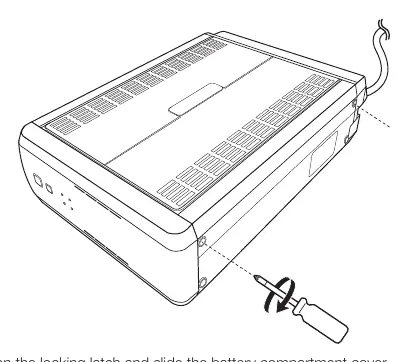
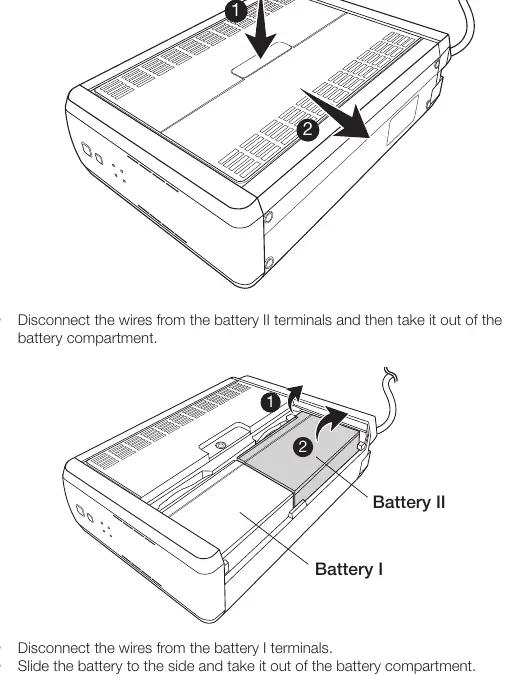
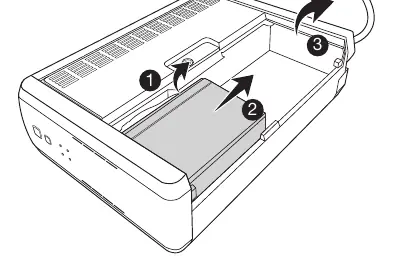
- Switch off and unplug all connected equipment, then disconnect the UPS from the power supply.
- Place the unit on its side on a stable surface.
- Loosen the battery compartment cover screws and remove the cover.
- Disconnect the wires from the battery terminals.
- Slide the batteries out and replace them with new ones.
- Reconnect the wires according to the wiring diagram (Red to positive, Yellow to positive/negative, Black to negative).
- Secure the cover with screws.
Cleaning and maintenance
Switch off and unplug the unit before cleaning. Wipe with a soft, slightly moist cloth. Do not use corrosive detergents, wire brushes, or abrasive scourers. Never immerse the product in water.
Practical help
Common problems
Circuit breaker has tripped
Power supply overload. Unplug at least one connected device, wait 10 seconds, and press the RESET button.
Product does not switch on
Ensure it is connected to a 120V, 60Hz outlet. If the power button was pressed rapidly, wait 10 seconds and try again.
PowerPanel software is inactive
Check that the USB cable is connected to the correct port on both the UPS and the computer.
Product does not perform expected runtime
Battery may not be fully charged or is worn out. Recharge or replace the battery.
Before use
- Check for transport damages.
- Verify that the power supply voltage matches the product rating label.
- Choose a wall outlet protected by a fuse or circuit breaker.
- Charge the battery for at least 24 hours before first use.
- Ensure the product is connected to power to release the delivery safety lock.
Specs in practice
- Power Capacity
- 1500 VA / 900 W maximum load.
- Battery Type
- Maintenance-free sealed lead-acid battery (12V, 9AH).
- Operating Temperature
- 32 °F to 104 °F (0 °C to 40 °C).
Images and diagrams
- Front panel indicators: Online (C), AVR (D), On Battery (E), Overload (F).
- Rear panel: Battery backup outlets (I) and Surge protection outlets (K).
- Battery replacement: Requires removing the side cover and disconnecting internal wiring.
Model compatibility
- Do not use with medical or life support equipment.
- Do not use with or near aquariums.
- Not for use in a computer room as defined by ANSI/NFPA 75.
- Do not connect laser printers or heaters to battery backup outlets.

Manual page author
Michael Turner
Technical manual editor
Reviews PDF manuals for structure, safety notes, and practical product details so readers can find the right information quickly.