Home Appliances / Cookers & Ranges
User Manual for Amica 2226C(GX)2.334eETsDpHbS / EHCX 933 130 S Oven and Cooktop
Comprehensive user guide for the Amica 2226C(GX)2.334eETsDpHbS / EHCX 933 130 S oven and ceramic cooktop. Includes installation, operation, cleaning, and troubleshooting instructions.
PDF source: CS · summary: English
Table of contents
Manual images
Click an image to enlargeQuick Guide
This manual provides essential instructions for the safe and efficient use of your Amica oven and ceramic cooktop. Before first use, ensure all packaging is removed, the interior is cleaned, and the oven is heated to 250°C for 30 minutes to remove factory residues. Always set the current time on the electronic programmer to enable oven operation.
Product Description
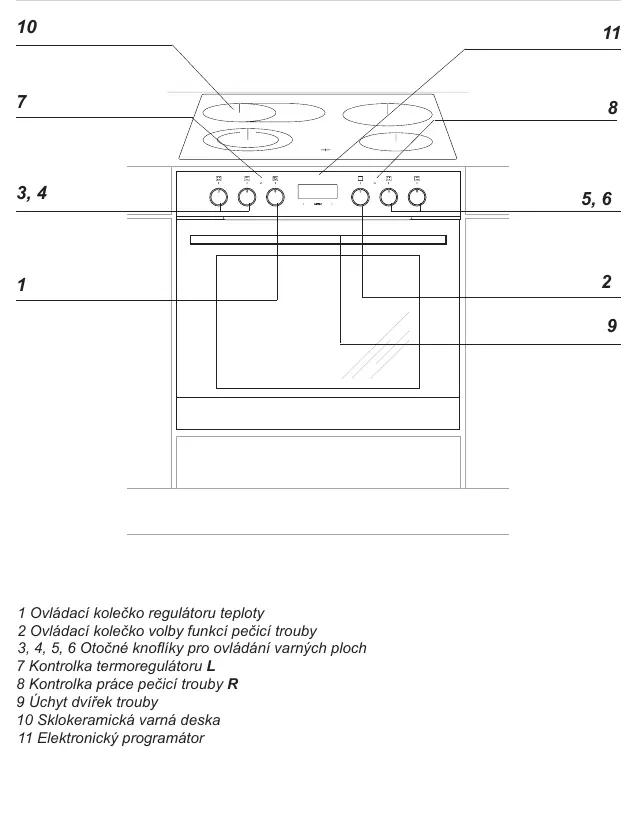
The appliance features a ceramic cooktop with multiple heating zones and an electric oven with various functions, including rapid preheat, defrost, and grill. It is equipped with an electronic programmer for time management.
Installation
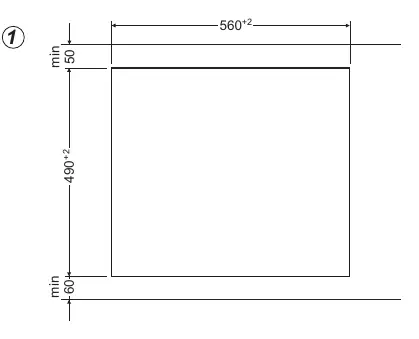
Installation must be performed by a qualified professional. Ensure the kitchen is well-ventilated. The cooktop requires a specific cutout in the countertop (560x490 mm). The oven must be securely fastened into the furniture cabinet using the provided screws. Electrical connection must be performed according to the wiring diagram provided in the manual, ensuring proper grounding.


Operation
Cooktop: Use the control knobs to adjust power levels. The cooktop features dual-zone capability on some models. Always use cookware with a flat, clean bottom to ensure efficient heat transfer.

Oven: Select the desired function and temperature using the control knobs. The electronic programmer allows you to set the time, timer, and duration of cooking. The oven includes a Steam Clean function for easier maintenance.
Cleaning and Maintenance
Clean the ceramic cooktop after every use using a scraper for stubborn stains. Do not use abrasive cleaners. The oven interior should be cleaned with warm water and mild detergent. The Steam Clean function can be used by pouring 0.25L of water into a tray and heating the oven to 50°C for 30 minutes. Always disconnect power before replacing the oven light bulb.
Troubleshooting
If the appliance does not work, check the house fuse. If the programmer display shows 0.00, set the current time. If the oven light fails, check or replace the bulb.
Technical Data
The appliance operates at 230/400V~50 Hz with a maximum power of 10.2 kW.
Manufacturer information
Amica S.A.
Practical help
Common problems
Appliance does not work
Check the house fuse or circuit breaker.
Programmer display shows 0.00
Set the current time on the electronic programmer.
Oven light not working
Tighten the bulb or replace it with a new G9 25W bulb.
Before use
- Remove all packaging materials.
- Clean the oven interior with warm water and mild detergent.
- Heat the empty oven to 250°C for 30 minutes.
- Set the current time on the electronic programmer.
Show more Show less
Images and diagrams
- The cooktop layout shows different heating zone diameters.
- Installation diagrams illustrate the required cutout dimensions for the cooktop and oven.
- Wiring diagrams show connections for 1N~, 2N~, and 3N~ power supplies.
Model compatibility
- Use cookware with a flat, clean bottom.
- Do not use cookware with concave or convex bottoms.
- Ensure the cooktop and oven are installed in a well-ventilated area.

Manual page author
Michael Turner
Technical manual editor