Home Appliances / Cookers & Ranges
User Manual for Amica 2022CC2.20eX / EHC 937 011 E Electric Oven and Cooktop
Quick guide for the Amica 2022CC2.20eX / EHC 937 011 E electric oven and cooktop. Includes installation, operation, cleaning, and troubleshooting instructions.
PDF source: CS · summary: English
Table of contents
Manual images
Click an image to enlargeQuick guide from the manual
This document provides essential instructions for the installation, operation, and maintenance of the Amica 2022CC2.20eX / EHC 937 011 E electric oven and cooktop. Before using the appliance, ensure it is correctly installed and that you have read all safety precautions.
Safety Instructions
- Hot Surfaces: The appliance and its accessible parts become hot during use. Keep children under 8 years old away unless supervised.
- Fire Hazard: Never leave the appliance unattended when cooking with oil or fat. Do not store items on the cooking surface.
- Extinguishing Fires: Never attempt to extinguish a fire with water. Switch off the appliance and cover the flame with a lid or fire blanket.
- Electrical Safety: If the cooktop surface is cracked, disconnect the power immediately to avoid electric shock.
Installation
Installation must be performed by a qualified technician. Ensure the kitchen is well-ventilated and the appliance is stable.


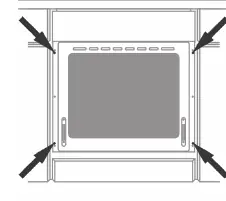

- Cooktop: Ensure the countertop is heat-resistant (up to 100°C) and properly sealed. Follow the specific cutout dimensions provided in the manual.
- Oven: Secure the oven in the cabinet using the provided screws. Ensure the electrical connection is made according to the wiring diagram on the appliance.
Operation
The appliance is controlled via knobs on the front panel.
- Cooktop: Select the desired heat level by turning the knob. Indicators show when a cooking zone is hot.
- Oven: Use the function selector and temperature knob to set the desired cooking mode. Common modes include top/bottom heat, fan-assisted heating, and defrost.
- Energy Saving: Use pots with flat, thick bottoms. Turn off the oven 10 minutes before the end of cooking to utilize residual heat.
Cleaning and Maintenance
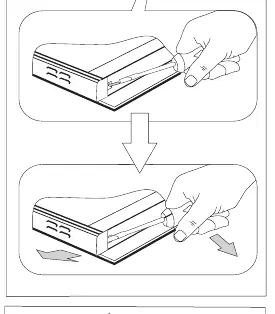
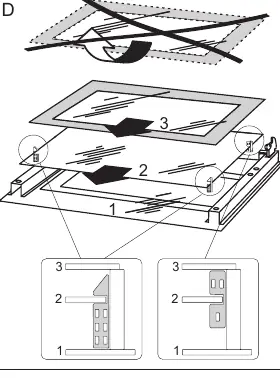
- Cooktop: Clean after every use. Use a special scraper for stubborn stains. Do not use abrasive cleaners.
- Oven: Use the Steam Clean function by placing 0.25L of water in a tray on the bottom level and heating at 50°C for 30 minutes.
- Glass Removal: The oven door and inner glass panes can be removed for thorough cleaning. Follow the steps carefully to avoid damaging the hinges or glass.
Troubleshooting
- Appliance not working: Check the house fuse or circuit breaker.
- Oven light not working: Tighten or replace the halogen bulb (G9, 230V, 25W).
Manufacturer information
Amica S.A.
Practical help
Common problems
Appliance does not work
Check the house fuse or circuit breaker.
Oven light does not work
Tighten the bulb or replace it with a new G9 230V 25W halogen bulb.
Before use
- Remove all packaging materials.
- Clean the oven interior and cooktop.
- Heat the oven to 250°C for 30 minutes to remove factory residues.
- Ensure proper ventilation in the room.
- Verify electrical connection is secure.
Show more Show less
Images and diagrams
- Installation cutout dimensions for cooktop
- Wiring diagrams for 1N~, 2N~, and 3N~ connections
- Oven door removal and glass pane disassembly steps
Model compatibility
- Use cookware suitable for ceramic cooktops.
- Do not use pots with concave or convex bottoms.
- Ensure cookware diameter matches the cooking zone.

Manual page author
David Miller
Documentation analyst